
jijophmdjdapikfmbckmhhiheghkgoee
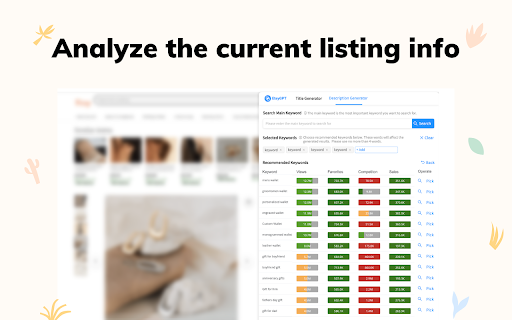
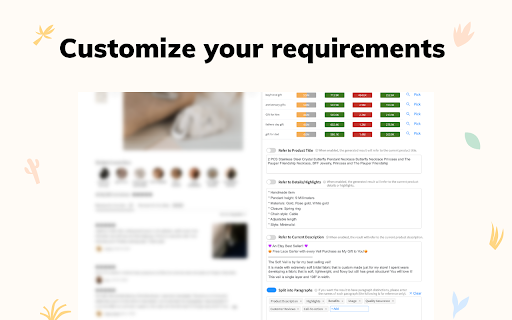

A free tool to help you find more keywords, and optimize your listing. AmazonGPT is a free AI-powered listing optimizer that helps Amazon sellers improve their search ranking by optimizing their listings. With AmazonGPT, you no longer need to search for Amazon tips or templates for your listings. With just one click, ChatGPT OpenAI can provide you with better listing choices. Optimizing the title of your Amazon listing Optimizing the description of your Amazon listing Finding and suggesting keywords Copying optimized listing content with just one click Exporting optimized listing content as a .doc file 🚀 How to Use Optimizing the title a. Go to the listing page of your product b. Open AmazonGPT and select Title Generator c. Search and select keywords d. Click the Generate Title button and get suggestions Optimizing the description a. Go to the listing page of your product b. Open AmazonGPT and select Description Generator c. Search and select keywords, and set parameters d. Click Generate Description and get suggestions 🚀 How It Works AmazonGPT analyzes your current product information, such as the title, description, and keywords, and uses ChatGPT to provide you with optimized listing content.

SellerSprite - Amazon Research Tool
Join over a million sellers using SellerSprite to research, analyze, and optimize smarter — directly from your browser. Built on powerful data and AI, SellerSprite's Chrome Extension mirrors 80% of the full web app’s functionality. From product research to keyword analysis and competitor tracking, streamline your Amazon FBA business with real-time insights —all without leaving the Amazon page. In a single view, you can instantly spot high-potential products, analyze top competitors, uncover hidden keywords, and filter by sales, ratings, BSR, and more — without ever switching tabs. Key Features 📊 Deep Market Insights - Analyze subcategories with 16+ data points: demand, competition, supply/demand ratio to instantly spot high-potential niches and blue-ocean markets - Access granular BSR analytics with Top 400 rankings—track performance by parent and child ASINs, analyze variant-level sales distribution, and identify underexploited long-tail demand with precision - Customize your own product lists to batch-research trends, volume, and seasonality 🔑 Smart Keyword Tools - Discover high-converting long-tail keywords and build optimized listings - Track organic & sponsored keyword rankings in realtime - Reverse-search competitor ASINs to uncover hidden keyword strategies 🎯 Competitor Intelligence - Track BSR and sales across global sites - Detect brand infringement risks and benchmark strategies - Analyze reviews with AI and generate optimization suggestions ⚙️ Bulk Efficiency Tools - Download images, reviews, and selling points in one click - Collect ASINs and invite reviews in batches - Save hours with automation and smart scraping 💡 Why Sellers Choose SellerSprite - Feature-rich extension with 80% of full functionality — built into your browser - Real-time insights directly on Amazon pages - Trusted by over 1,400,000 Amazon sellers worldwide - Works with all major Amazon marketplaces ✅ Free to install — start exploring today! 1. Install the Extension • Download the SellerSprite Chrome Extension from the Chrome Web Store. 2. Create a Free Account • Sign up or log in. • New users get a 3 day-free trial of premium services. 3. Start Researching • Visit any Amazon product page to activate the extension. • Uncover competitor strategies, analyze product performance, and explore market trends. • Access in-depth historical data on pricing, sales, and keyword rankings to make informed decisions.

GPT for Ecom: Product Listing optimizer
Free Open AI ChatGPT and AI writer tool for e-commerce to generate compelling Product listing content easily **New Feature:No OpenAi or ChatGPT account need!** What is GPT for Ecom? This free AI-powered chrome extension uses Open AI ChatGPT to generate listing titles and descriptions for Sellers. It can analyze and recognize the current listing information, such as title, keywords, and description and then develop new content based on them. It will help you improve your listings' visibility and increase sales by offering an easy-to-use solution for listing optimization. How can it help me? Our extension provides sellers with an efficient and convenient way to optimize their listings with the help of AI technology. Using ChatGPT, it can generate top-quality titles and descriptions based on the seller's existing listing information, ensuring that their listings are more attractive to potential buyers and rank higher in search results. It can also provide helpful tips and clarify clear description paragraphs for sellers to create more effective listings and improve their SEO. Who can benefit from this tool? This extension is ideal for anyone who wants to improve their listings and increase sales. Whether you're a new seller who needs help creating effective listings, or an experienced seller who wants to streamline your listing optimization process, we can help you save time and effort while improving your results. You can also use this product to learn and analyze your competitors' good product content. How does it work? We use AI technology to analyze and recognize the current listing information, such as the title, keywords, and description, and generate optimized titles and descriptions based on this information. With the help of this product, you will never need to search for tips or templates for your listings. With one click, you can instantly generate compelling content and easily optimize your listings. 💡Need to Know: Both new and existing sellers may be stuck optimizing their Etsy Shops. EtsyHunt is a all-in-one Etsy seller tool, allowing you to make informed decision. Please check in https://etsyhunt.com. The term 'Etsy' is a trademark of Etsy,Inc. This application uses the Etsy API but is not endorsed or certified by Etsy

AMZ Suggestion Expander
Chrome extension to expand the number of search suggestions that are shown in the Amazon search bar. For Amazon Sellers! This Chrome extension expands the number of search suggestions that are shown in the Amazon search bar by showing the keywords that Amazon would suggest before and after the keywords you have entered. This makes searching for new product niches easy! Works in US, CA, MX, UK, DE, FR, IT, AU and ES markets. Updates: v2.1.50: Bug fixes v2.1.49: Bug fixes v2.1.48: Bug fixes, improvements v2.1.47 Bug fixes v2.1.46: Bug fixes v2.1.45: Bug fixes v2.1.43: Bug fixes and maintenance v2.1.42: Bug fixes v2.1.41: Bug fixes v2.1.40: Bug fixes v2.1.39: Fix issue with keywords not downloading. v2.1.38: Bug fixes v2.1.37: Added search volume in search bar results (Pro only). Changed keyword download to sort by search volume (Pro only). v2.1.36: Bug fixes v2.1.35: Fix issue with keywords not displaying. v2.1.34: Bug fixes v2.1.33: Added full amazon.com.au support. v2.1.32: Bug fixes v2.1.29: Pro Version: Added keyword search volume estimates to downloaded keywords. v2.0.27: Bug fixes v2.0.26: Major update! Faster keyword display. New Pro version with keyword download functionality and other features. v1.0.25: Bug fixes v1.0.23: Update to support changes in future versions of Chrome. v1.0.22: Bug fixes v1.0.19: Added amazon.com.au support. v1.0.18 : Bug fixes v1.0.11 : Bug fixes Tip display. v1.0.10 : Bug fixes v1.0.9 : Added display of Amazon Suggestions when you press the down arrow key to move thru the list of original suggestions.

Amazon Index Checker
Free keyword ranking & index check tool by SellerApp - The most accurate seller tool for all amazon market places. Don’t have the time to track the right keywords for your listings? We don’t blame you. We understand that your time is valuable to you. Heck, that’s why we've got you the Keyword Rank Tracker. Amazon SEO takes time. Tracking keywords manually takes time. Marketing takes time. It’s not much freedom if you’re spending all of your time in front of a computer instead you could be spending doing what you love — spending your time your way. The combined Index Checker and Keyword Rank Tracker is built with focus on ease of use and effectivity. Save your time, benefit from the indexing information, page ranking, and the keyword position all on one screen. Helps you accurately identify the keyword ranks for you to know the position of your product listing for the most important keywords - Check your current Amazon keyword ranking, indexing information, Page Rank and positions - Helps you check ranking on all marketplaces - US, EU, UK, CN, JP, FR, DE, IT, NL, CA, MX, BR, AU - Helps monitor the effectiveness of your marketing efforts with changes in your PPC campaigns, keywords in your listings - Manually refresh your real time keyword ranking results - Export your daily keyword indexing, ranking and other ranking information to a Google spreadsheet for custom analysis and backup Keyword research, on-page and off-page optimization are just small parts of the SEO puzzle. It is more critical to control how your listing is performing in search. It's really important to understand what is going on your listing, and to track your most important product keywords to be alerted whenever something is going wrong -to know if you're losing rankings for a certain keyword or a pool of keywords. If you're not ranking for your most important keywords anymore, you could lose a lot of money in sales. The listing keyword search ranks keep constantly changing and you should stay vigilant against your keyword performance. Rank tracking also helps you find out how your competitors are ranking in search and find the best ways to outrank them. Make sure you keep an eye on the competition with the ranking tracker. Q1. How to check keyword ranking on amazon? Enter all the your most important keywords in the keyword tracker and click on ‘Analyze’. The Extension crawls through the Amazon listing pages to analyze your listing position in the search results. Q2. How to index keywords on Amazon? Keywords on Amazon are indexed based on the sales made by the listing for the keyword. Amazon considers the product making the most sales as the most relevant one and places it on the top of the search results for the keyword. Q3. How to enter keywords in listing? The keywords can be entered in different parts of the listing including the title, bullet points, the product description and the backend keywords. Amazon’s search engine picks up the keywords from your listing under all these portions to index it for your product listing.
