
bmkeakikhanegdbepkdemnpdapfemjln

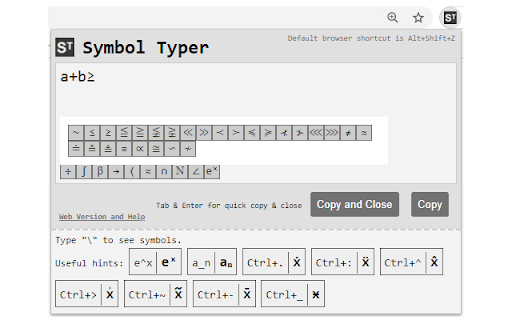
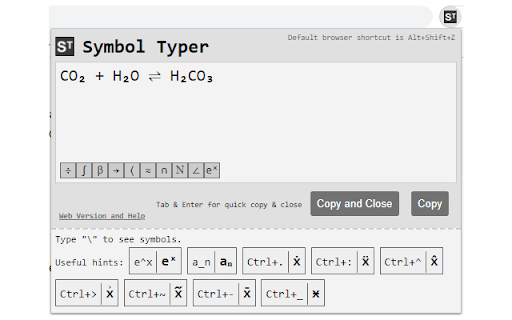
Write special symbols in plain text and paste them anywhere! Using Symbol Typer, you can easily type mathematical symbols in plain text. Simply open the extension and start typing: e^x will turn into eˣ,\alpha will become α, and many other symbols are available. - Math? Easy! A\cup B = C → A∪B=C - Chemistry? No problem! H_2 O → H₂O - Physics? We got your back! H(t)|\Psi(t)\ket → H(t)|Ψ(t)〉 To activate the extension press Alt+Shift+Z in your browser or set a shortcut of your own in Chrome->Settings->Extensions->Menu->Keyboard Shortcuts. No permissions are required for Symbol Typer to work! This extension is lightweight, quick and easy.

Math Symbol Keyboard
Quick access to math symbols - click to copy and insert into any text field. Great for ChatGPT, Gemini, and other AI chatbots! Typing math into AI shouldn't feel impossible. Yet every time you need ∫, ∇, or Ω, you end up breaking your flow searching for symbols. Click any symbol → it appears instantly in your prompt. Save your most-used expressions and reuse them in one click. Stop getting vague answers because your input is incomplete. With proper notation, AI tools like ChatGPT, Google Gemini, and Claude become significantly more accurate. Write full equations instead of approximations. Get explanations that actually match your problem. ## Built for Engineers, Physicists, and Math Students Perfect for: * One-click symbol insertion into any website * Works in ChatGPT, Gemini, Claude, and more * Built-in search (type “integral”, “delta”, etc.) * Favorites & recent symbols for fast reuse * Auto-insert or copy mode * Clean, fast, no learning curve Everything stays on your device. ## Stop Letting Your Keyboard Limit Your Thinking Download Math Symbol Keyboard and start communicating with AI the way science was meant to be written.

LaTeX for Jira Cloud - Math Editor
This is the only add-on for writing Math content using LaTeX on JIRA Cloud. This browser extension helps render LaTeX content in Jira Cloud. See documentation here https://fulstech.gitbook.io/docs/latex-for-jira/jira-cloud/overview.

SuperSub
Type Superscripts, Subscripts, and Other Scientific and Mathematical Symbols Directly Into Google Forms and Google Sheets No need to copy and paste from other sources! For Superscript: type ^ before the character you want. For Subscript: type _ before the character you want. For Science or Math symbol: type \ then the character you want. For Accent or other symbols: type ` then the accent or character you want. To toggle Superscripts: press ctrl and the . key. To toggle Subscripts: press ctrl and the , key. This extension applies only to Google Forms and Google Sheets. For most fonts these Unicode glyphs for super and sub scripts are actually the numerators and denominators for diagonal fractions and so they may not look exactly the same as the equivalent markup. There are super and sub scripts for all numerical digits. However, there are some super and sub Latin letters that have not yet been encoded by the Consortium, particularly for subscripts. In those cases a message will be displayed on the screen and the original typed character will appear instead. Once installed, click on the SuperSub Extension Icon (top right corner of Chrome) to see the list of characters that have already been encoded and the required key to type. I will of course update this list as soon as we get more super and sub glyphs encoded by the Consortium. For the science and math symbols, I chose those that are, from my experience, the most commonly used in high school science and math and I tried to match the Greek letters to the closest corresponding Latin equivalents whenever I could. For the overhead vector symbol, the vector symbol needs to be typed first and then the letter for the base. Placing a space before the overhead vector symbol may be necessary in some cases. For accents above the letter: 1. the letter needs to typed first, 2. then press the ` key (usually found at the top left corner of QWERTY keyboards), 3. and then press the key corresponding to the accent that you want. Here are the keys for some of the most common accents: `1 for acute `2 for grave `3 for circumflex `4 for macron `5 for tilde `6 for breve `7 for hacek `8 for diaeresis or umlaut `9 for dot above `0 for ring above There are other keys that will also trigger these accents. Click on the SuperSub Extension Icon for the full list of accents and some other international symbols. In situations where you want ^ or _ or \ or ` to appear in the text just press the key twice. Hi, my name is Hyoun Park and I'm a high school teacher and developer living just north of Toronto in Canada. I built this extension primarily for teachers and students. These days the need for simpler, more effective time-saving tools is an even greater imperative. I am also an associate member of the teachassist foundation.

Latex Math Equations for Google Chrome™
You can edit and then save it as an image to Google Drive. Do you need to finish up some math equations/online math homework on your computer? Are you struggling to write out the correct mathematical symbols on your computer for your math homework? Try using our software Latex Math Equations for Google Chrome™ today. You can write out complex mathematical equations in a user-friendly manner once you have installed Latex Math Equations for Google Chrome™. The main purpose of this software is to allow complex latex math equations to be typed out on the computer and allow students worldwide to finish their digital maths homework. Disclaimer: Please note this extension is NOT made by Google and is made by an independent development team. All copyrights belong to their respective owners. Google doesn’t endorse or sponsor this Chrome extension. Latex Math Equations for Google Chrome™ is not owned by, is not licensed by and is not a subsidiary of Google Inc.
