
bmfmbanhkhjhfeckobkcecohknhlnamb
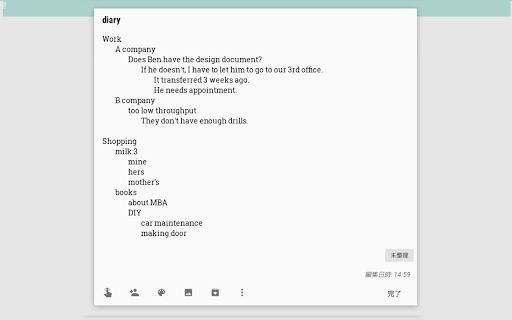

This is an extension for Google Keep. You can input tab ('Tab' button) into Google Keep memos. Do you like using Google Keeps, but the memos are getting unstructured? With this extension, you can input tabs into memos in Google Keep. To do this: - open any memo and start writing; - press the "Tab" button on your keyboard. You can easily write structured text like the Markdown. ADS When using the Input Tab in Google Keep, you may encounter ads for other extensions. These situational ads allow us to develop the product and make it free. Made with ❤️ by BrowseCraft gang. Stand with Ukraine 💙💛.

Notes: Keep Sticky Thoughts in Google Drive
Simple and useful notes that sync with Google Drive. Keep sticky thoughts in notes. Keep notes in Google Drive. Keep your mind calm. Sick of emailing yourself notes, links and ideas? Want to keep everything in Google Drive? Notes extension lets you keep all your notes in Google Drive and get access to them in one click. FEATURES • Automatically saves your notes to Google Drive as soon as you start typing. • Automatically generates a note title from the first line. • Drag and drop reordering of notes. • Text formatting: bold text, italics, lists. Make each of your notes unique. • Quick access buttons for opening the Google Drive folder where keep your notes. Made with ❤️ by BrowseCraft gang. Stand with Ukraine 💙💛. DISCLAIMER Please note "Notes: Keep Sticky Thoughts in Google Drive" is not made by Google™ or affiliated with Google™. Google™ and Google Drive™ are trademarks of Google LLC.

checklist for Google Tasks™
Access and manage all your Google Tasks™ directly in Chrome Provide an interface to Google Tasks™ via an easy-to-use Chrome extension. List of tasks and the ability to quickly add a task are a keyboard shortcut away. * fast access to tasks from Chrome * ability to add a page, or text from a page, as a task directly via right-click menu and keyboard shortcuts * great for use with gmail to make a task out of an email; adding a page as a task stores the URL of that page for quick access later * support for multiple lists and consolidated view of all lists

Send to Google Tasks
Send the page you are reading to Google Tasks Send to Google Tasks is a chrome extension that performs one simple thing: it send the page or link from your chrome browser to Google Tasks. Attribution for the icons and graphics: - Icons are made by Pixel perfect (https://www.flaticon.com/authors/pixel-perfect) from Flaticon (https://www.flaticon.com).

Full Screen for Google Tasks
Standalone Google Tasks app for desktop! A Google Tasks app for computer users. It can either open in a new tab, or launch an independent window like a desktop app - works the same on Windows PC, Mac, Linux and Chromebook. Try it if Google Task is your daily todo list, but sometimes you want to: - make the sidebar wider / bigger / fullscreen - use it alone in a separate window / separate tab, not on the side of gmail / google calendar - search across all lists - have a dedicated desktop client or PWA that you can pin to the Taskbar / Dock - print or export your list - sort the lists in the order you want - work offline Also available as a web version: https://fullscreen-for-googletasks.com/
