
bmcnakllnfgdjlalfffanmfhampcoalm
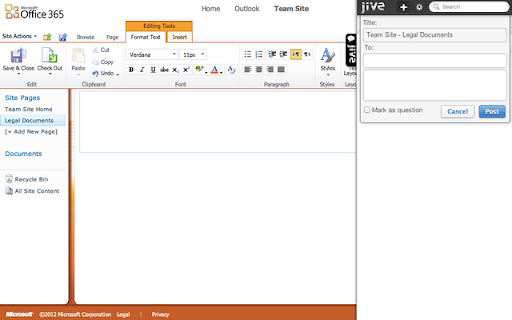


Connects your browser to Jive Jive Anywhere is a social upgrade for the whole web. It instantly brings Jive's social capabilities to any website or application. Visiting a website or using a web app? Just click the Jive Anywhere tab in your browser. A sidebar opens, showing you related conversations, documents and groups in your Jive network. You can see what your colleagues are saying, start a discussion, launch a group and more. Use Jive Anywhere across the web to collaborate, discuss and share feedback with your team. The same goes for your own in-house systems. Use Jive Anywhere to add social interaction to static intranets, invoicing systems and other legacy web apps.

SuperSorter
Clean up your bookmark mess! Sort bookmarks automatically, delete duplicates, merge folders, etc. Are your Chrome bookmarks a mess? SuperSorter can help! SuperSorter sorts all of your bookmarks, in all your folders, into alphabetical order. It sorts folders too and if you like it will put the folders at the top of the list. SuperSorter also deletes empty folders, deletes duplicate bookmarks and merges folders with the same name. It can also sort bookmarks automatically every few minutes, making it even easier to keep everything tidy. Warning: There is no undo function, so use this extension at your own risk! - Added a dropdown to choose the language to sort and compare in.

Cyber-Ark Clipboard Extension
Provides integration for Cyber-Ark products with the user's clipboard. (C) Cyber-Ark Software, Ltd. All rights reserved. This extension allows the CyberArk Password Vault Web Access to access a user’s clipboard. For security reasons, some browsers prevent programmatic access to the clipboard. This prevents CyberArk Password Vault Web Access users from being able to copy account content when needed. The CyberArk Password Vault Web Access Clipboard extension enables CyberArk Password Vault Web Access users to continue to copy and paste from the clipboard. Please note that clipboard content will be deleted after 25 seconds, or when the user signs out in order to make sure account content is not kept in the clipboard. This extension is supported in CyberArk Password Vault Web Access. Use of this extension is governed by the following license terms: https://www.cyberark.com/EULA.pdf. Please see the section describing free of charge software (“Free Trial or Beta Versions of the Software”).

Todoist for Gmail: Planner & Calendar
Stay on top of emails with Todoist for Gmail Trusted by over 47 million people, Todoist simplifies tasks for individuals and teams. Instantly declutter your mind, build habits, and boost your productivity. Use Todoist for Gmail to: • Add emails as tasks: Finally, achieve inbox zero by adding emails to Todoist so that you can take action on them later. • Remember to follow up: Include dates, reminders, deadlines, and priorities to the emails that you've added as tasks so that they'll never slip under your radar. • Plan your day: Quickly organize your tasks for the day right from the extension as a list, as boards or as a calendar planner. • Complete tasks from your inbox: Once your tasks are done, check them off from within Gmail without switching context.

Degreed Extension
Track all your learning. Bring learning into your everyday workflow with the Degreed button. You can track your learning from any website, share content with others, save for later, add to a Pathway, or search for content in Degreed without ever leaving the site you’re on. Track your learning: Track all your learning directly from your browser without leaving the page you’re on — and save comments about what you learned. Share with others: If you love what you learned, you can recommend it to a friend or a group. Save for later: If you find an article you want to read later, you can save it. If you forget, Degreed will recommend it in your feed. Add to Pathway or Plan: When building a Pathway or plan in Degreed, you can add to it directly from the Degreed Button. Add to catalog: If you have the “Manage Content” permission, you can add directly to the catalog. The Degreed Button will scrape the title, description, and image for the content if available, removing the need to manually add the information. You can also review and modify the title and description before the item is added to the catalog. Find more learning resources: Find new learning resources and people to follow. If you want to learn more, search to see other learning items or find people to follow and see what they’re reading. Stay in touch with notifications: Your Degreed notifications are available directly. If someone recommends an item, you get notified without leaving the page you are on.
