
hjebfgojnlefhdgmomncgjglmdckngij
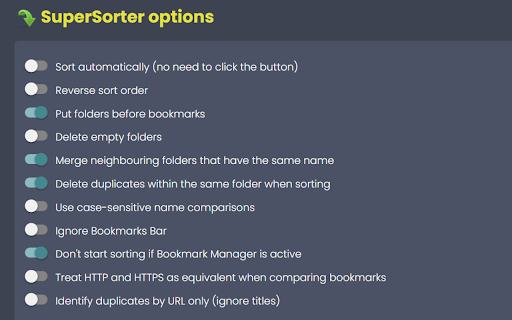
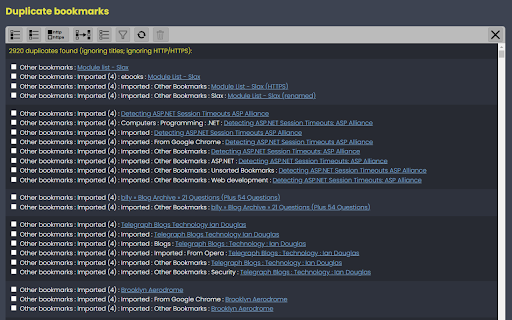

Clean up your bookmark mess! Sort bookmarks automatically, delete duplicates, merge folders, etc. Are your Chrome bookmarks a mess? SuperSorter can help! SuperSorter sorts all of your bookmarks, in all your folders, into alphabetical order. It sorts folders too and if you like it will put the folders at the top of the list. SuperSorter also deletes empty folders, deletes duplicate bookmarks and merges folders with the same name. It can also sort bookmarks automatically every few minutes, making it even easier to keep everything tidy. Warning: There is no undo function, so use this extension at your own risk! - Added a dropdown to choose the language to sort and compare in.

Recursive Bookmark Sorter
Sort your bookmarks recursive ## Sort your chrome bookmarks recursive ### Description This extension can sort ALL your bookmarks RECURSIVELY. Withouto this extenion you can sort ONLY ONE bookmark folder by Chrome Bookmark Manager. Now, ALL bookmarks will be sorted by just one click !

Booksorter
Sort your bookmarks automatically by selecting a sorting rule for each folder. With this extension, you will no longer need to manually sort your bookmarks every time after you add a new item or modify an existing one. Start by choosing a bookmark folder and how you want it sorted (by name, by url, by date, etc). This extension will then start tracking those folders for any change made, and whenever you add or modify a bookmark within them, their contents will be automatically sorted according to the rule you created. Features: - Sort your folders automatically whenever they are changed - Or sort the folder only once, without tracking for further changes - Sort by Title, URL, Date or even randomly - Inverted order (Z to A) is also possible - Sort subfolders automatically with Recursive Sorting - Choose whether you want subfolders sorted normally or left at the top/bottom - Enable manual sorting when you reorder bookmarks within the folder Changelog: v1.4.0: - Added sorting method: Unsorted. Use it to sort your bookmarks while keeping your folders sorted manually, or vice-versa - Added "Skip Base Folder" option to Recursive Sorting to only sort subfolders v1.3.0: - Remember last used sorting options v1.2.0: - Updated to ManifestV3 v1.1.0: - Added Recursive Sorting to also automatically sort subfolders. - Improved sorting performance when only moving one bookmark.

Starmarks Bookmark Manager
Unleash the power of your bookmarks! Effortlessly filter, sort, and organize your favorite websites with Starmarks. • Smart collections for advanced categorization • 5-star ratings and visit tracking for all your most-loved bookmarks • Drag select and edit multiple bookmarks at once • Full backup support with data export and download • Dark mode theme option for a sleek browsing experience Transform your bookmarking experience and never lose track of an important website again!

Bookmark Manager and Viewer
An elegant bookmark manager with fuzzy search and more The "Bookmarks Manager and Viewer" extension provides a panel view to modify your bookmarks. The panel is equipped with fuzzy search (like Google search) to help you find the matching bookmarks. You have a set of tools to edit your bookmarks on the fly. It is even possible to drag a bookmark to a new position in the tree or create a new directory and place the bookmark inside it. Features: 1. Fuzzy Search: Use to find matching items even if you are not sure what the exact title or URL of the stored bookmark is. 2. Validation Button: Delete broken bookmarks or find duplicated bookmarks recursively. 3. Edit Properties: Modify the title or address of a bookmark 4. Toolbar Color: Detect if the current page is bookmarked or not 5. Sort Bookmarks 6. Supports Live Bookmarks 7. Opening Mode: Open in a browser tab or popup view 8. Keyboard Navigation and Operation
