
blimjkpadkhcpmkeboeknjcmiaogbkph

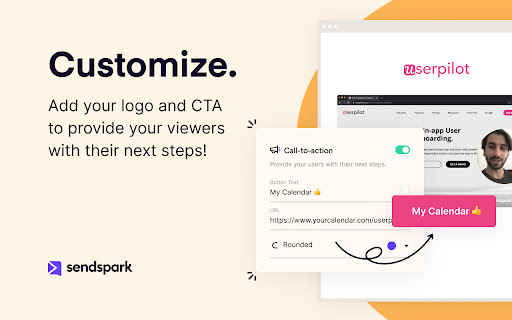
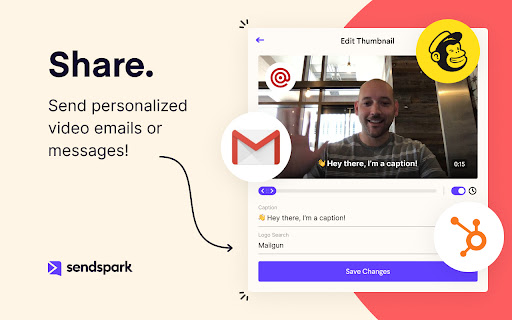

Record and share professional-looking videos for business Easily capture & share professional-looking updates, pitches, presentations, and demos. Perfect for Marketing, Sales, Support and Customer Success: → Build personal relationships with customers → Collaborate with team members → Capture instant demos and tutorials → Drive more engagement and conversions → Increase customer delight and retention → Enhance marketing newsletters, automated email sequences, & quick personal messages Record → Personalized video messages → Screen recordings → Request recordings from others with a quick-share link Personalize at scale → Custom thumbnails that pop in email → Add your customer's name & logo → Use polished landing pages Convert with calls-to-action → Add a CTA below your content → Embed your calendar below recordings → Let viewers reply with a recording Share anywhere → Send in email → Embed in website or blog pages → Instant integrations with Gmail, LinkedIn, Outreach, and more Collaborate with your team → Edit together → Share in team folders → Request clips from coworkers Track engagement & conversions → CRM integrations with Salesforce, HubSpot, and Zoho → Real-time notifications → Detailed analytics and viewer insights

InTab
edit any website's HTML and CSS visually 👓 Visually edit any website with InTab's No-Code CSS editor 🔍 Hover to inspect CSS - no need to open devtools 📱 Test your website responsiveness in 20+ devices with real-time sync 🏃♀️ Write CSS faster with built-in templates for animations/flexbox/grid layout 👇 1 Click to export auto-generated media quires and global CSS

blurweb.app
Blur any element text, image, input or paragraphs with single click. 🔒 Blurweb.app - Protect Your Sensitive Data on the Web Instantly! 🔒 Whether you're recording, screen sharing, or presenting online, blurweb.app ensures your sensitive information remains private. No editing required! 🎥✨ Easily blur text, paragraphs, images, inputs, or any selected elements with just one click. Now featuring a new 'Keep Blur' function that maintains your blur settings even after a reload. 🔄 💨 Single Click Blur: Effortlessly blur headings, paragraphs, images, or videos with just one click. 🖍️ Blur Area: Draw a rectangle anywhere on the page, and we'll blur it while keeping it in place. 🔄 Keep Blur: Click 'Keep Blur' before applying any blurs to maintain them after reloading or revisiting the URL. 🔧 Customizable: Control blur intensity, clear all blurs with a click, and even blur selected text. Plus, hide tab titles & icons for added privacy. 🔥 Use Cases 🔥 📺 Content creators: Protect sensitive information while live streaming or recording. 🏢 Agency owners: Share client projects securely during presentations or demos. 👩🏫 Teachers: Keep students' personal information confidential during online classes. 💼 Professionals: Safeguard sensitive company data during remote meetings. 🛍️ Online shoppers: Conceal personal details while sharing screens for shopping assistance. 🎮 Gamers: Hide private in-game chats or messages while live streaming. ✅ Pros Easy to use: Simply click to blur any element on the page. Customizable: Adjust blur intensity, hide tab titles & icons. Versatile: Suitable for various professional and personal use cases. ❌ Cons Requires a license: Visit blurweb.app to purchase your license. Limited compatibility: May not work with certain websites or web elements. 🛍️ Frequently Bought Together 🛍️ blurscreen.app: Blur anything on your screen. quickpresent.app: One-click worry-free screen sharing. Join 5000+ content creators, agency owners, teachers, and more who already trust blurweb.app for their privacy needs. Visit blurweb.app to grab your license today! 🚀 🎉 Enjoy a more secure and private browsing experience with blurweb.app! 🎉

Lavender
Easily write more thoughtful and effective e-mails using social data and linguistic AI. 📧 Increase reply rates Your Email Coach grades your email and gives tips to improve. It’ll find and fix anything that hurts your chance of getting a reply, using generative AI and data from millions of emails. You'll receive more replies when you send emails with a high score (90 or above). 👩💼 Personalization made easy The Personalization Assistant brings prospect data directly to your inbox (or wherever you send emails). We'll suggest ways to personalize your email based on the data. We also surface personality-based insights to help create deeper connections with your recipients. 📈 Improve over time The Lavender email score moves with you. You'll receive real-time coaching based on your inbox and billions of data points. When email behavior evolves, our recommendations do too (thanks to generative AI). So you’re always using the best practices. 👏 Data-driven coaching Managers are empowered to coach with real data-backed email insights — from you and your team’s inboxes. Lavender helps you track performance, ROI, what’s working across your team, and who needs help (and where). 🔗 Integrates with your favorite tools Use the magic of Lavender wherever you send email. ✅ Join thousands of other salespeople to supercharge your outbound messaging. 🔒 Lavender is 100% encrypted and private. SOC 2 & GDPR Certified 🥰 If you need help on an email, just forward it to us at team@lavender.ai

typedesk Canned Responses
Boost your productivity effortlessly! Automate typing tasks, streamline with canned responses, text snippets, and automation. Typedesk is the leading app to reclaim time wasted typing the same things over and over again! Create text templates of your every day sentences and messages, and typedesk makes reusing them quick and easy. Use the / character followed by your custom shortcuts to quickly insert your response. For instance, typedesk can transform "/eml" into your email address, or "/tmpl" into a full email with your opening line and signature. Need something more visual? Hit Alt+C and typedesk's search bar opens up instantly to quickly and easily find and insert the responses you need. ➤ It works where you do Whether you need your snippets within your email client, word document, code editor or backoffice, typedesk works out of the box with all the apps and websites you use daily. Our apps for Windows, Mac and all the major browsers are giving you typing superpowers everywhere you work! ➤ Powerful variables for personalised responses Personalising messages can be daunting, let alone making sure you didn't leave a placeholder before hitting "Send"! typedesk's powerful engine allows you to create interactive forms to personalise each response quickly and easily so you always hit the right spot! ➤ Designed for teams typedesk has been designed from the ground up to work great with teams. Invite as many users as you want on your account, and share one or more folders with specific permissions for each user. ➤ Built for privacy Unlike most text expanders, typedesk never listens to your keyboard before you request it with a shortcut. Your data is encrypted with LUKS and SSL to ensure complete peace of mind. Need your responses outside of your browser? No problem, get our apps for Windows and Mac to experience the same typing speed in your favorite native apps. ➤ Don't take our word for it! "We're loving typedesk! It's easy to use, and saves us tons of time when it comes to sending emails to our customers." Seb Fontan, Founder @ TripHitz Marketing Agency "We keep finding new ways to use typedesk. It started with the obvious canned email responses, especially for the repetitive emails we get every day. Recently, we've implemented it with social media posts, especially YouTube videos descriptions, and this is where Variables comes in handy." Ninos M., Creative Director "The set up was quick and painless and adding in new templates or using the templates after they are added takes no time at all, making working with emails a short and simple process." Tori, Customer Success @ BookRetreats
