
bkhaonhfcaokcjommpebdbglhnoidmce
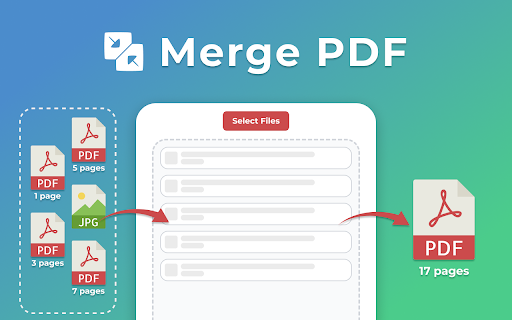
Use Merge PDF to efficiently combine pdf files. Our easy-to-use pdf merger helps you organize and create a single file in seconds. 🖥️ Looking for an easy way to merge pdf files online? Our extension simplifies and speeds up the process of combining pdfs. No more complicated software - just a quick and user-friendly tool that makes organizing your documents effortless. 💠 Secure and private: your documents are processed securely and are never transferred anywhere. 💠 Combine pdfs easily: effortlessly turn multiple files into a single one with just a few clicks. 💠 Regular updates: we constantly improve our merge pdf tool to ensure the best performance and results. 💠 Simplify your work: streamline organizing, reviewing, and sharing your materials with ease. 💠 User-friendly interface: our pdf joiner is simple to navigate, and no technical skills are required. 1️⃣ Select or drag and drop your documents. 2️⃣ Arrange files to ensure they’re in the correct order. 3️⃣ Just click the button to merge pdfs online. 4️⃣ Download your new combined document instantly. 🔹 Efficient process: Save time and keep your documents well-organized. 🔹 Instant results: Get your merged pdf within seconds, saving you time and effort. 🔹 Seamless printing: Streamlines the process for quicker and easier results. 🔹 No quality loss: The quality remains unchanged after merging pdf files. 🔹 Fast and easy: Effortlessly create a single document from multiple in just a few clicks. 🔹 Combine multiple pdfs into one: Consolidating info into one doc makes access easier. 🔸 Professionals: Organize business reports, presentations, and other materials into one. 🔸 Students: Combine lecture notes, study guides, and research papers for easy access. 🔸 Marketers: Mergepdf marketing reports, proposals, and presentations for smoother workflows. 🔸 Researchers: Bring together academic papers, articles, and journals for easier reference. 🔸 Lawyers: Merg pdf contracts and legal papers for better organization and faster access. 🔸 Business Owners: Gather invoices, contracts, and reports for easy tracking and management. 🔸 Anyone: Perfect for anyone who needs to organize docs into a more efficient structure. 🎉 When people ask, how to combine pdf files online, the answer is simple: just use our extension! This tool allows you to merge pdf online quickly and effortlessly. It's fast, reliable, and integrates seamlessly into your workflow, making document management easier than ever. ✅ No installation needed: Handle your documents directly in your browser, saving system resources and time. ✅ Support for multiple files: Whether it's two or twenty, you can quickly and easily use pdf combine. ✅ Offline capability: Use it easily without an internet connection, allowing you to work anytime, anywhere. ✅ No loss of quality: Merging pdfs keeps the original quality and formatting completely intact. ❓ How do I merge pdf into one file? 💡 Click select or drag and drop your files. If needed, adjust the order, then click the corresponding button to save your combined documents. ❓ Is it secure to use pdf merger online? 💡 We do not store data or send it to a server; everything is processed directly in your browser on the computer. ❓ How many pages can I include in a merged file? 💡 You can upload unlimited documents, but processing a large number may take a bit more time. ❓ In what order will my merged pdf files appear? 💡 After adding your materials, simply drag and drop them in the desired order, and the top item will appear first in the final combined document. ❓ Can I use the tool without an Internet connection? 💡 Yes, it works offline, allowing you to create a combined pdf without needing an internet connection. ❓ Can I use this app on mobile devices? 💡 Currently, this tool is designed for desktop use via Chrome, but you can access it anytime in your browser to mergepdf. ❓ Can adobe combine pdf? 💡 Yes, Adobe can do it, but our app is optimized for fast, efficient processing directly in your browser. 👩💻 Don’t waste time searching for how to merge multiple pdf files. Get this Chrome extension now and enjoy hassle-free pdf merging anytime! Whenever you’re dealing with multiple docs, use our tool for a smoother and faster experience.

PDF Merge by PDFly
Merge PDFs directly from the browser Need to merge PDF files into one? Our PDF Merge Extension simplifies the process, allowing you to combine PDF documents with ease. Whether you're working on reports, presentations, or personal files, this tool lets you merge PDFs quickly and securely. No need for complicated software—just drag and drop your files, hit merge, and you're done! ✅ Fast PDF Merging: Merge any number of PDFs in seconds. ✅ Easy-to-Use Interface: Simple drag-and-drop functionality for quick merging. ✅ No Watermarks: Merge PDFs without any annoying watermarks or limitations. ✅ Privacy-Focused: Your documents are never stored online; your data remains private and secure. ✅ Free to Use: Merge PDFs without the need for subscriptions or complicated sign-ups. Why Choose PDF Merge Extension? 📌 Perfect for Office & Personal Use: Merge files for work, school, or personal projects. 📌 Optimized for Efficiency: Save time and stay productive with fast PDF merging. 📌 Seamless Integration: Directly integrates with your browser for easy access anytime. 📥 Download PDF Merge Extension now and simplify your PDF workflow today! Made with ❤️ by PDFly -- This extension is completely free to use without any limits. For more PDF-related tools such as Organize PDF, Rotate PDF, Remove PDF Content, Edit PDF, Read PDF, Compress PDF, Protect PDF, Unlock PDF and converting JPG to PDF, PNG to PDF, BMP to PDF, TIFF to PDF, Word to PDF, PPT to PDF, TXT to PDF, Excel to PDF, PDF to ZIP, download PDFly app.

Merge PDF
Easy and secure way to Merge PDF files online. Merge an unlimited number of files, easy and secure! You can also reorder your files with our drag & drop feature. Select or drag your files, then click the merge button to download your document into one pdf file. All merged files maintain the best quality which can be accepted on any web platform (when uploading to a website or attaching as email). Your files are fully secure as they are been transferred over a secure connection. All files are deleted permanently from our servers within few hours of the conversion.

PDF Combine - Convert and Merge
Convert and merge multiple files with different formats into a single PDF document This extension converts document, HTML, and image file types into PDF format. Also, the extension can merge multiple files into a single PDF document. Use cases: 1. Append an image file to an existing PDF document 2. Merge multiple PDF files into a single PDF document 3. Convert Word to PDF 4. Convert multiple files with different formats into a single PDF document. 5. Change the order of a PDF page Conversion Method: Local: The extension runs the official "pdfunite" executable from the alpine Linux repository inside an iframe using blink's x86-64-Linux emulator. This method works offline. There is no server interaction whatsoever. Remote: The extension sends all your files to www.online-convert.com, and conversion happens on the server. You can convert any file type to PDF using this method. Notes: 1. This extension uses www.online-convert.com APIs to do the conversion, so there is no need to install a native program to convert each file. 2. The quality of the document is kept while merging or converting into PDF format. 3. It is recommended to get and use your API key to make sure you don't hit the rate limit if you prefer the "Remote" method.

PDF Merger
Looking for a simple and secure way to combine pdf files? Our PDF Merger app is a powerful, user-friendly solution designed for anyone who wants to merge pdf files into one without relying on online tools like PDF Mergy, iLovePDF, Adobe PDF merger, SmallPDF, or other services that upload your documents to external servers. With our app, all processing happens locally on your device. You stay in control of your documents from start to finish. 🏆 Why choose this pdf combiner? ✅ Keeps files on your device ✅ Works offline — no internet needed ✅ Easy to use, even for beginners ✅ Fast joining of multiple documents ❓ If you’ve been wondering how to merge pdf files without acrobat or complicated software, this is the answer. 1️⃣ Select the documents you want to combine from your computer. 2️⃣ Arrange them in the order you need. 3️⃣ Click "Merge", and you’re done! 🔑 Key features you’ll love: 1️⃣ One-click pdf combiner 2️⃣ Unlimited number of files to join 3️⃣ Easily re-order files before completing the task 4️⃣ Name your merged file before saving 5️⃣ Choose the destination folder for the output file 🔒 Privacy & security: Unlike online pdf merger tools, this app keeps your data private. No uploads, no sharing. Everything happens directly on your computer. That’s why it’s the best choice for anyone asking how to merge pdf files securely or how can I merge pdf files without risking privacy. 🌟 Benefits of using our pdf merger: ✅ Ease of use: effortlessly merge all pdf into one with just a few clicks. ✅ No internet dependency: combine pdf documents offline. ✅ No third-party servers involved. ✅ Merge files into one pdf instantly on your device. ✅ No file size limitations. ✅ No watermarks on the output file. ✅ OS Compatibility: use it to combine pdf files into one document in Windows, Mac, and Linux. ✅ Regular updates and responsive developers to keep improving our pdf merger tool. ❓ Who is this pdf merger for? ✍🏻 Accountants managing multiple reports 🧑⚖️ Lawyers compiling case files 👩🎓 Students submitting multi-document assignments 🧑🎓 Researchers combining papers for review 👷 Business owners gathering invoices, contracts, and reports for easy management 👨💼 Office managers organizing PDF documents for easy retrieval Whether you’re a student combining notes, a lawyer combining contracts, or an accountant organizing reports, this pdf merger is perfect for you. Forget about complicated steps or needing expensive software like Acrobat. Now you know how to merge pdf files without acrobat or complex tools. 👍 Popular use cases: 📌 Storing invoices for accounting 📌 Combining legal documents into one pdf 📌 Joining multiple research papers 📌 Compiling student notes into a single file 📌 Merging scanned pages into a book format ⚠️ Risks of using a pdf merger online: 1️⃣ Privacy and security concerns: uploaded files may be stored on third-party servers, risking exposure of sensitive data. 2️⃣ Data leaks and breaches: even reputable sites can be hacked, making your data accessible to unauthorized parties. 3️⃣ Retention of your data without transparency: online tools may keep files longer than disclosed or use them for analytics. 4️⃣ No control over file deletion: you can’t be sure files were fully deleted even if you click "delete." 5️⃣ Exposure to malware or phishing sites: some merger sites could inject malware or redirect you to malicious pages. 6️⃣ File size limitations and upload failures: many online tools have limits or fail on large files. 7️⃣ No offline access: no internet? You can’t do the job when you need to. 8️⃣ Legal or compliance violations: uploading client or patient documents could violate privacy laws (GDPR, HIPAA, etc.). 9️⃣ Reduced quality or missing features: some tools compress files or strip bookmarks and links. ✅ Why offline merging is safer: Using an offline tool like our pdf merger ensures that your documents never leave your device, maintaining full control, security, and compliance. ✅ DO’s of merging PDFs: 1️⃣ Do check the page order before combining them: ensure the final document reads in the correct sequence. 2️⃣ Do keep original copies of the PDFs: back up files in case you need them separately later. 3️⃣ Do name the output document clearly: use descriptive filenames like ProjectReport_Final.pdf. 4️⃣ Do review the page after combining: check for missing or duplicated pages. 5️⃣ Do use offline tools for sensitive documents: protect privacy by avoiding online mergers. 6️⃣ Do compress the resulting document if large: reduce file size for sharing. 7️⃣ Do verify compatibility with the recipient’s software: make sure the PDF opens properly in standard readers. ❌ DON’Ts of merging PDFs: 1️⃣ Don’t combine files with different page sizes or orientations without reviewing: standardize formats first. 2️⃣ Don’t assume the resulting file is error-free: double-check bookmarks, links, and navigation. 3️⃣ Don’t overwrite important files: save the merged PDF as a new file. 4️⃣ Don’t unite files you lack permission to combine: respect copyrights and privacy. 5️⃣ Don’t upload sensitive files to unknown online mergers: avoid risking data leaks. 6️⃣ Don’t ignore email or upload limits: compress or split large files as needed. ❓ Is PDF merging the right solution for you? Not everyone needs to combine pdf pages into one in all situations. Consider these alternatives: ➤ Using hyperlinks between PDFs: link related files instead of joining them, useful for manuals or research references. ➤ Zipping multiple PDFs into a compressed folder: send a zip archive rather than a single merged file, keeping originals intact. ➤ Embedding PDFs into a master document: insert PDFs into a Word, PowerPoint, or LaTeX file for combined presentation. ❓ Why merging Is still the preferred method: While alternatives work, combining all pdf into one creates a seamless, easy-to-manage document that: ➤ Preserves page order ➤ Simplifies storage and sharing ➤ Ensures compatibility across devices No more worrying about sensitive data exposure. Our app gives you peace of mind while offering all the benefits of an online pdf merger — but offline and secure. In summary, whether you need to merge adobe pdf documents or unite pdf files for a project, PDF Merger is the perfect solution. 👉 Install today and experience easy and safe pdf merge. 📁👌
