
bkeneiekcedkhfnbcfhliembblmjghjh

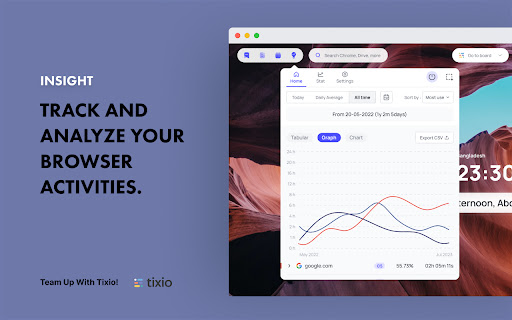
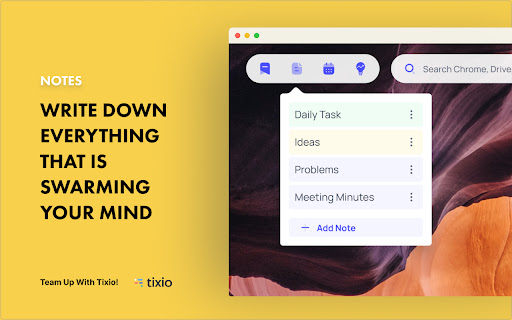

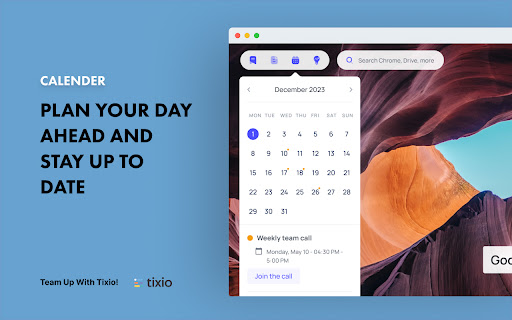
Your personal dashboard for the new TAB page with features like to-do, weather, world clock, and many more! Imagine you just open your Chrome browser and can see your to-do list, notes, bookmark, browser activity, and access to all your Gmail accounts from one single place! Also, you can make it as beautiful and customized as you want! Yes for this Tixio Lite is here! Tixio Lite is a modish Chrome extension to turn your regular browser tab into a beautiful & convenient start page. Begin your workday with a zen mode- personalize your tab with soothing backgrounds & handy features to help focus & inspire. Whenever you open your browser it uplifts your mood & productivity with an eye-pleasing dashboard along with useful tools and reminders. But it’s not limited to to-dos and notes. There's a lot more to it. Note: Please click the ‘Keep it’ button on the ‘Change back to Google’ notification after installing Tixio Lite. View it on each new tab you open. You also can choose which data you want to share with us or not. Track your browser activity and increase productivity easily. Look at your data in graph or tabular form as you want. Personalise your dashboard with an image from our pleasing collection. Shuffle them with time & get amazed You can make your Chrome tab with featured photos or any aesthetic photos you wish. Style your dashboard with a clock, or weather, or add your to-do list in the center to stay focused on your work. Get quick access to all your bookmarks from one place. Make it easier by creating folders or adding links. Want to track your daily work? Create your work Todo list and keep it on focus, so that no work can miss out! Forget using docs/stickies for quick notes—quick-take notes right on the browser tab in a faster & easier way. Get a friendly reminder of your events that can also be connected to your Google calendar. A minimal search bar where you type and get Google / Bing search results easily. ◆ World Clocks and weather update Add time zones to your dashboard or pin multiple time zones to your home. Keep track of time across the globe. Get local weather info as you like. Click on the widget for more detailed info - daily forecast precipitation, humidity & wind. ◆ Countdowns Track the seconds tick down to your important events, tasks, or vacation. Get repeated reminders on browser tabs. ◆ Privacy We respect your privacy and will not share your data with others. Check out our privacy policy at https://tixio.io/privacy-policy/ ***Tixio Insight Usage Cautions: To provide analytics of your web browsing usage, our system collected browsing history. If you don't want us to track the browsing history of any particular site, please block the site from Insight Settings first before browsing. “Get a Tixio workspace free with Tixio Lite. Connect and enjoy!” Connect with your Tixio account and enjoy the most out of it. Go to Tixio Board with a click from Tixio Lite. For more questions or support, please mail us at support@tixio.io

Blixem Tab Manager
Organize, save & share your tabs for easy collaboration with Blixem. Blixem helps you manage your tabs and windows efficiently, reducing distractions and improving performance. Homepage: Your new tab screen shows tabs vertically, gives quick access to favorite sites, and lets you launch Workspaces with one click. Customize with widgets, colors, and backgrounds. Workspaces: Save tabs into Workspaces for easy access, sharing, and collaboration. Customize Workspaces and share them with a few clicks. Collaborate: Share Workspaces by granting view or edit permissions. Teams can add content, comment, and invite others with a link or email. Collaborators don't need the extension installed. Windows: See all open tabs across all Chrome windows from one page. Rearrange, close, or add tabs to Workspaces. Pause tabs and windows to speed up your computer. Widgets: Add widgets like recently closed tabs, frequently visited sites, and top Workspaces to your homepage. Work-Personal Separation: Separate work and personal tabs using Categories. Hide work tabs when off duty and personal tabs during work hours. Blixem Tab Manager helps you control and organize your online life.

Pau | Bookmark Manager
Organize your bookmarks fast and easy with Pau bookmark manager A powerful browser extension to boots your productivity on your day-to-day, it's the easiest way to save, access, organize and manage your most used links and bookmarks Group your bookmarks by collections Create collections by context to stay organized. - set it once and forget about it. Multiple Layouts Customize the layout to make it work the way you want it to. - take advantage from each one. Share Collections Share your collection easily with your team/clients. - it's like givint them the whole context Use the theme that fits you Choose the best theme that better fits your personality. - try out the featured ones! Check out trending themes in here: https://www.pauapp.com/themes

tabExtend - Easy Tab manager
Transform your new tab into a powerful dashboard. Add notes, set reminders, and sync across devices to boost productivity. The best way to manage your tabs and organize your workflow on any device. (Chrome, Brave and Edge supported) TabExtend is the easiest way to manage browser tabs, offering a seamless solution for anyone looking to organize and control their tabs. The pain caused by having too many open tabs and disorganized windows in Google Chrome is a thing of the past. You might have tried other tab management tools, such as OneTab, Workona or Toby, and run into countless problems with feature limitations and organization. TabExtend is the ultimate replacement for this. We transform your new tab into an interactive dashboard and Kanban board, ensuring your tabs and workspaces are always organized and in sync. If you are looking for a way to manage tabs in Chrome, look no further. We have you covered with TabExtend - tab management has never been easier nor more efficient. What are you waiting for? Once you install, you will finally have a way to take control of your tabs. ✔︎ Manage tabs & tab-groups across multiple windows ✔︎ Notes / To-dos ✔︎ Setup reminders for sites and notes ✔︎ Popover with saved notes on any site ✔︎ Sync to Mobile apps(iOS & Android) ✔︎ Import bookmarks and top sites ✔︎ Save selected text-snippets ✔︎ Search sites and items ✔︎ Dark/light theme ✔︎ Shared workspaces ✔︎ Share categories via public link ✔︎ Upload custom emojis Try as guest or sign up for a free account. All features included up to 30 saves. Available for Chrome, Brave, and Edge TabExtend helps users with all sorts of questions; here are just a few: How do I manage too many tabs in Chrome? How do I organize my Chrome tabs? How do I save tab groups in Chrome? How do I sync tabs across devices? How do I manage browser tabs efficiently? How to organize Chrome tabs? How to save tab groups? How to manage multiple windows? How to sync tabs between devices?

Upbase - Bookmarks, Tasks, Notes, Calendar
Turn Chrome's New Tab page into your productivity hub with Bookmarks, Tasks, Notes, Calendar. With Upbase, you can quickly capture ideas, take notes, make to-do lists, plan your day with time blocking, stay focused with a Pomodoro timer, and many more. Simple, clean, and beautifully designed. Organize your favorite websites on a Kanban-style board. You can drag and drop your bookmarks to quickly change their position and column. ◾️ Private and Team Tasks Quickly create monthly, weekly, and daily tasks. Add subtasks, detailed description, set priority, attach files, and collaborate with your teammates. ◾️ Notepad and Daily Notes Got something on your mind? Open the Notepad or Daily Notes and quickly jot down your thoughts and ideas. Stay focused and boost productivity with the Pomodoro Technique. Just pick a task you need to work on, start the timer, and focus on the task for 25 minutes. Take a break and repeat. Simple, yet very effective. ◾️ Calendar with Time Blocking Schedule your daily tasks on the calendar to create a sense of urgency, avoid procrastination and practice deep work. ➔ Do I need to sign up for an account to use Upbase? Yes, you need to sign up for an account and create a FREE workspace to be able to use the extension. A workspace is the highest-level organizational unit in Upbase. It's where you organize all your work and collaborate with your teammates. With each account, you can create multiple workspaces. Yes, Upbase is completely free. Also, if you want to use Upbase as a project management tool, you can upgrade to the Premium plan to unlock additional features. Visit upbase.io/pricing for more information.
