
bkabpllkghhddkikpelcmjklipifickd


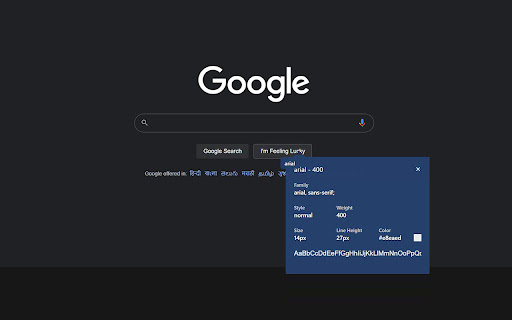
Now you can easily identify any font on the page using Font Finder. Whatfont extension is a perfect for developer, graphic designers and for everyone who wants to identify the font details. This font finder extension for chrome browser gives you information about font name, family, weight, color and more. ✅ What this extension detects: 1. Font Family 2. Font Size 3. Font Weight 4. Line Height 5. Font Style 6. RGB Color Code ✅ How To Use : 1. Click on the “Add to chrome” button to install it 2. Tap on “Whatfont Plus” icon, this will enable the extension 3. Click the mouse pointer on any word for which you want to get font details 4. After clicking the word you will get all the font details

WhatFont?
WhatFont helps to identify the font family of any text in the web page.

Font Finder
An easy-to-use font inspector to get CSS styles of the selected element FontFinder is created for designers, developers, and typographers. It allows a user to analyze the font information of any element and copy any pieces of that information to the clipboard. Font Finder examines all the selected characters to detect the font used to display this particular character. 1. Analyze any font on the active page. 2. Copy any piece of the element's information to the clipboard 3. Any active element can have any piece of the font's options (such as color, size, or family) adjusted inline Access these options by right-clicking the context menu over the selected text or right-clicking on the page and inspecting the element. Information Captured: 1. Font color (RGB and HEX) 2. Background color (RGB and HEX) 3. Font family (including actually rendered font!) 4. Font size 5. Line height, vertical alignment, letter, and word spacing 6. Font weight, style, variant 7. Text transform, decoration, align and indent 8. Element's type, class, and ID 9. Displays remote and local tags next to the rendered font Tools: Replace or change font family. Use custom fonts. Get the list of all fonts in the current frame. Notes: You can change the window opening mode to embedded mode from the right-click items over the toolbar button. This mode helps use the extension in full-screen mode.

Page Ruler
Measure page elements size in pixel with an easy-to-use ruler. Page Ruler is an extension that lets you measure distances (in pixels) on a webpage. It draws a rectangular ruler when you move your mouse on the page. The ruler has width, height, start and end all labeled with corresponding metrics in pixels. When you move your mouse, the rectangle changes its size and all the numerics are updated. To activate the addon please press the toolbar button once. Likewise, to disable the addon please press the toolbar button again. This addon works with mouse clicks in desktop machines. For touch-enabled devices, you can work with touch to draw the rectangle within the page. If you have a feature request in mind or found a bug to report, please fill the bug report form on the addon's homepage (https://mybrowseraddon.com/page-ruler.html).

WhatFont
The easiest way to identify fonts on web pages. Say goodbye to the complexity of developer tools for identifying fonts. With WhatFont, discovering the fonts used on websites becomes as effortless as hovering over text. Want more details? A simple click on any element reveals the styles applied, making it easier than ever to uncover the secrets behind beautiful typography. Recommended by Wired WebMonkey, Lifehacker, and SwissMiss. History: • 3.2.0 - Improved toolbar icon compatibility • 3.1.1 - Removed unnecessary developer logging • 3.1.0 - Added multiple color format support • 3.0.1 - Restored escape key to exit • 3.0.0 - Completely Rewritten: The entire extension has been rebuilt for better performance and usability. - Updated Permission Model: We've revised permissions to better respect user privacy while maintaining functionalities. - Refreshed Appearance: The look has been updated for a more modern feel. - Isolation from Host Website Styling: Ensures WhatFont's appearance is unaffected by the website it's used on. - Adaptive Toolbar Icon: The toolbar icon now changes based on the system's appearance settings. - Support for New CSS Color Values: Enhanced support for the latest CSS color values. • 2.1.0 - A new design thanks to Siddharth Mate • 2.0.3 - Retina toolbar icon • 2.0.2 - Fix option page for button styles • 2.0.1 - Use native screen capturer • 2.0 - Improved sharing • 1.7 - Added font services detection for FontDeck (Thanks to Mark Perkins) - Improved font detecting algorithm - Improved overall performance • 1.6.1 - Added color detection for text • 1.6 - Added a tweet button for instant sharing through Twitter - Improved style reseting • 1.5 - Overall restyling • 1.4.4 - Supported light icon for dark themes • 1.4.3 - Fixed a bug related to Typekit service detection • 1.4.2 - Reduced loading time - Supported HTTPS protocol • 1.4.1 - Fixed stylesheet bug • 1.4 - Restructured source code - Supported font services detection for Typekit and Google Font API - Fixed toolbar button bug. Second click is now "Exit WhatFont"
