
jgeefkaionmdkgligjchjeeakclckgmc
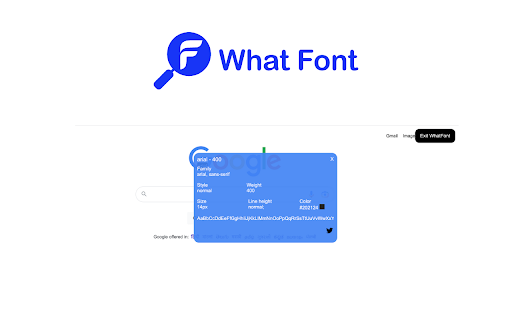
WhatFont helps to identify the font family of any text in the web page.

VisBug
Open source web design debug tools built with JavaScript: a FireBug for designers. - Point, click, move, resize & tinker - Edit or style any page, in any state, like it's an artboard - Inspect styles, spacing, distance, accessibility and alignment - Nitpick layouts & content, in the real end environment, at any device size - Leverage adobe/sketch skills - Edit text, replace images - Design within the chaos: use production or prototypes and the odd states they produce, as artboards and design opportunities - Design while DevTools simulates latency, i18n, media queries, platform constraints, CPUs, screensize, etc - Make more decisions on the front end of your site/app (a11y, responsive, edge cases, etc) - No waiting for developers to expose their legos, just go direct and edit the end state (regardless of framework) and execute/test an idea Give power to designers & content creators, in a place where they currently feel they have little to none, **by bringing design tool interactions and hotkeys to the browser**

TypeScan What Font Finder
Identify What Font Instantly. Copy with Ease, Free Always WhatFont Font Finder. What HTML Font? Instantly identify web fonts and effortlessly copy font family data with just one click. This browser extension is 100% free, offering a seamless font-finding experience without any premium features. Features: - Find what font is on a web page - Copy a font family data to the clipboard in one click - 100% free to use, no premium features

CSSViewer
How to use : To enable CSSViewer, simply click the toolbar icon and then hover any element on you want to inspect in current page. Privacy : In order to work properly, CSSViewer requires the permission to access to your history and website data. However, CSSViewer do not collect nor will ever transmit any of your private data. Known issues : - CSSViewer will not work in any opened tabs before installing it nor in the Google chrome store (This is how Google roll :) - The style may broke sometimes depending on the site you are surfing. - Patches are welcome. Credits: This chrome extension is a straight port of the Firefox CSSViewer add-on with minor enhancements. Credits goes to the original developer and contributors.

What Font
Discover What Font to identify typography effortlessly! Quickly answer, "what font is this?" and find font that sparks creativity. 📚 Discover What Font with Ease Have you ever stumbled upon a beautiful design and wondered, "What font is this?" With our cutting-edge browser extension, identifying has never been easier. Whether you’re exploring creative websites or admiring eye-catching typography, our tool is here to help you answer the question: what the font? ✅ Accurate: Quickly identify fonts on any webpage with just a click. ✅ Easy to Use: Our intuitive interface ensures smooth navigation for all users. ✅ Comprehensive Database: Gain access to a robust library of styles. ✅ Exclusive Insights: Learn more about font characteristics, including styles and weights. 🌐 How What Font Works Our extension uses advanced algorithms to analyze and recognize typography on web pages. Simply hover over the text you’re curious about, and the extension will instantly identify the typeface. This seamless process lets you find and check details in seconds, making it easier than ever to answer the questions about styles. 📂 Main Features of What Font: 🔄 Browser Compatibility: Works seamlessly with Chrome, Edge, and other major browsers. 🔄 One-Click Identification: Highlight text and click to unveil what font is used. 🔄 Secure and Private: Your data stays safe with our encryption standards. 🔄 Customization Options: Tailor the extension to fit your workflow. 💕 Benefits You’ll Love ➤ Save Time: No more manual searches you admire – our tool makes it quick and effortless. ➤ Discover: Expand your library with unique typefaces identified on the go. ➤ Boost Creativity: Find inspiration for your next design project with resonate. ➤ Stay Organized: Keep track of identified styles in your personal list and revisit them whenever needed. 💎 Why What Font Stands Out Unlike generic tools, our font finder delivers results tailored to design professionals. It’s more than just a font detector – it’s a creative companion that’s always ready to assist. With our tool, answering questions like "font what the?" becomes an effortless experience. 🛠️ Extend Your Creative Potential Don’t limit your ideas! The world of typography is vast, and with our extension, you can explore it effortlessly. Answer questions like "what am I looking at?" or "how fits this design?" Expand your creative horizon by discovering new typefaces every day. 🎨 Graphic Designers: Enhance your toolkit with precise identification 🎨 Web Developers: Save time by instantly identifying a styles on live sites and improving your workflow. 🎨 Creatives: Draw inspiration from beautiful designs you come across online and explore new ideas. 🌍 Advanced Features ⚡ Detailed Attributes: Discover weights, kerning, and line heights. ⚡ Usage Statistics: Learn where and how often is used across various platforms. ⚡ Design Recommendations: Get pairing suggestions to enhance your creativity. 🤝 The Perfect Font Identifier Whether you’re asking, "what da font is this?", our extension has got you covered. It’s about empowering your creativity with tools that make a difference. With its advanced fontfinder capabilities, you’ll never need to wonder about again. 🚀 Transform the way you interact with websites by uncovering hidden design details. From layout inspiration to visual storytelling, explore every element with a new perspective and make your browsing both engaging and insightful. 📌 What’s the font compatibility? Our extension identifies both modern and classic typefaces, ensuring a wide range of support. 📌 Can I use it offline? While the extension requires an internet connection for find font, its interface remains accessible for reviewing previous finds. 📌 What if the style isn’t found? You’ll receive suggestions for similar styles to explore and use in your projects. 🔎 Step-by-Step 1. Install the What Font: Add the tool to your browser in seconds. 2. Activate: Enable the extension with one click and start exploring typography. 3. Detect: Hover over any text and let the extension reveal what font it is. 4. Learn More: Access detailed information about the typeface family, style, and usage. 🔥Unleash Your Creative Potential Explore endless design possibilities by diving into unique visual styles and layouts. Discover inspiration from every corner of the web, turning everyday browsing into a treasure hunt for fresh ideas. With every click, transform ordinary moments into extraordinary opportunities for creativity and growth. 💡 Ready to Explore? Download the extension today and discover what font matches your inspiration. Take the guesswork out of font recognition and let your creativity shine! Whether it’s for design, development, or personal projects, this tool is here to make your workflow seamless and enjoyable.
