
bjigeikccploejbfehpegopaomndfojm
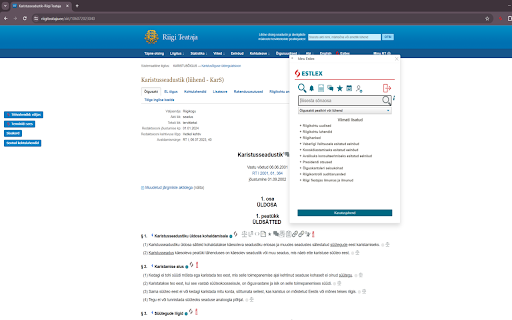

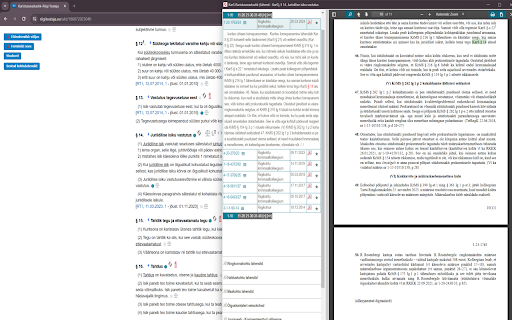
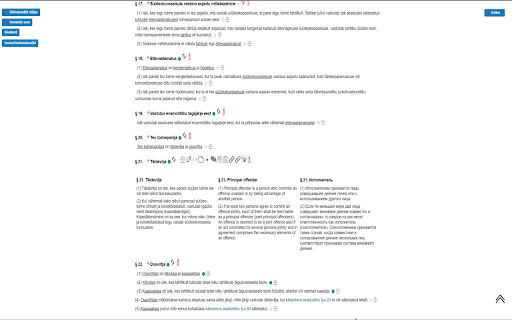

Estlex plugin allows to use Estlex functions on websites of Riigi Teataja and Riigikohus. For more information please contact info@estlex.ee

Web Scrapbook: Text & Image Saver
A minimalistic web scrapbook to save, manage, and streamline web content. No external requests. No tracking. No bullshit. Collect, manage, and archive important content from the web. Save images and text from any webpage with a single click! Web Scrapbook is your personal internet curator. Save images and text directly from your browser, manage your collection within our user-friendly interface, and organize your scrapbook your way. - **Save with Ease:** Right-click on any image or text selection to save directly to your Web Scrapbook. - **Intuitive Management:** Access your saved items through a simple popup interface. Review, add, or delete items with ease. - **Group By URL:** Consolidate items from the same page for easy reference. - **Edit Mode:** Switch to edit mode to modify your items in a Markdown format. - **Export Functionality:** Reset your collection and export all items as a JSON file for easy data migration or backup. - **Privacy Focused:** All your data is stored locally and never leaves your computer. With Web Scrapbook, you have a powerful tool that makes the internet more accessible and manageable, right at your fingertips. Transform your browsing experience today!

Bookmarks HotList
A Speed Dial in your toolbar, with easy set-up and keyboard shortcuts Set up your HotList in the Bookmark Manager, access it from the toolbar in a choice of layouts and colours. For keyboard access, the default shortcut to open the extension is Alt+B (or Command+B). To change the shortcut, paste this into the address bar: chrome://extensions/shortcuts When the extension is open, shortcut keys (1-9 and A-Z) are available for each bookmark. Hold down the Space Bar to reveal hints. Open multiple tabs: 1 click will open a bookmark in a background tab, but the Popup stays open. A 2nd click on that bookmark will close the Popup and activate the tab, or you can open other bookmarks instead. The only automated modification to your bookmarks will be the creation of a new folder to contain those displayed by this extension, and a bookmark to get you started. The Star icon is “Actions bookmark new list Icon” by Oxygen Team, available from Icon Archive under the GNU Lesser General Public License: http://www.iconarchive.com/show/oxygen-icons-by-oxygen-icons.org/Actions-bookmark-new-list-icon.html Icons used in promotional images are in the public domain and available from http://paomedia.github.io/small-n-flat/

Save Website as PDF
Easily save website as PDF. Convert pages to PDF. Get clean, readable, and editable documents — link-friendly and ready to print. With this Chrome extension you can convert any web page into a clean, high-quality document in seconds. Whether you want to download, edit, print, or archive web content, this tool makes it effortless. No more messy layouts or ads. Just the essential content you need in a structured format. 🔍 Top Benefits: ➤ Convert pages to PDF instantly with just a few clicks ➤ Automatically remove ads, pop-ups, and menus ➤ Preserve original layout and clickable links so your document looks exactly like the original ➤ Edit with ease – add notes, highlight, or remove text as needed ➤ Works offline once saved, so you can work on your document, share it easily, or print it anytime ➤ 100% secure – conversion happens on your device, ensuring privacy when you convert pages to pdf 💰 Free & Pro Plans Enjoy the extension for free with generous limits. 🔹 Free: up to 10 PDFs per month Upgrade anytime for unlimited access: 🔹 Pro Monthly — $4/month 🔹 Pro Lifetime — $24 (one-time payment) No account required. Cancel anytime. 🔥 Key Features: ✅ Simplicity – Just two clicks to save website as pdf chrome ✅ High-quality output – Perfect for print or archiving ✅ Privacy – No data sent to external servers ✅ Compatibility – Works seamlessly in Chrome ✅ Preserves links and images – Keep the original structure 💡 How to Save Website Page as PDF? 1️⃣ Install the extension from Chrome Web Store 2️⃣ Open the web page you want to save 3️⃣ Click the extension icon 4️⃣ Choose whether to convert the full page or article only for a clean, clutter-free document 5️⃣ Edit your document – add notes, highlight text, or remove unnecessary elements 6️⃣ Download website as PDF instantly 7️⃣ Share or print to pdf for easy access ❓ Why Save Website Page? 🔺 Works offline once saved. You can work, share or print your document 🔺 Archive important articles and research by using this tool 🔺 Easy sharing with colleagues or friends 🔺 Structured format for printing 🔺 No risk of losing content when links expire because you’ve already saved a website page as a pdf 🧑🎓 Who Benefits from This Tool? 🔹 Students who need to save website as pdf Chrome for research and assignments 🔹 Researchers looking to convert webpage to pdf for projects and citations 🔹 Professionals who want to save reports and documentation 🔹 Travelers who need to use documents for offline reading 🔹 Freelancers and creatives preserving content for inspiration and future work 🔹 Businesses archiving compliance documents 🧐 Frequently Asked Questions: ❓ How to save a webpage as a pdf? 💡 Open the page, click the extension icon, choose full page or article view, and save website as pdf instantly ❓ Will the document look like the original page? 💡 Yes! All formatting, images, and links are preserved ❓ Can I remove unwanted content? 💡 Absolutely. Ads, menus and other useless content are removed automatically or manually ❓ Can I edit my document? 💡 Yes! Highlight text, add notes, and remove any unwanted elements with ease ❓ Is my data secure? 💡 100%. Conversion happens locally on your device, so your files always stay private ❓ Does it keep links active? 💡 Yes! All hyperlinks remain clickable ❓ Does it work in Chrome? 💡 Yes, this is a Chrome-exclusive extension for maximum compatibility 📄 Additional Benefits ➤ No extra software required – works directly in Chrome ➤ Smartly identifies main content for clean conversion ➤ Accurate formatting for any content type ➤ Automatically name files based on page title ➤ Automatically adjust layout for perfect printing Add Convenience to Your Workflow! Stop bookmarking links that might disappear. With Save Website as PDF, you can keep essential information at hand. Perfect for work, study, or personal use. No more worrying about broken links or missing articles—your content stays safe. ✅ Install Save Website as PDF today and discover the easiest way to save your documents with Chrome!

Bookmarks Table
View your Chrome bookmarks by date in a sortable searchable table Search your entire Chrome bookmarks collection in a table format. Each column is sortable and searchable. To open click the icon to the right of your address bar. This is an Open Source source project, please see the website link for more info.
