
bjgpjbokjclninmjgnijolnpjeipodbp

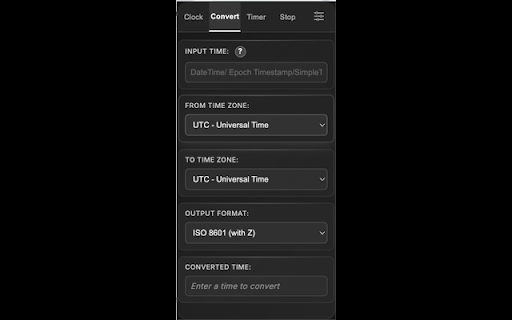


Multi-timezone clock with drag reorder, custom lists & presets. Timer, Stopwatch & Time Converter included. View or Convert the current time, date, and seconds for multiple time zones at once! Right from your Chrome browser (UTC, EST, CST, MST, PST, GMT, CET, JST, IST, AET). ✨ New in v3.1.0: Drag & drop to reorder your timezone list Save up to 3 custom timezone lists Quick-select preset regions: Europe, Americas, East Asia, Middle East, Oceania Search to quickly find any timezone New Light theme option Features: Live UTC badge on the extension icon Easy timezone management with one-click selection Timer with customizable alarm sounds Stopwatch with lap tracking Time Converter between any two timezones 3 beautiful themes: Green-Black, Default, and Light 50+ timezones supported worldwide Perfect for remote teams, travelers, traders, and anyone working across time zones!

Time Zone Converter - Savvy Time
Time zone and local time converter. Compare and convert time between many locations at a time. Time zone and city time converter between multiple locations worldwide. Converter allows find, add and compare over 100,000 cities and about 300 time zones. Converts times instantly as you type, in both direction. To help us improve, we would love to hear your feedback and any suggestions for future updates.

Multi Timer
Use Multi Timer app – set countdown timer, alarm clock, stopwatch & countdown widget with multi presets, groups & clock timer ⏱️ Multi Timer – your countdown timer, alarm clock and stopwatch app Run multiple named alerts, alarms and a stopwatch in Chrome. Whether you need to set timer for cooking, track work intervals or manage daily routines, this multi timer app handles it all. Set a timer, set alarm, launch a group of presets – multi timer online keeps your schedule organized. 1. Add multi timer to Chrome 2. Click the icon to open the popup or side panel 3. Type 5m check email in quick-add 4. Your countdown starts with a sound notification 5. Save presets and groups for routines you repeat daily 📌 Here are 🔟 reasons to choose multi timer 1️⃣ Run several parallel alerts at once – cooking, breaks and meetings 2️⃣ Set alarm for a specific time with a desktop notification 3️⃣ Built-in stopwatch to track elapsed time 4️⃣ Create presets for schedules you use often – one click to launch 5️⃣ Group presets and launch them together with staggered offsets 6️⃣ Quick-add lets you type 5m or 1h30m to start a countdown in seconds 7️⃣ Page companion countdown widget shows active entries on the webpage 8️⃣ Side panel workspace – a full command center alongside your tabs 9️⃣ Dark and light themes to match your preference 🔟 All data stays local – no accounts, no cloud, no tracking ✨ Countdown features ➤ Set countdown for 1 minute, 20 minutes, 1 hour or any custom duration ➤ Progress bar shows how much time is left before the alert ➤ Desktop notifications with sound when the time is up ➤ Snooze fired alerts for a few more minutes ➤ Recurring schedules repeat at your chosen interval ➤ Online countdown timer that works right in your browser ⏰ Set alarm clock and stopwatch ◆ Set alarm for any time of day – the internet alarm clock notifies you even if the popup is closed ◆ Web alarm clock with reliable browser notifications ◆ Online stop watch with start, pause and tracking ◆ Stop watch with clear display and timer clock precision 📋 Presets and groups ▸ Save any countdown or alarm as a preset with a custom name, duration and sound ▸ Organize presets into groups – launch an entire morning routine in one click ▸ Staggered group launch – set offsets so entries start one after another ▸ Import and export presets to share setups across devices ❓ When is multi timer most useful ➤ Cooking and baking – track multiple dishes with separate alerts ➤ Work and study – pomodoro sessions, meeting reminders and break schedules ➤ Gaming – cooldowns, raid events and respawn tracking ➤ Fitness – interval training, rest periods and workout rounds ➤ Daily routines – morning, evening and meal prep schedules ➤ Project management – deadlines, standups and sprint checkpoints 🖥️ Page companion – countdown widget on any webpage The multi timer page companion shows a chip on the edge of any webpage. Expand it to see active entries, add a new one or launch a preset without switching tabs. The countdown widget stays visible while you scroll, so you always know how much time is left. 🗂️ Side panel workspace Open the multi timer side panel for a full command center. Active alerts with search, presets library, groups, history and settings – all in one scrollable view alongside your tabs. 🔐 Offline and private All presets and history are saved locally. This multi timer app works offline – no sign-up, no data sent anywhere. The countdown timer application runs within Chrome, so your data stays under your control. 📌 Can I run multiple alerts at the same time? 💡 Yes, multi timer lets you run as many parallel entries and alarms as you need. Each runs independently with its own notification. 📌 How do I start a countdown quickly? 💡 Type 5m break or 1h30m focus in quick-add and hit Enter. It launches immediately with the name you typed. 📌 Can I set alarm for a specific time? 💡 Switch to alarm mode and pick any time. The set alarm clock feature supports same-day, next-day and recurring alarms. 📌 Does it work when my laptop is asleep? 💡 Multi timer online detects missed alerts after wake and shows notifications for any that fired while your device slept. 📌 Where is my data saved? 💡 Locally in Chrome storage. The countdown app does not sync to any cloud by default. 📌 Can I see alerts on the webpage? 💡 Enable the page companion to get a countdown widget on any site with your active entries. 🎉 Download multi timer today. Set alarm, launch a countdown, track with a stopwatch or start a group of presets – all from one compact countdown clock timer for Chrome.

Calendar Plus
Google Calendar extension that provides insights into where your time goes. Includes power user tools, data export and customization Features: - Plot your week/month/year using Bar Chart, Pie Chart or a Time Chart - Allows to automatically place events into correct calendars based on defined rules - Adds autocomplete for event names when creating events - Adds ability to condense the interface to have more space for events - Adds ability to ghost an event (make it semi transparent and non-interactive) - Supports exporting plotted data and exporting/importing plugin settings

UTC Time & World Clock
See UTC time at a glance on the extension icon, and switch to any time zone when needed Your time, always in sight. See the current UTC time or any selected world clock directly on your Browser extension icon. No extra tabs. No searching. No friction. Built for people who work, travel, plan, and communicate across time zones, this extension gives you a faster way to stay in sync with the world. 📍 Live time on the extension badge Keep the time you need visible прямо on the extension icon. 🌍 UTC or any world time zone Track the time that matters most to you. 🌗 Day/night indicator See at a glance whether it is day or night in the selected location. 🗓️ Locale-based date and time display Use a format that feels familiar and natural. 🗣️ Multiple language support Choose the language you prefer. 🎨 Light and dark theme friendly Comfortable and readable in different browsing conditions. ⚡ Always one glance away The time is already there when you open Browser. From global teamwork to everyday planning, this extension keeps the time you need exactly where you need it: inside Browser, always in view. Install it and stop wasting clicks on checking the time.
