
bjcfejhmbcbpngohabeibdhloechgabd


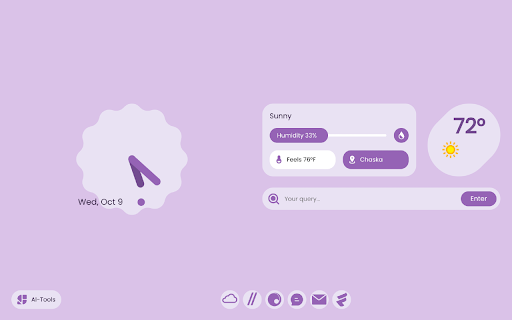

A Simple New Tab inspired by Google's 'Material You' design. A simple new tab page inspired by Google's 'Material You' design. It is built around the Cirrus Suite and uses Seekr to search, as well as offering shortcuts to Cirrus Suite products at the bottom, if enabled. You can also enable the AI tools short cut, offering short cuts to various AI chat and image generation tools. When viewing the page, it displays an analog clock, with the current time and date, a weather center, displaying the humidity, real feel, temperature, and location for your area. Lastly, and most importantly, it features a stylish home bar to search the internet with.

Aurora: Productive and cozy new tab
Free to define your new tab,add website icons,HD wallpapers,quick access to bookmarks,todo list,weather and history Aurora New Tabs gives you the freedom to define your browser tabs, add website icons, HD wallpapers, quick access to bookmarks, to-do lists, weather and history. Aurora New Tabs strives to create excellent interaction and perfect UI interface, not only provides rich features, but also easy to use and highly free to customize as you like, so you can say goodbye to the dull and boring native tabs and bring you a new personalized experience to redefine your new tabs. With Aurora's new tabs, you can get the following features. High degree of editing freedom 40+ setting options, customize the layout as you like, and make your new tabs your own. Easy management of frequently used websites Integrate thousands of commonly used websites, add them with one click and manage them in batches. Beautiful wallpaper change at will Built-in a large number of high-definition wallpapers, you can also locally upload your favorite wallpapers, so that your new tab page is pleasing to the eye. Super quick navigation Your most frequently used websites can be added to the bottom of the shortcut navigation for quick access and efficiency with one click. Efficient functional components Several functional components are built in, including calendar, weather forecast, history, bookmark management, to-do list, etc. and are constantly updated to improve productivity. Feature Grouping You can set up different groups according to your habits, and under each group you can place website shortcut icons to improve productivity. Search engine customization Integrate several mainstream search engines, such as google, Baidu, bing, yandex, etc. You can switch to use any search engine according to your needs, and can intelligently associate search. Cloud data backup Register an account with your email address to enjoy cloud backup and multi-synchronization to ensure data is never lost.

Minimalistic Smart New Tab
A minimalistic, secure new tab experience with smart features and offline support. 🚀 Transform Your Browsing Experience with Minimalistic Smart New Tab Minimalistic Smart New Tab is the ultimate productivity extension that transforms your default new tab into an elegant, feature-rich dashboard. Built with Material Design 3 principles and powered by smooth animations, it's everything you need for efficient browsing in one beautiful interface. ✨ Core Features 🔍 Intelligent Multi-Engine Search - Smart Search Switching: Instantly switch between Google, Bing, and DuckDuckGo with Tab key - Live Search Suggestions: Real-time suggestions from your browsing history - Lightning-Fast Access: Press '/' or Ctrl+K to focus search instantly - Search History Integration: Personalized suggestions based on your habits ⏰ Advanced Digital Clock & Timer - Customizable Display: Choose between 12h/24h formats with optional seconds - Three Size Options: Small, medium, or large to match your preference - Elegant Typography: Beautiful, readable fonts with smooth animations - Built-in Pomodoro Timer: Focus sessions with customizable work/break intervals - Smart Date Display: Full weekday and date with elegant formatting 📱 Revolutionary Tab Groups Management - Visual Tab Organization: Create, manage, and organize tab groups with colors - Quick Group Actions: Add links, open all tabs, or delete groups with one click - Staggered Animations: Smooth Material Design animations for group interactions - Smart Pagination: Navigate through multiple tab groups effortlessly - Keyboard Shortcuts: Alt+G to toggle groups, Alt+Left/Right to navigate 📝 Advanced Personal Notes System - Quick Note Creation: Add notes instantly with the + button or Ctrl+N - Task Management: Set due dates, mark complete, and organize by priority - Smart Animations: Smooth strikethrough, completion, and deletion effects - Always Expanded Mode: Keep notes visible or show on hover - Local Storage: All notes stored securely on your device 🎨 Beautiful & Accessible Design 🌈 Advanced Theming System - Three Theme Options: Light, Dark, and System (auto-detection) - Instant Theme Switching: No flash or delay when changing themes - CSS Custom Properties: Smooth transitions between theme states - Background Customization: Choose from curated backgrounds or upload your own -Material Design 3: Latest design system with dynamic color palette ✨ Smooth Animations & Interactions - Cubic Bezier Easing: Buttery-smooth 60fps animations throughout - Staggered Reveals: Notes, groups, and suggestions appear with delightful timing - Hover Effects: Subtle scale, shadow, and color transitions - Loading Animations: Beautiful pulse and fade effects - Micro-interactions: Every button, toggle, and input feels responsive ⚙️ Comprehensive Settings Panel - Compact Settings Modal: Clean, organized settings in a beautiful modal - Real-time Preview: See changes instantly as you adjust settings - Toggle Switches: Beautiful Material Design toggle controls - Background Gallery: Visual background selection with previews - Smart Defaults: Sensible defaults that work for everyone 🔒 Privacy & Security First 🛡️ Zero Data Collection - No Tracking: Absolutely no analytics, tracking, or data harvesting - Local Storage Only: All your data stays on your device - Minimal Permissions: Only 2 essential permissions requested - No External Servers: Complete offline functionality after first load 🔐 Secure Architecture - Content Security Policy: Strict CSP prevents malicious code execution - Manifest V3: Latest Chrome extension security standards - Input Sanitization: All user inputs properly sanitized and validated - Safe URL Handling: Secure navigation and link processing ⚡ Blazing Fast Performance 🚄 Optimized Loading - Sub-100ms New Tab: Virtually instant new tab opening - Smart Caching: Intelligent content caching for offline use - Memory Efficient: Lightweight with minimal resource usage - No Dependencies: Zero external libraries or frameworks 🎯 Perfect For 1.👨💼 Professionals - Quick access to work tools and project management - Tab groups for organizing work sessions - Pomodoro timer for focused work periods - Notes system for task tracking 2.👨🎓 Students & Researchers - Multi-engine search for comprehensive research - Note-taking with due dates for assignments - Tab groups for organizing study materials - Distraction-free, focused environment 3. 🔐 Privacy-Conscious Users - Zero data collection or tracking - Local-only storage with no cloud sync - Minimal permissions for security - Open-source transparency 4.🎨 Design Enthusiasts - Beautiful Material Design 3 interface - Customizable themes and backgrounds - Smooth, delightful animations - Attention to every visual detail 🌟 Why Choose Minimalistic Smart New Tab? In a world of cluttered, data-hungry extensions, Minimalistic Smart New Tab stands out with its commitment to simplicity, privacy, and performance. Every feature is thoughtfully designed to enhance your browsing without compromising your data or slowing down your browser. 🏆 What Sets Us Apart 1. Material Design 3: Latest design system with dynamic theming 2. Smooth Animations: Every interaction feels polished and responsive 3. Tab Groups: Advanced tab organization not found in other extensions 4. Pomodoro Timer: Built-in productivity tools 5. Zero Tracking: Completely private with no data collection 6. Lightning Fast: Optimized for performance and battery life Download today and experience the perfect balance of beauty, functionality, and privacy in your daily browsing. Your new tab, reimagined. Your productivity, supercharged. Your privacy, protected.

Casca: New Tab with ChatGPT and Widgets
Customise your new tab page and boost your productivity with Casca Extension Casca Extension is a tool with ChatGPT for productivity and collaboration. Customize your new tab, create and share multiple spaces, and maintain a work-life balance with ease. — Multiple workspaces: create separate spaces for work, personal projects, or hobbies. Keep each workspace organized and switch between them easily — Customizable dashboard: personalize your dashboard with widgets and customize the layout to suit your needs — Light / Dark themes with automatic switching — ChatGPT: get answers, explore new topics, and engage in interactive discussions — Change your wallpaper: search for the perfect wallpaper directly in your new tab, or use your own image — Website preview: preview multiple links without leaving your current tab. Simply long-press any link to activate a split-screen mode and compare content without switching tabs — Sticky notes: place important information anywhere on your dashboard — Collaboration: work on projects with colleagues or share spaces with friends. Collaborate in real-time and stay connected — Sync: Access your dashboard on multiple devices without having to register ✅ Todos: Create and manage to-do lists. 📝 Notes: Write a story, save articles or take notes 🗓️ Schedule: Efficiently plan tasks and activities 🍅 Pomodoro: Improve productivity with the Pomodoro Technique, breaking work into intervals with short breaks 🔒 Website blocker: Block distracting websites and stay focused 📑 Kanban: Visually organize tasks using interactive cards for effective workflow management ☀️ Weather: Current weather conditions and forecast for any city 🗂 Links Folder: Create a folder containing links to your favorite websites ☁️ Image hosting: Host and share images easily. Generate shareable links for smooth collaboration and image sharing 🖼️ Embedded Website: Embed any website you want to view in your dashboard ⏰ Clock: Display of current time 📅 Calendar: Track the day of the month 📧 Gmail: See all unread emails in your Gmail inbox 🔗 Link: Save frequently visited websites or important resources 🤖 Reddit Media: Browse random posts from your favorite subreddits 🛠️ GitHub PRs: Stay informed about the latest pull requests in repositories 💻 LeetCode: Sharpen coding skills with coding challenges and solutions 🚀 Product Hunt: Discover the latest products and trends in the tech industry 💡 Indie Hackers: Stay updated on innovative projects and startups 📰 Hacker News: Get the latest tech news and discussions from the community 📖 Word of the Day: Expand your vocabulary with a new word and definition every day And more 😉 Whether you're working on a project with colleagues or tracking your personal goals, Casca Extension has got you covered! Casca Extension prioritizes user privacy by not storing personal information. All data is securely stored in the browser storage by default. For more information, visit https://casca.space/privacy-policy/.

Reflect New Tab
Replace Google Chrome's default new tab page with a beautiful dashboard of customizable widgets. You can see an overview of your… Replace Google Chrome's default new tab page with a beautiful dashboard of customizable widgets. You can see an overview of your day, upcoming meetings, your team's different time zones, the weather, your top links, and more. - View an aggregate view of calendar events for the day - Search through your browser history, or search using Google and Perplexity - Compare international time zones - See how old you are in days, months or years - View the local weather report - See top sites, and recent history This extension is free, has no analytics tracking, and none of your data touches our servers.
