
lcjggfamlfhhaggffljddjjlcgidknhg
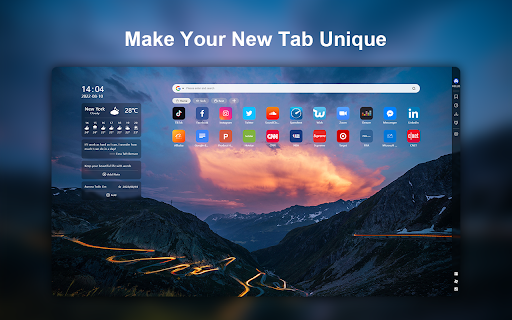

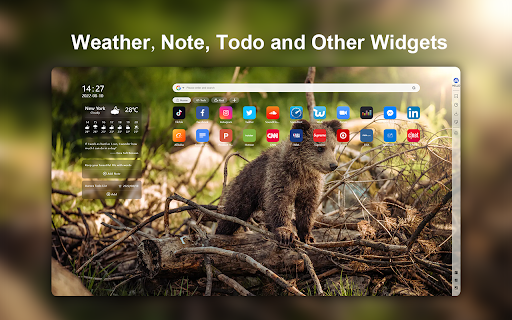
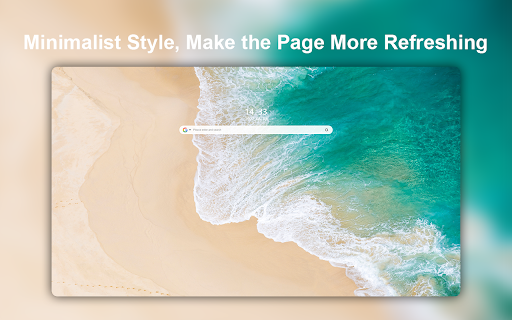
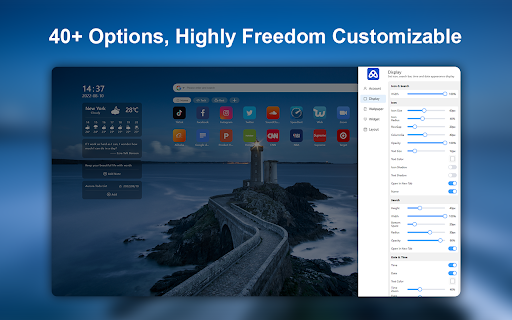
Free to define your new tab,add website icons,HD wallpapers,quick access to bookmarks,todo list,weather and history Aurora New Tabs gives you the freedom to define your browser tabs, add website icons, HD wallpapers, quick access to bookmarks, to-do lists, weather and history. Aurora New Tabs strives to create excellent interaction and perfect UI interface, not only provides rich features, but also easy to use and highly free to customize as you like, so you can say goodbye to the dull and boring native tabs and bring you a new personalized experience to redefine your new tabs. With Aurora's new tabs, you can get the following features. High degree of editing freedom 40+ setting options, customize the layout as you like, and make your new tabs your own. Easy management of frequently used websites Integrate thousands of commonly used websites, add them with one click and manage them in batches. Beautiful wallpaper change at will Built-in a large number of high-definition wallpapers, you can also locally upload your favorite wallpapers, so that your new tab page is pleasing to the eye. Super quick navigation Your most frequently used websites can be added to the bottom of the shortcut navigation for quick access and efficiency with one click. Efficient functional components Several functional components are built in, including calendar, weather forecast, history, bookmark management, to-do list, etc. and are constantly updated to improve productivity. Feature Grouping You can set up different groups according to your habits, and under each group you can place website shortcut icons to improve productivity. Search engine customization Integrate several mainstream search engines, such as google, Baidu, bing, yandex, etc. You can switch to use any search engine according to your needs, and can intelligently associate search. Cloud data backup Register an account with your email address to enjoy cloud backup and multi-synchronization to ensure data is never lost.

New Tab With ChatGPT for Chrome™
Get Instant Answers with ChatGPT on Your New Chrome Tab ChatGPT with new tab for chrome is a chrome extension to get things done quickly and efficiently. This powerful extension transforms your Chrome new tab into a knowledge hub, helping you find answers to your questions and access information on any topic with ease. One of the key features of the extension is its integration with ChatGPT, an advanced AI technology that can provide you with instant answers to your questions. Whether you're looking for the latest news, want to know the weather forecast, or need to do some research on a specific topic, ChatGPT has got you covered. With its extensive knowledge base, ChatGPT can provide you with accurate and reliable information, making it an essential tool for anyone looking to boost their productivity. But that's not all - "New Tab With ChatGPT for Chrome™" also comes with a Todoist™ integration within the new tab. This feature allows you to manage your tasks efficiently and stay on top of your daily routine. Simply add your tasks to the list and keep track of them right from the new tab. This saves you time and ensures that you never forget anything important. Another great feature of the extension is its ability to customize your new tab. You can choose from a variety of themes and backgrounds, giving your new tab a unique look and feel. This is a great way to add a personal touch to your browsing experience and make your new tab more enjoyable to use. "New Tab With ChatGPT for Chrome™" is also very easy to use. Once you install the extension, it automatically takes over your new tab, so you don't have to do anything else. The interface is intuitive and user-friendly, so you can start using it right away without any hassle. The extension is also very fast and responsive. It uses advanced caching techniques to ensure that information is loaded quickly and efficiently. This means that you can get answers to your questions and access information on any topic almost instantly, without having to wait for pages to load. It is a must-have extension for anyone looking to boost their productivity and streamline their browsing experience. With its advanced AI technology, ToDo list integration, and customizable interface, it has everything you need to stay on top of your game.

IHome New Tab
IHome is a practical tool browser new tab extension。And you can switch between multiple different browsers, and you don’t have to…

Calendar New Tab
Meomni is the best calendar extension for Chrome, built for users who depend on Google Calendar and Microsoft Outlook to stay organized. It transforms your New Tab into a fast, minimalist productivity dashboard with the most reliable and seamless calendar integration available on the Chrome Web Store. Whether you manage a busy schedule, track appointments, or plan upcoming events, Meomni provides a unified, intuitive calendar experience that outperforms traditional calendar add-ons. Designed as the top Google Calendar extension, Meomni syncs instantly with your Google Calendar and Microsoft Outlook calendar. Events, reminders, and schedules load immediately on your New Tab, giving you a clear snapshot of your day every time you open the browser. It is also the most complete Outlook calendar extension for Chrome, offering dependable two-way syncing and smooth navigation between work and personal calendars. Meomni goes beyond standard calendar tools by combining advanced task management, a powerful ChatGPT sidebar, Gmail notifications, note-taking, and news updates—all in one place. Manage tasks across Google Tasks, Todoist, TickTick, and Microsoft To Do, while using AI to summarize information, rewrite text, translate content, or assist with work and research. Integrated weather forecasts, RSS news feeds, and a cloud-synced notepad enhance daily planning. Customization options include themes, wallpapers, colors, fonts, and layout controls, helping you create the calendar dashboard that fits your style. Live wallpapers and premium visual themes elevate the experience further. If you’re searching for the best Google Calendar extension or the most reliable Outlook calendar integration for Chrome, Meomni stands out by combining speed, clarity, and powerful productivity tools. It transforms your New Tab into the most complete calendar and productivity hub available. Upgrade your workflow with Meomni and experience why users consider it the best calendar extension for Chrome.

Casca: New Tab with ChatGPT and Widgets
Customise your new tab page and boost your productivity with Casca Extension Casca Extension is a tool with ChatGPT for productivity and collaboration. Customize your new tab, create and share multiple spaces, and maintain a work-life balance with ease. — Multiple workspaces: create separate spaces for work, personal projects, or hobbies. Keep each workspace organized and switch between them easily — Customizable dashboard: personalize your dashboard with widgets and customize the layout to suit your needs — Light / Dark themes with automatic switching — ChatGPT: get answers, explore new topics, and engage in interactive discussions — Change your wallpaper: search for the perfect wallpaper directly in your new tab, or use your own image — Website preview: preview multiple links without leaving your current tab. Simply long-press any link to activate a split-screen mode and compare content without switching tabs — Sticky notes: place important information anywhere on your dashboard — Collaboration: work on projects with colleagues or share spaces with friends. Collaborate in real-time and stay connected — Sync: Access your dashboard on multiple devices without having to register ✅ Todos: Create and manage to-do lists. 📝 Notes: Write a story, save articles or take notes 🗓️ Schedule: Efficiently plan tasks and activities 🍅 Pomodoro: Improve productivity with the Pomodoro Technique, breaking work into intervals with short breaks 🔒 Website blocker: Block distracting websites and stay focused 📑 Kanban: Visually organize tasks using interactive cards for effective workflow management ☀️ Weather: Current weather conditions and forecast for any city 🗂 Links Folder: Create a folder containing links to your favorite websites ☁️ Image hosting: Host and share images easily. Generate shareable links for smooth collaboration and image sharing 🖼️ Embedded Website: Embed any website you want to view in your dashboard ⏰ Clock: Display of current time 📅 Calendar: Track the day of the month 📧 Gmail: See all unread emails in your Gmail inbox 🔗 Link: Save frequently visited websites or important resources 🤖 Reddit Media: Browse random posts from your favorite subreddits 🛠️ GitHub PRs: Stay informed about the latest pull requests in repositories 💻 LeetCode: Sharpen coding skills with coding challenges and solutions 🚀 Product Hunt: Discover the latest products and trends in the tech industry 💡 Indie Hackers: Stay updated on innovative projects and startups 📰 Hacker News: Get the latest tech news and discussions from the community 📖 Word of the Day: Expand your vocabulary with a new word and definition every day And more 😉 Whether you're working on a project with colleagues or tracking your personal goals, Casca Extension has got you covered! Casca Extension prioritizes user privacy by not storing personal information. All data is securely stored in the browser storage by default. For more information, visit https://casca.space/privacy-policy/.
