
bikchegbhnimpiggdgcpajpjpkaneice
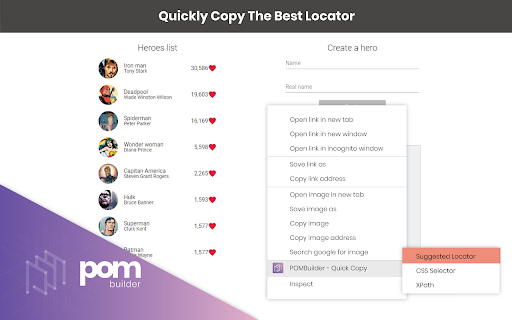


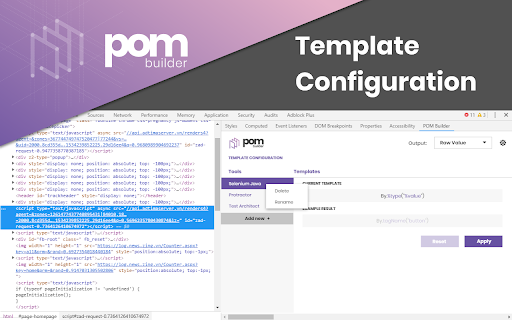
Instantly auto-generate the most robust locator including Xpath, CSS selector and more for use with Selenium or Protractor. Save time by letting POM Builder instantly suggest the most reliable locator for your inspected web element. The suggestion might be either XPath, CSS selector, By.id, By.name, By.linkText, etc. You can use these locators for all automation frameworks including Selenium, Protractor, Robot Framework, webdriver.io, TestArchitect Enterprise and TestArchitect Gondola. WHO IS IT FOR? * Test automation engineers who specialize in web testing using Selenium, Protractor, Robot Framework, webdriver.io and TestArchitect Automation Suite. WHY USE IT? SMART GEN * POM Builder automatically generates the best locator for your web element of interest. The best locator should be [1] short, [2] reliable and [3] easy to understand. * POM Builder’s smart algorithm automatically detects and ignores dynamic IDs generated by some front-end frameworks. * If you don’t want to use the suggested locator or if your project’s convention dictates a certain type of locators, you can manually select the locator type that fits you best. LOCATOR TEST * You can evaluate the suggested locator or your customized locator to check whether that locator can uniquely identify the web element of interest. POM CODE GEN * After designing the best locator for your web element, POM Builder can help you generate the corresponding POM code snippet. You can paste this code snippet directly into your Selenium, Protractor and TestArchitect project. NOTES: * POM Builder does not track your browsing history in any way, nor does it transmit any data over the internet. All data remains on your local hard disk drive at all times. However, POM Builder needs "webNavigation" permissions in order to generate locators for elements inside iFrames. WHAT'S NEW * Version: 1.1.8 - Chrome extension manifest v3 migration * Version: 1.0.124 - Added more information to the popup window - Minor bug fixes * Version: 1.0.104 - Generates frame path for an element located inside an iFrame - Add escape sequences to output locator, if required. - Improve UI/UX for POM Template Configuration feature: change behaviors of saving and reset functions. - Improve UI/UX for Smart Gen feature: auto-hide non value field. - Improve xPath and Css algorithm. - Fix some other issues reported by our dear users. Known Issues: - Test Locator does not work properly in auto-redirect website. - Locator values are not refreshed if user inspects the control in another frame then inspects back to exactly previous element.

SelectorsHub
Locators Plugin to Auto Generate and Verify Playwright Locators, XPath & CSS Selectors. SelectorsHub - Auto-generate Playwright Locators, XPath & CSS Selectors SelectorsHub is a powerful developer tool that automatically generates and verifies Playwright locators, XPath, and CSS selectors for web automation testing. Key Features: 1. Auto-generation: Instantly generates multiple selector types including native Playwright locators, XPath, CSS selectors, IDs, names, and more. 2. Advanced element support: Works seamlessly with iframes, Shadow DOM, SVG elements, dynamic elements, dropdowns, and complex UI components. 3. Smart suggestions: Auto-suggests attributes, text values, and occurrences to help you build selectors faster—no more copying and pasting from the DOM. 4. Error detection: Provides clear error messages indicating what's wrong with your XPath or CSS selectors. 5. Element highlighting: Automatically highlights matching elements and scrolls them into view for easy verification. 6. XPath Healing: Verify all the xpath in one shot. 7. Locators Page: Generate Locator Page in one go. How to Use: 1. Open Chrome DevTools (F12 or right-click > Inspect) 2. Navigate to the SelectorsHub tab in the DevTools sidebar, or click the SelectorsHub icon in your browser toolbar 3. Inspect any element to automatically generate all selector types 4. For Playwright locators, click the "Playwright Selectors" button, then inspect the element 5. Type or edit selectors in the input box—smart suggestions will help you complete them quickly 6. Press Enter to verify and highlight all matching elements on the page Perfect for: a) QA Engineers and Test Automation professionals, b) Web developers working with Playwright, Selenium, Cypress, or other testing frameworks c) Anyone who needs reliable, maintainable element selectors

Ranorex Selocity
Auto-generate robust XPath, link text, RanoreXPath, and CSS selectors for use with Selenium. * Rapidly generate selectors with one click directly in the DevTools sidebar panel. The smart selector generator automatically detects and ignores dynamically generated IDs. * Manual selection: Ranorex Selocity generates XPath, link text, RanoreXPath, and CSS selectors. Because only you know which selector fits your needs the best. * Instantly generate selectors for elements within iframes, both same-origin and cross-origin. * Exploratory selector creation: If you choose to modify a selector yourself, Ranorex Selocity provides instant feedback to ensure the selector is useful. * Automatic escaping of selectors: If desired, quotes and escape characters are automatically added to your selector, ready for instant use in locators in Selenium tests. * Unique RanoreXPath selector: The generated RanoreXPath (RxPath) simplifies the XPath and provides additional attributes and operators, making the resulting selector shorter and more robust against changes. * Dark theme and light theme

SelectorsHub Pro
xPath plugin to auto generate, write and verify xpath & cssSelector. SelectorsHub Pro- Auto-generate Playwright Locators, XPath & CSS Selectors SelectorsHub Pro is a powerful developer tool that automatically generates and verifies Playwright locators, XPath, and CSS selectors for web automation testing. Key Features: 1. Auto-generation: Instantly generates multiple selector types including native Playwright locators, XPath, CSS selectors, IDs, names, and more. 2. Advanced element support: Works seamlessly with iframes, Shadow DOM, SVG elements, dynamic elements, dropdowns, and complex UI components. 3. Smart suggestions: Auto-suggests attributes, text values, and occurrences to help you build selectors faster—no more copying and pasting from the DOM. 4. Error detection: Provides clear error messages indicating what's wrong with your XPath or CSS selectors. 5. Element highlighting: Automatically highlights matching elements and scrolls them into view for easy verification. 6. XPath Healing: Verify all the xpath in one shot. 7. Locators Page: Generate Locator Page in one go. Very simple steps to use SelectorsHub Pro plugin- 1. Add SelectorsHub Pro to your Chrome Browser. 2. Now checkout the plans and take the Free trial from below link- https://selectorshub.com/selectorshub-pro/plans/ 3. After taking a subscription you will get the login credentials. 4. Now click on SelectorsHub Pro Logo and log in with the credentials you received in mail. 5. Inspect any element to automatically generate all selector types 6. For Playwright locators, click the "Playwright Selectors" button, then inspect the element 7. Type or edit selectors in the input box—smart suggestions will help you complete them quickly Please follow below tutorial to get started with SelectorsHub Pro- https://www.youtube.com/watch?v=GhaJSrVsrP4 To learn more about SelectorsHub Pro, please checkout product page- https://selectorshub.com/selectorshub-pro/ Perfect for: a) QA Engineers and Test Automation professionals, b) Web developers working with Playwright, Selenium, Cypress, or other testing frameworks c) Anyone who needs reliable, maintainable element selectors If you have any query, please write us at support@selectorshub.com

CSS Selector Capture Pro
Generate a copiable CSS Selector with a mouseover without Devtool Clean, simple and intuitive to use, accompanied with these exclusive features. ✓ Copiable and tweak-able Selector ready to use in CSS/JavaScript ✓ Highlights of elements which match the Selector ✓ Total matches based on the Selector within Viewport context ✓ The choice of Concise or Verbose selector ✓ Minimal interference with the page * Short version: - Enable the App, Use "CTRL" Key to lock/unlock the selector highlight in position and click the Copy button to copy the selector. - If needed, click on the selector path to tweak the selector before copying. - Use "ESC" key to exit the App * Beware the extension does not support the following contexts: - shadow DOM (suggestion: use chrome devtool since you will be traversing down the shadow root anyway) - iframe (suggestion: to open the iframe URL in new tab and use the extension) ≡ Where would this extension be useful * The extension would typically suit the use of Front End Development, End to End testing such as Selenium as well as Data Scraping where visually identifying a target, matches and getting the CSS selector are needed. * If you do find this extension useful, please support it by simply giving it a good review and that will help others find it. * The extension does NOT collect any data or send data to third party. * 2.4.0 (2024.06.06) - Optimization for highlights, scroll and resize * 2.3.0 (2021.07.15) - Optimization for concise selector * 2.2.0 (2019.03.23) - Added a User Guide Link in Extension Icon Popup * 2.1.0 (2019.03.21) - Added a shortcut hotkey (CTRL) for locking toggle of the overlays * 2.0.0 (2019.02.25) - Optimization for concise selector (i.e. shorter) - Adjustment of selector background opacity when trigger button for Settings Dialog is on top and user hovers it * 1.0.3 (2018.10.15) - Optimization for selector retrieval
