
bijgpkifioecdiebmfdlecnbgiommlmf
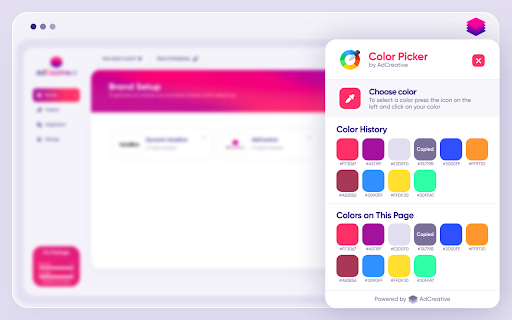
Click the color picker icon (or use the shortcut 'i') to select any color on your screen. Discover the power of color with the Color Picker v3 by AdCreative.ai. Our free, constantly updated extension features both HEX and RGB color options for ultimate flexibility and you can use "i" keyboard shortcut to select several colors in a row when needed. With two optimized color pickers, you'll find the perfect shade for any design project. The first picker is designed to work seamlessly with the latest Windows and Mac devices, ensuring that you'll always have access to the best color options. The second part of the extension automatically reads the code of any website and presents the 12 most frequently used colors. This feature allows you to quickly and easily incorporate colors that already work well together into your design. At AdCreative.ai, we take your privacy seriously. Our startup, based in Paris, adheres to all GDPR rules and never collects any information from your computer or account. Whether you're a using AdCreative.ai to generate conversion focused ad creatives, or just looking to add some color to your everyday browsing, the Color Picker by AdCreative.ai is the perfect tool. Try it out today and discover how easy and fun it is to work with color!

Web Color Picker - online color grabber
Grab colors from web pages. Color picker, color history. Live smart color picker tool in HEX, RGBA. Eyedropper colorpick for free Web Color Picker revolution tool for designers. Now you can easily pick any from any website with our new extension. Eyedropper tool will get color palette from any webpage you need. It`s pretty useful tool for web developers or web designers. This extension is pretty simple to use and it has simple and user-friendly interface. We provide you and amazing and useful eyedropper tool so you can get RGB colors from any webpage. Extract palette from web pages while you're browsing the web. There are three color formats available: RGB, CSS, and HSL. It`s also pretty simple to use – just click on extension icon in the upper right and star working. - Identifying the RGB HEX CMYK - Saving pallets - Editing them into beautiful palette combinations is a quick and simple job. Color Picker features are: * Different formats: HEX, RGB, HSV * Detect most used color on the page * Color list of recently picked colors * Red-Green-Blue (RGB) wheel to adjust selected and lot of others

Color Picker - Eyedropper Tool
Pick colors from web pages with Eyedropper. Picker, gradient generator, palette. Quickly grab HEX, RGB. Color Picker and Eyedropper Tool is a must-have browser extension for web developers, designers, and anyone who needs to choose colors from a webpage or extract a website's palette. Whether you're creating a website, designing graphics, or working on a digital project, extension will make the process of color selection easier and faster. Features: - Employ zoom technology to select and store multiple from any - Archive your preferred gradients; a single click on any stores its HEX value in your clipboard; - The site palette feature retrieves all the colors present on any webpage; - Personalize the type for automatic copying. Great for any designer, Chrome extension that easily allows you to identify the Hex colour code of any UI element you hover your mouse over. It's great for quick access to colours you gain inspiration from when browsing online. This extension stores the last six selected and represents the color in HEX, RGBA, HSVA, HSLA, and CMYK formats. Free open-source Color Picker extension. Source on GitHub. No ads, no tracking. Try using our software to find the color codes for any pixel today.

Simple Color Picker
A Simple Color Picker extension to pick colors and copy them to clipboard A Simple Color Picker extension is a tool that allows users to easily select and copy colors from any part of their computer screen. This can be useful for a variety of tasks, such as web design, graphic design, and digital art. How to use ? 1. Add the Simple Color Picker to chrome through Chrome Web Store 2. Pin the extension 3. Click on the extension and click the Pick a color button 4. Now you can move the eyedropper to and select any color on any screen 5. The selected color will be stored and user can easily copy the HEX code by clicking on it and paste it anywhere 6. User can store multiple colors 7. When Clear All is clicked all the colors stored will be deleted Highlighted Features - Select colors from any part of the screen - Store multiple colors - Can easily copy and paste - Clear All the colors in a click Overall, A Simple Color Picker extension is a convenient and easy-to-use tool for anyone who needs to work with colors on their computer. It can save time and effort by eliminating the need to manually enter color values and can be helpful in any industry where color is important. IMPORTANT We don't collect any user data and we don't display any ads

Website Color Palette
The first extension that takes the real colors of the web page you are viewing. The first extension that takes the real colors of the web page you are viewing. - Multiple color formats: rgb, hexadecimal, hsl and more... - Copy the color instantly (on click). - No waiting times: 5 milliseconds. - No fake or random colors.
