
bfgoiiandhlddbcenmpijfpacgkdeenp


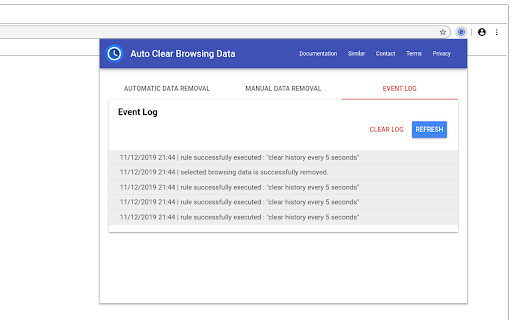
Helps users to automatically clear your browsing data after pre-defined time intervals. "Auto Clear Browsing Data" extension helps users to remove unnecessary browsing data. Users can either manually remove specific data or they can define automatic tasks that execute after a pre-defined time interval or on browser startup. Users can define independent tasks for removing specific data type set from their web browser. This extension also provides a comprehensive event log to inform users about how tasks are executed. Please follow simple steps given below to automatically remove specific data type set from your web browser: - Click on add task button. - Enter task identifier. - Select time interval between removal of data. - Select data type set to be removed example: cookies, history, cache etc. - Click on add button. - Click on apply changes and reload button to start executing the task. - See the event log to verify if the task is properly executing. - Websites' appcaches. - The browser's cache. - Cache storage - The browser's cookies. - The browser's download list. - Websites' file systems. - The browser's stored form data. - The browser's history. - Websites' IndexedDB data. - Websites' local storage data. - Stored passwords. - Service Workers. - Websites' WebSQL data. Privacy notice: This software neither collects nor transmits any personally identifiable information. This software does not track your browsing behavior. Information necessary for functioning of this software is stored on the devices of the end user, our servers do not have access to this information. For more information please read our privacy policy and terms of service.

History Cleaner
Chrome extension that deletes history older than a specified amount of days. * Behavior * Decides what history the extension will delete when it triggers. * Either disabled, delete old history, or delete all history. * Defaults to disabled, so the extension doesn't do anything until you configure it. * Number of Days to Keep History * Delete history older than midnight on the specified number of days ago. * Only has effect if behavior is set to delete old history. * Defaults to 0. * Trigger Mode * Whether the extension triggers on browser startup or at a set interval. * Defaults to timer. * Timer Interval * Interval in minutes between triggering. * Only has effect if trigger mode is set to timer. * Defaults to 1440 (24 hours), Minimum 1 * `history` * Used to clear browser history * `storage` * Used to save user options * `idle` (Prior to 1.6.0) * Used to detect when the browser is idle for the idle trigger mode * `notifications` * Used to send a notification when history is cleared * Notifications are only sent if the user enables notifications in options * `downloads` * Used to clear download history * Download history is only cleared if user enables the option * `alarms` * Used to set a timer for the timer trigger mode.

Clear Browsing Data
Delete browsing data directly from the browser toolbar. Clear cookies, history and cache with a single click. Clear Browsing Data is a browser extension which enables you to delete browsing data, such as cookies, history and cache, directly from the browser toolbar. The toolbar button can be configured to clear all browsing data with a single click, or to show a list of data types available for clearing. Clear Browsing Data is an open source project made possible thanks to a community of awesome supporters. If you'd like to support the continued development of the extension, please check out https://armin.dev/go/patreon The extension also supports closing and reloading tabs, these features can be configured from the extension's options. Supported data types: • Cookies • Browsing history • Cached images and files • Cache storage data • Autofill form data • Download history • Service Workers • Local storage data • IndexedDB data • Web SQL data • Website file systems • Application Cache The data types and their order can be customized from the extension's options. The extension is also available for Edge and Firefox: https://github.com/dessant/clear-browsing-data#readme The developer does not collect any personal data from this extension, visit the extension's privacy policy for more information. Reviews are not monitored for bug reports, please use GitHub for issues and feature requests.

Auto History Wipe
Auto History Wipe: Clean browsing history, cache & cookies automatically or manually. Supports incognito mode and tab management. 🔒 Auto History Wipe: Your Privacy, Automated Easily manage and Auto History Wipe clean your browsing data with customizable schedules and options. Auto History Wipe Key Features: ✨ One-Click Cleaning: Clear your browsing data instantly with a single click ⏰ Scheduled Cleaning: Set automatic cleaning intervals 🎯 Selective Cleaning: Choose what to clean: • Auto History Cleaner delete history • Clear Download History • Auto History Cleaner delete cache • Clear Cookies • Clear Local Storage • Clear Saved Passwords • Clear Form Data Auto History Wipe Perfect for: - Privacy-conscious users - Shared computer users - Regular privacy maintenance - Automated browsing data management Auto History Wipe Simple, lightweight, and privacy-focused! ⚙️ Latest updates for Auto History Wipe : 13.05.2025 🔄 On/Off Button - Ability to easily activate and deactivate the plugin 🔗 Share Button - Ability to share the plugin with your friends on social media and messaging apps ⏱️ Auto Delete Timer - Countdown and progress bar display for the next auto-clean ⚙️ Latest updates for Auto History Wipe : 22.04.2025 🛡️ Auto-clear feature is now disabled by default, putting control in users' hands 🔔 Fixed notification icon loading issues 🗑️ "Delete All Browsing Data" button now properly activates only when data types are selected ⏱️ Improved time range options and fixed related bugs 🕒 "All Time" option now works correctly 🇺🇸 Added American English (en_US) language support ⚡ General performance and usability improvements 🔹 Fixed a bug where timed auto-clear was clearing all data types even when only specific types were selected. 🔹 Added support for two new languages: Swedish (Svenska) and Finnish (Suomi) 🔹 Added new privacy and auto-cleaning feature descriptions for Chrome Web Store Auto History Wipe is a user-friendly extension that helps you automatically or manually clear your browsing history, cookies, cache, and other browsing data. • Auto Clear when browser closes • Timed Auto-Clear at regular intervals • Manual clearing with one click • Select which data types to clear • Choose time range for data clearing • Set custom clearing intervals ✅ Data Types You Can Clear: 🔒 PRIVACY FOCUSED 🔒 Auto History Wipe respects your privacy. It doesn't collect or transmit any data. All operations happen locally on your device. 🔧 EASY TO USE 🔧 With its simple and intuitive interface, anyone can use it. Set your preferences once and let the extension work for you. Take control of your browsing data and protect your privacy with Auto History Wipe!

Clear Tabs
This extension clears all but the active tab in your browser. UPDATE v2: Complete code refactor for manifest v3! Have a lot of open tabs you want to easily close? Quickly close all of your open tabs except the one in current window with this extension. Easily re-open all of your previously closed tabs. The first click of the extension icon closes all of open tabs except for the current one in browser window. Made a mistake? Just click again when "1 R" is displayed on the extension's icon to re-open the tabs you just closed. "Clear Tabs" allows you to quickly close all open tabs in Chrome, except for your currently selected tab. Just click the extension icon! The extension also counts how many tabs you have open. Simple, easy, memory efficient, and privacy safe. Built for ease of use and privacy! Please keep the following features in mind: Only tabs in the current Chrome window will close, it will not close tabs on other Chrome window sessions. If you create a new tab, remove a tab, or change window focus, your previously closed tabs will NOT be recoverable. Tabs are only recoverable when the "R" recovery badge is visible in the extension icon. The recovery feature is for accidental clicks only, not a "tab saver" function. PRIVACY POLICY: This extension does NOT collect any personal information from the user: We have no way to collect data or store it. It will work with and without an internet connection because it does not need one to work, since data is never sent to any third party. Permissions used: TABS: To open and close tabs. STORAGE: To maintain extension state when background process is suspended. Version History 2.0.1 -- Overcome Chromium bug where events in chrome extension background service workers are ignored. 2.0.0 -- Complete code re-factor. Update all code with static-typing using ES2020 standards. Now using Manifest v3. Extension now releases memory and processor when not in use. 1.0.0 -- Initial public release. 1.0.1 -- Improper recovery fixed when only two tabs open. 1.0.2 -- Package integrity error. 1.0.3 -- Icon working with Firefox extension. 1.0.4 -- Fixed error: Too many open tabs caused them not to be able to be restored. - Performance improvement on closing tabs. - First attempt at getting extension to work with Firefox for Android. 1.0.5 -- Performance improvements. Finally fixed all bugs that would not allow a restore with a high number of tabs open.
