
bfgblailifedppfilabonohepkofbkpm
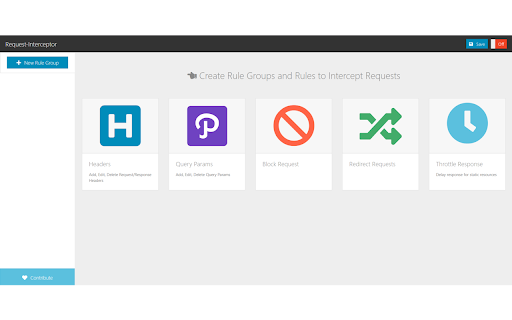
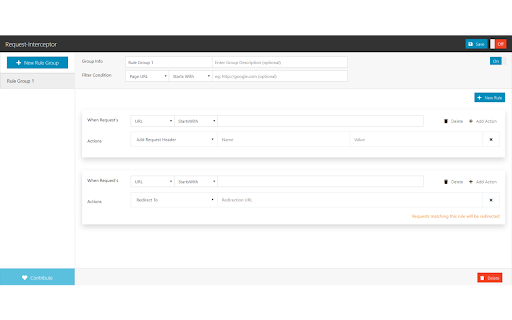
Intercept Requests and add custom rules to modify request/response headers, block/redirect requests, modify query params. This extension helps in building rules(conditions) which when met will help in

MockMan - mock APIs
Mocks api responses for AJAX (XHR) requests. (Postman for Frontend) This is essentially built to increase productivity in frontend development. Made for developers, it lets users to define rules (url, method and mock response) to respond to AJAX calls. Supports all common libraries like axios, superagent, XMLHttp, fetch etc. Response can be a JSON object or an error. It includes a JSON formatter to automatically convert your response in proper json format. Each rule can be individually turned on/off to apply mocking. There's a global power switch to turn off mocking all the rules at once. The JSON object maker lets users to make the object in JS syntax and the formatter will convert it into valid JSON object with inverted commas and no trailing commas etc. Features: 1. Urls can be absolute complete paths or regex enabled. 2. Labels for rules, so user can add different versions of same api 3. Delay in response 4. Test your app with success and error responses. 5. Add response headers along with mock response in the rule. Steps for Users - 1. Define the api url, method, response JSON or error msg to be mocked. 2. Refresh the project and the ajax / fetch request will be mocked. Mocked url will disappear from network tab and appear in console if rule matches. For any query or bug report or feature request - reach out to nerdynbirdy@gmail.com. This extension is made with love for fellow developers. If this helps you, support us with good reviews :)) Let's build stuff.

Inssman: Open-Source: Modify HTTP Request
Inssman add custom rules to modify HTTP requests and responses. It is a free developer tool that which helps developers to organize their work more fast and easy. Inssman monitors the browser network for all tabs and if finds a request which matches one of the rule will accordingly modify. ✳️ What can Inssman do?✳️ 👉 Redirect Request: ➡️ Redirect any request like HTML/CSS/JS/JSON/...etc. 👉 Block Request: ➡️ Block all type of request like GET/POST/PUT/...etc 👉 Modify Query Params: ➡️ Easily remove presenting parameters in the url or replace the existing one or adding new parameter. 👉 Modify Header: ➡️ Add/Remove/Append request and response headers. One of example is developer can fix issue like CORS by setting Content-Security-Policy, X-Frame-Options headers and all headers can by change by provide header and value. 👉 Modify Response: ➡️ This cool feature can return custom data from the network. Now is possible to return data types like HTML/CSS/JS/JSON. By choosing one of type developer can write custom code in the editor which has powerful user interface like VSCODE which supports everything that developer need to write code. 👉 Inject File: ➡️ You can easily inject external CSS and JavaScript files into any web page by simply providing the link to the file. This is a great way to quickly modify the style or functionality of a website without needing to manually edit the code. If you want to inject your own custom code into a web page you can enter HTML, CSS, or JavaScript directly into the extension, and it will be injected into the page as if it were part of the original code. 👉 HTTP Logger: ➡️ This feature allows you to easily view and analyze the request and response headers of all tabs in one place, giving you valuable insights into the data being exchanged. 👉 Modify Request Body: ➡️ Now it is possible to modify the request body for both APIs, XMLHttpRequest and Fetch. This new feature allows modification of the body without making any changes to the code. 🙌These all features are free and there isn't any limitation to create a rule.

ModResponse - Mock and replay API
Mock, modify, and replay API. Easy setup. No proxy needed. No code change required. ModResponse is a powerful and easy-to-use tool for web developers that simplifies the process of modifying, stubbing, and replaying HTTP responses. It requires no extra proxy or code change to be made, allowing you to quickly and conveniently test different scenarios and debug edge cases. With ModResponse, you can modify the API response, return different HTTP status code, add delay to your request, etc. You can also reroute your HTTP request to a different server, allowing you to test your local changes in production domain within seconds, without the risk of breaking production. ModResponse does not require extra proxy or making any code change. It can modify pretty much any HTTP request, not just XHR requests. Simply install it and you are ready to go! ** What can ModResponse do?** - Record and replay HTTP response - Stub HTTP response - Reroute request to a different URLs - Change HTTP response body, status code, and headers - Delay HTTP requests to simulate slow network - Simulate network errors - Advanced filtering by tab, tab group, window, or time - Demo with fake data Want to create perfect data for your product demo? With ModResponse, you can replace the actual API response with a fake one that contains the data you want. No need to change your real data or make code change. - Speed up slow requests Do you have API requests that are taking a long time to finish, and every time you make a small UI tweak you need to wait >10 seconds for the API request to finish to visualize your change? Using replay response, you can record and replay the slow API request. That way, you will only need to wait on the slow API request once. All subsequent requests to be served from the cached response within a few milliseconds. - Develop against edge cases Need to handle a 4XX or 5XX status code from an XHR request, or try out how your UI will behave with a very long string? Using replay response or stub response, you can modify the response body, status code, or response headers to simulate different scenarios that you need to handle. - Develop against unimplemented APIs Are you a web developer who is blocked because an endpoint you depend on is not yet implemented? Using stub response, you can mock the API response so you can start developing against that endpoint. That way, you can develop the frontend while others implement the endpoint (as long as the actual implementation return the response in the same format). - Testing on production domains Do you need to integrate with a third party platform that only works on your production domain? Using proxy request, you can reroute the request from your production domain to localhost or a dev domain, allowing you to test your changes on your production domain without the risk of breaking it. - Debug edge cases Need to test how your app behaves when some resources takes too long to load, or when they fail to load due to network errors? With ModResponse, you can add artificial delay and simulate different network error conditions so you can debug and handle edge cases with ease. ** Other ModResponse features ** - Support having multiple profiles with quick switching between profiles - Export and import profile - Easily share your profiles with others - Dark mode support - Customizable profile badge - Clone profile ...and more!!! "debugger" is required in order for response modification to work. "tabs" permission is required for prefilling the URLs, and for tab filter, tab group filter, and window filter to work. "storage" and "unlimitedStorage" are required to store the response modification. "contextMenus" is used to enable quick pause/unpause by right-clicking on the icon. ** Known issues ** 1, You will see ["ModResponse" started debugging this browser] banner when ModResponse is activated. This is because it uses the debugger API, which is needed for response modification. Due to Chrome's security policy (https://crbug.com/1096262), that banner would show up on all tabs even when a tab is not being modified, and it may still for a few more seconds after ModResponse is paused or disabled. To hide it, you can run chrome with --silent-debugger-extension-api command line switch. 2, Clicking on the "Cancel" button on the ["ModResponse" started debugging this browser] banner will not deactivate ModResponse. To deactivate it, please open ModResponse and click on the "Pause" button. Once paused, the banner should disappear in a few seconds.

Ajax Interceptor Tools
Modify the response text of Ajax requests An extension plugin for Chrome that modifies the response of AJAX requests. 🧰 Main features: 1. Intercept and modify the response of XMLHttpRequest and fetch requests, including 404 status requests. 2. Match requests based on regular expressions and HTTP request methods. 3. Edit response results in JSON or JavaScript format, with support for Mock.js syntax. 4. Easily create mock scenarios in JavaScript programming by accessing original request information from the arguments parameter. 5. New U-Network panel in DevTools for quickly intercepting requests and modifying response results. 6. Support change the request URL, request headers and body. 7. Support importing/exporting rule configurations. 8. Support adjusting the order of groups and rules. 9. Support picture-in-picture option for opening the configuration page. 10. Support intercepting network configuration pages using declarativeNetRequest. ⚠️ Notes: 1. After installing the plugin, restart the browser or refresh the relevant pages to ensure normal use. 2. The plugin only modifies the response at the JS level and cannot display the modified result in the Network panel. The plugin prints the modified results to the console, which can be viewed there. 🌟GitHub repository (please star if you find it helpful): https://github.com/PengChen96/ajax-tools
