
bigfgeehfoenaimkoohnokeeideaomnd

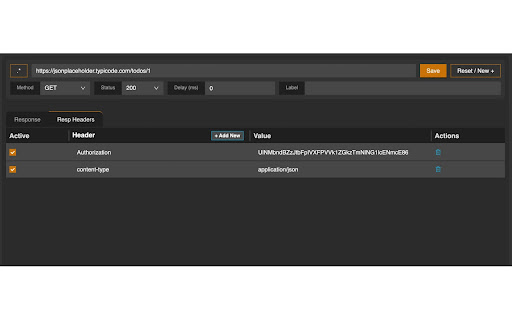

Mocks api responses for AJAX (XHR) requests. (Postman for Frontend) This is essentially built to increase productivity in frontend development. Made for developers, it lets users to define rules (url, method and mock response) to respond to AJAX calls. Supports all common libraries like axios, superagent, XMLHttp, fetch etc. Response can be a JSON object or an error. It includes a JSON formatter to automatically convert your response in proper json format. Each rule can be individually turned on/off to apply mocking. There's a global power switch to turn off mocking all the rules at once. The JSON object maker lets users to make the object in JS syntax and the formatter will convert it into valid JSON object with inverted commas and no trailing commas etc. Features: 1. Urls can be absolute complete paths or regex enabled. 2. Labels for rules, so user can add different versions of same api 3. Delay in response 4. Test your app with success and error responses. 5. Add response headers along with mock response in the rule. Steps for Users - 1. Define the api url, method, response JSON or error msg to be mocked. 2. Refresh the project and the ajax / fetch request will be mocked. Mocked url will disappear from network tab and appear in console if rule matches. For any query or bug report or feature request - reach out to nerdynbirdy@gmail.com. This extension is made with love for fellow developers. If this helps you, support us with good reviews :)) Let's build stuff.

Mokku
Adds the API mocker MOKKU to Chrome Developer Tools for seamless integration & testing. 🚀 Take Control of Your API Workflows with Mokku Stop waiting for backend deployments or struggling with unstable staging environments. Mokku is the ultimate developer tool that integrates directly into your Chrome DevTools to let you mock, modify, and manage API responses seamlessly. Whether you're building a frontend against a non-existent API or testing edge-case error states, Mokku gives you the power of a full mock server right inside your browser. Complete Control: Specify JSON bodies, HTTP status codes, time delays (latency), and custom headers. GraphQL Native: Full support for mocking GraphQL queries and mutations. Dynamic Responses: Go beyond static files. Write JavaScript functions to return complex, conditional data based on the request. Dynamic URL Matching: Use patterns like /goals/:goalId (powered by path-to-regexp v8.2.0). URL parameters are passed directly to your response functions. Pro Editor: Built-in Monaco Editor (the engine behind VSCode) for a premium coding experience. Modify request headers globally or on a per-URL basis. Perfect for testing auth tokens or custom headers without touching your source code. Projects: Group mocks and headers by project to keep your workspace clutter-free. Import/Export: Share mocks with your team or backup your setup by exporting project-based configurations. ⚙️ How it Works Mokku adds a dedicated tab to your Chrome DevTools. You can: Click-to-Mock: Pick any existing network call from your logs and turn it into a mock with one click. Start from Scratch: Create custom mocks manually for APIs that don’t exist yet. Safe Injection: Mokku is non-intrusive. It only injects scripts into localhost by default. For all other domains, it remains inactive until you manually enable it from the panel. Secure Storage: Your mocks are stored safely within your Chrome profile storage. Stop waiting for the backend. Start building with Mokku.

Netify
Debugging proxy that will allow you to intercept and mutate requests from a web page Netify is a debugging proxy that will allow you to intercept and mutate your requests, like Fiddler or Charles, but it more compact and implemented directly in the Chrome. Features that Netify gives you: - Filter requests for proxy by URL, method or type of resource. - Redirect request to arbitrary URL. - Adding, replacing and removing request headers. - Replacing the request body, text/JSON, Base64 or form data. - Replacing the response status code. - Adding, replacing and removing response headers. - Replacing the response body with a text value, Base64, or file's content. - Adding an extra response delay - Cancel request on the client. - The above changes can be made according to predefined rules, by script or by making changes to the intercepted request (like breakpoint). Attention!!! This extension is based on the experimental features of the Chrome Devtool protocol, which may lead to inoperability with the update of the browser. If you have some trouble with Netify or you have some suggestions, please report it here (https://github.com/vladlavrik/netify/issues)

Mock API Responses
Mock the response based on request url filter. Current Features: - Mock the API response - Fail the API based on request url - Pause and Resume the rules - Beautify the JSON response - Update of existing rule between mutation and failed - Get notification in extension itself whenever the rule filters matches - Label/Name the rule - Mock based on method type such as ANY, GET, POST... Upcoming: - Delay - Mock the request body - Route to different url Versions: 1.0: - Starter and only supports mocking of response - Update and delete of exiting responses 2.0: - Beautify the JSON response - Pause and Resume individual rules - Fail the API based on filtered request url - Update of existing rule between mutation and failed - Styling updates 2.2: - Get notification in extension itself whenever the rule filters matches - Clicking over tool will now directly opens the options page 2.3: - Added Label/Name the rule 2.5: - Removed restriction to mock only JSON. Now can mock response body type - Added NEW text over extension icon whenever the updates installed 2.6: - Fixed NEW text at extension over each new chrome session

Ajax Modifier
To modify ajax responses on any page 1. It is recommended to turn off this extension(the icon should be gray) when you are not using it. 2. This extension only overrides the response data in the XMLHTTPRequest object as well as the fetch method. The original response which you can see in DevTools' "Network" panel will not be modified. github: https://github.com/YGYOOO/ajax-interceptor
