
npdofjlahafeeodffcjkflbcfomjmfph
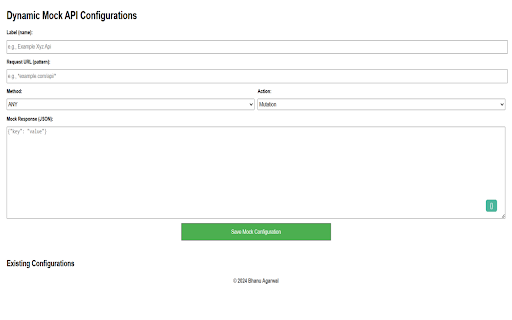


Mock the response based on request url filter. Current Features: - Mock the API response - Fail the API based on request url - Pause and Resume the rules - Beautify the JSON response - Update of existing rule between mutation and failed - Get notification in extension itself whenever the rule filters matches - Label/Name the rule - Mock based on method type such as ANY, GET, POST... Upcoming: - Delay - Mock the request body - Route to different url Versions: 1.0: - Starter and only supports mocking of response - Update and delete of exiting responses 2.0: - Beautify the JSON response - Pause and Resume individual rules - Fail the API based on filtered request url - Update of existing rule between mutation and failed - Styling updates 2.2: - Get notification in extension itself whenever the rule filters matches - Clicking over tool will now directly opens the options page 2.3: - Added Label/Name the rule 2.5: - Removed restriction to mock only JSON. Now can mock response body type - Added NEW text over extension icon whenever the updates installed 2.6: - Fixed NEW text at extension over each new chrome session

Url Redirector
To redirect the URL from X to Y based on user provided filters. In addition, can have excluded paths This tool is use when we need to auto redirect the url from x to y. In addition have option to allow the excluded path. In this case if the request url matches the exclude path that is /checkout then it won't route https://www.xyz.com/checkout to https://www.abc.com/checkout. Note: All the params will be automatically carry forward if params are not added over source url. Original Url: https://www.xyz.com?someparam=somevalue&anotherparam=anothervalue Then route carry forward the params over destination automatically and the final url will be https://www.abc.com?someparam=somevalue&anotherparam=anothervalue

Mokku
Adds the API mocker MOKKU to Chrome Developer Tools for seamless integration & testing. 🚀 Take Control of Your API Workflows with Mokku Stop waiting for backend deployments or struggling with unstable staging environments. Mokku is the ultimate developer tool that integrates directly into your Chrome DevTools to let you mock, modify, and manage API responses seamlessly. Whether you're building a frontend against a non-existent API or testing edge-case error states, Mokku gives you the power of a full mock server right inside your browser. Complete Control: Specify JSON bodies, HTTP status codes, time delays (latency), and custom headers. GraphQL Native: Full support for mocking GraphQL queries and mutations. Dynamic Responses: Go beyond static files. Write JavaScript functions to return complex, conditional data based on the request. Dynamic URL Matching: Use patterns like /goals/:goalId (powered by path-to-regexp v8.2.0). URL parameters are passed directly to your response functions. Pro Editor: Built-in Monaco Editor (the engine behind VSCode) for a premium coding experience. Modify request headers globally or on a per-URL basis. Perfect for testing auth tokens or custom headers without touching your source code. Projects: Group mocks and headers by project to keep your workspace clutter-free. Import/Export: Share mocks with your team or backup your setup by exporting project-based configurations. ⚙️ How it Works Mokku adds a dedicated tab to your Chrome DevTools. You can: Click-to-Mock: Pick any existing network call from your logs and turn it into a mock with one click. Start from Scratch: Create custom mocks manually for APIs that don’t exist yet. Safe Injection: Mokku is non-intrusive. It only injects scripts into localhost by default. For all other domains, it remains inactive until you manually enable it from the panel. Secure Storage: Your mocks are stored safely within your Chrome profile storage. Stop waiting for the backend. Start building with Mokku.

Parrot API mocking
Hassle-free mocking of xhr and fetch calls. Mocking your API responses like a pro. The Parrot browser extension allows you to mock any asynchronous call you like. Using its network viewer you can monitor all calls being done, and with the ease of just one mouse button click you can start mocking every call you need to be mocked. Works for both old-school XmlHttpRequest and modern Fetch-API calls. Mocking can be as easy as just pasting alternative JSON payloads to be returned by the call, or by doing more complex transformation of responses using JavaScript. Whether or not mocking needs to take place can be decided by comparing the URL with a matching string or regular expression or, if a more fine-grained approach is needed, by inspecting the request using JavaScript. 💡 When to use this extension? 🔸 You are developing a front end that needs to connect to some back end API, but that API has not yet been developed or is down. 🔸 You want to give a live demo but the back end API needed is currently not available or broken. 🔸 You would not only like to test the happy flow, but would also like to see how your front end behaves given any possible alternate scenario or edge case. 🔸 You are experiencing a nasty bug but have no way of reproducing it easily using the real back end system. You would like to tweak the response to check if any unexpected response could be the cause of your issue. 💡 How to use this extension? Just make sure you have the Parrot the network viewer (see below) option enabled and start your journey. Any API-call done will showup in the viewer and can be mocked by the click of one single button. As an alternative, you can also start by pressing the "Define your mocks" button and then pressing the Add button to define a mocked response for a specific request. A line will show up on which you can define the HTTP verb/method and the URL-fragment of the request you would like to be mocked. The URL fragment is defined with a regular expression, allowing you to make any matching requirement as loose or strict as you would like it to be. NB In cases where the request also has a payload (like POST), the content of that payload can be used for determining if mocking should take place. On that same line you can then define the status code of your response, the exact response type and the payload to be returned. Once the extension detects the method/URL you expressed, the regular call will still be done. However, once the actual response has been received, no matter it's actual result, it will be replaced by the mocked response you defined. NB Next to being JSON, for any response also SCRIPT can be specified. In this case plain JavaScript statements can be defined with which the original response can be modified (you can just reference the contextual variable "response"). 💡 JSON5 Parrot uses JSON5 (https://json5.org) to allow for a less strict JSON-format. This means that typical JavaScript JSON-responses can be copied and pasted with ease. No need to use quotes around properties. If used, quotes can be single or double. Dangling comma's are allowed and you can even have comment in your JSON-structure. When determining the mock data to be substituted, there can be multiple rules matching the given URL and method. By default, Parrot will just cycle through the available mocks in top-down order. You can easily change this behavior by always selecting the first available mock, always selecting the last available mock, randomly picking one of the available mocks or sequencing through them. 💡 Timing your calls by adding a delay Particularly for checking for, or debugging of, potential race condition issues, for any request a delay (expressed in milliseconds) can be specified. This delay will be taken into account before the response is returned to the client that made the request. By carefully timing request/response cycles you can make sure that responses will be received in the exact order you would like them to be. 💡 Export and Import your mock rules The set of mock rules can also be exported to the file system using the Export button. This allows you to share your mock data with others and also allows you to create/maintain sets of mock rules. Exported files can easily be reimported by using the Import button. Imported files will be appended to any currently existing mock rules in the extension, allowing you to stack multiple sets on top of each other. Every time mock data has been substituted, a small notification will show up. This behavior can be turned off using the popup dialog. The notification will show the path that's being mocked, the number of mock rules applied on it's response and, if applicable, the delay that was taken into account. Parrot will show all asynchronous calls in a compact view directly attached to your content page. This network view offers you the possibility to show and mock any response with the click of one single button. The overview also directly shows which responses were mocked and which responses were original. In case of a mocked response, opening the mock dialog will show you the response that resulted after applying all involved mock rules.

Requestly: Intercept & Modify HTTP Requests
Intercept & modify HTTP(S) traffic: redirect URLs, modify headers, inject scripts, mock REST & GraphQL APIs, and more. 🚀 Best Chrome extension to supercharge Web Development & QA. Trusted by 300,000+ developers. 👉 Requestly works directly in Chrome with beautiful, modern UI and team collaboration features. Popular features – Modify HTTP Headers, Override API Responses, API Mocking, Redirect URLs, Insert Scripts & HTTP Interceptor. 🌟 Top Use Cases → Mock API Responses to build frontend when backend isn't ready → Modify HTTP Request & Response Headers → Test local JavaScript changes directly on production sites → Use HTTP Redirect Rule to load scripts from local or staging environments on production sites → Modify and Mock API Request payload, Response body, & Status Code → Override GraphQL Requests 📌 https://requestly.com/blog/what-is-requestly Requestly (now a part of BrowserStack) doesn't set up a proxy in your browser, and hence, developers don't face VPN issues or lags while using it. Requestly leverages Chrome Extension APIs under the hood to intercept & modify requests. 👉 Redirect URLs, Change Host, Modify Query Params (Map Remote or Map Local) → Use dev/staging APIs in production sites & test local changes without code changes → Debug remote Javascript by loading locally running JS in production sites → Switch Hosts (e.g. abc.com/* to xyz.com/*) using Replace Rule → Debug Ad Tracking Pixels, Debug A/B Test Campaigns, etc → Remote Debugging with Requestly on Production sites → Swap Adobe Launch (Adobe DTM) scripts in production with staging script 📌 Demo Video – https://www.youtube.com/watch?v=85GVaOWTnlE 👉 Insert Scripts to any Webpage → UserScripts are simple JavaScript/CSS code that can change the layout of a page, add or remove new functionality and content, or automate actions. → Use File Server to upload long scripts and Inject them using Script Rule → Inject your JS tags on potential customers' sites and test your features → The sales/product team can use this to demo the product directly on the prospect's website (10x engaging demo) 📌 Demo – https://www.youtube.com/watch?v=4dvucRjLwGY 👉 Requestly supports the following imports → All HTTP header profiles from ModHeader → JSON configuration for Redirects & Scripts from Resource Override → XML configuration from Charles Proxy (Map local isn't supported in chrome extension yet due to technical limitations in browser) 👉 Additional Features → Enable/Disable rules with a single click → Export and import the rules and maintain a backup for your rules → Easy collaboration with others. Share Rules with other Users in one click 📌 Demo – https://www.youtube.com/watch?v=BM7kTFy-vdc
