
kphegobalneikdjnboeiheiklpbbhncm


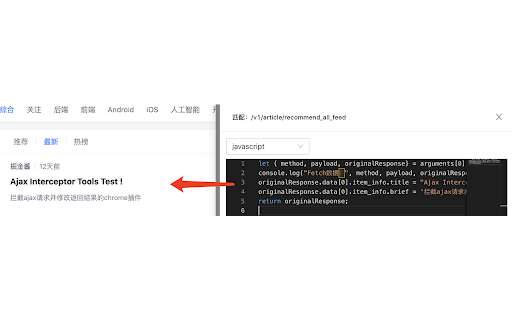

Modify the response text of Ajax requests An extension plugin for Chrome that modifies the response of AJAX requests. 🧰 Main features: 1. Intercept and modify the response of XMLHttpRequest and fetch requests, including 404 status requests. 2. Match requests based on regular expressions and HTTP request methods. 3. Edit response results in JSON or JavaScript format, with support for Mock.js syntax. 4. Easily create mock scenarios in JavaScript programming by accessing original request information from the arguments parameter. 5. New U-Network panel in DevTools for quickly intercepting requests and modifying response results. 6. Support change the request URL, request headers and body. 7. Support importing/exporting rule configurations. 8. Support adjusting the order of groups and rules. 9. Support picture-in-picture option for opening the configuration page. 10. Support intercepting network configuration pages using declarativeNetRequest. ⚠️ Notes: 1. After installing the plugin, restart the browser or refresh the relevant pages to ensure normal use. 2. The plugin only modifies the response at the JS level and cannot display the modified result in the Network panel. The plugin prints the modified results to the console, which can be viewed there. 🌟GitHub repository (please star if you find it helpful): https://github.com/PengChen96/ajax-tools

Apifox Browser Extension
Apifox 是 API 文档、API 调试、API Mock、API 自动化测试一体化协作平台,定位 Postman + Swagger + Mock + JMeter。通过一套系统、一份数据,解决多个系统之间的数据同步问题。API 文档和 API 开发调试使用同一个工具,API 调试完成后即可保证和 API 文档定义完全一致。让开发协作更高效、及时、准确!(Apifox Browser Extension 浏览器扩展用于 https://apifox.com 的 Web 版 API 接口调试。)

Mock:Intercept and directly return data
This is a tool for mocking XMLHttpRequest and fetch requests. It helps developers reduce reliance on real APIs during development, enabling more efficient coding and testing. 1. Support for mocking API requests made using XMLHttpRequest or fetch methods. 2. Automatic generation of mock data based on Swagger 2.0 documentation. 3. Ability to modify request headers (Request Headers). 4. Ability to modify request bodies (Request Body). 5. Support for redirecting API requests. 6. Offers three matching modes: contains, equals, and regexp, to meet different API matching needs. 7. Customization of return status and response time. 8. Support for importing and exporting configuration data. 9. Light and dark themes available. 10. Bilingual support for Chinese and English, with automatic language selection based on the browser's language settings. 11. Configuration data can be converted into TypeScript type definitions.

[Experiment] Edit and Resend: Ajax Request Debugger in Chrome DevTools
Enhance Chrome DevTools with a new tab. Edit and resend fetch() / XHR requests. Efficiently debug or test your web applications. ================================================================================================================== 🧪 Experiment in Progress: This extension is still in an experimental stage, and while it works most of the time, we found some bugs in real-world testing that we haven't found solutions for yet. ================================================================================================================== Are you a web developer looking to streamline your debugging process for Ajax requests? Introducing Edit and Resend: Ajax Request Debugger in Chrome DevTools, the essential Chrome extension that empowers you to efficiently edit and resend fetch or XHR requests directly within Chrome DevTools. Say goodbye to repetitive testing and manual data entry—our extension is here to optimize your workflow! - Edit Ajax Requests with Ease | - Modify request parameters, and payloads on the fly. | - Seamlessly integrate with Chrome DevTools for a native debugging experience. - Resend Requests Quickly | - Instantly resend modified Ajax requests to test different scenarios. | - Save time by avoiding the need to manually recreate requests for each test case. - User-Friendly Interface | - Intuitive design that fits naturally within Chrome DevTools. | - Easy access to all editing and resending functionalities without leaving your development environment. - Comprehensive Debugging Tools | - Analyze and troubleshoot Ajax requests with detailed insights. | - Compare responses from different request variations to identify issues swiftly. ## Why Choose Edit and Resend? - Boost Your Productivity | - Streamline your testing process by quickly iterating on Ajax requests. | - Focus more on development and less on repetitive debugging tasks. - Mimic Firefox’s Powerful Tools in Chrome | - Replicate the "Edit and Resend" feature available in Firefox DevTools, now functional in Chrome. | - Bridge the gap between browser development tools for a consistent debugging experience. - Enhance Testing Accuracy | - Ensure your web applications handle various request scenarios effectively. | - Validate different parameter combinations and data payloads with ease. - Web Developers | - Perfect for developers who regularly work with Ajax requests and need robust debugging tools. - Quality Assurance Engineers | - Enhance your testing strategies by simulating diverse request conditions. - Technical Enthusiasts | - Anyone interested in improving their web development and debugging toolkit. Installing Edit and Resend: Ajax Request Debugger in Chrome DevTools is simple and free. Elevate your Chrome DevTools capabilities and make your Ajax debugging process more efficient and effective. ## Feedback and reviews are welcome We’re committed to continuously improving "Edit and Resend". As a new extension, we welcome your feedback, bug reports, and feature requests. Help us make this tool even better by sharing your experiences and suggestions. Here is the link to Support Hub: https://chromewebstore.google.com/detail/ljfcmkhgcgljnomepfaeflehbdaimbhk/support

FeHelper - JSON格式化、编解码、二维码、开发者工具箱
FeHelper is a powerful developer tool designed for front-end developers. It integrates various practical tools to help developers improve work efficiency. However, FeHelper strictly adheres to the principle of single function activation. By default, FeHelper only provides the JSON auto-formatting function, and all other functions are disabled by default. If users need them, they can go to the plugin configuration page to install and enable them. The following are the main functions of FeHelper: ## JSON Tools: - JSON beautifier: Automatically detects and formats JSON data, supports manual formatting, decoding of messy codes, sorting, BigInt processing, editing, downloading, and skin customization, greatly facilitating developers' processing of JSON data. - JSON comparison tool: Supports automatic key-value comparison of two JSON contents, highlights differences, and helps developers quickly identify data changes. ## QR Code Tool: - QR code generator: Supports custom color and icon QR code generation, suitable for a variety of application scenarios. - QR code decoder: Supports multiple modes of QR code decoding, including decoding after pasting a screenshot, which is convenient and fast. ## Encoding tool: - String encoding and decoding: Supports multi-format information encoding and decoding, such as Unicode, UTF-8, URL, Base64, MD5, etc., to meet different encoding requirements. Code beautification tool: Supports code beautification for multiple languages, including Javascript, CSS, HTML, XML, and SQL, helping developers maintain clean and tidy code. Code compression tool: Provides simple code compression functionality, supports HTML, Javascript, and CSS code compression, and optimizes web page loading speed. ## Developer Tools: - AI assistant: A super intelligent dialogue tool powered by AI, supporting code writing, code modification, scheme design, and other tasks to improve development efficiency. - Simple Postman: An interface debugging tool that supports GET/POST/HEAD request methods, automatically formats JSON content, and simplifies the API testing process. - Websocket tool: supports packet capture testing for Websocket interfaces, including connection testing for ws services, message sending testing, result analysis, and more. ## Other tools: - Time (stamp) conversion: mutual conversion between localized time and time stamp, supporting second/millisecond, world time zone switching, clock display in various time zones, etc. - Random password generation: Generate passwords by randomly combining various characters, supporting specified length and character type to ensure password security. - My sticky notes: A sticky notes tool that supports creating directories to categorize and manage notes. Notes can be exported/imported with one click for convenient information management. - Markdown conversion: Markdown editing/preview tool, supports direct conversion of HTML fragments to Markdown, and supports downloading content in PDF format. - Webpage screenshot tool: It can take screenshots of any webpage, supporting both visible area screenshots and full-page scrolling screenshots. The final result can be previewed before being saved. - Page color picker tool: You can directly collect color values for any element on the webpage. Move the cursor to the location where you want to pick the color, and click OK.
