
eggdlmopfankeonchoflhfoglaakobma


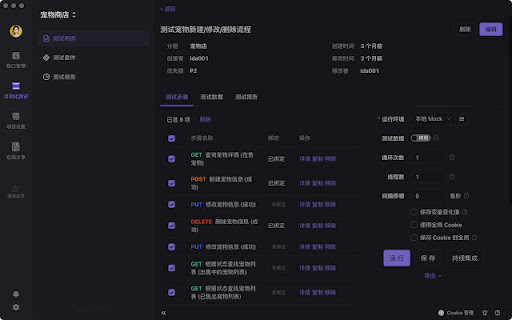


Apifox 是 API 文档、API 调试、API Mock、API 自动化测试一体化协作平台,定位 Postman + Swagger + Mock + JMeter。通过一套系统、一份数据,解决多个系统之间的数据同步问题。API 文档和 API 开发调试使用同一个工具,API 调试完成后即可保证和 API 文档定义完全一致。让开发协作更高效、及时、准确!(Apifox Browser Extension 浏览器扩展用于 https://apifox.com 的 Web 版 API 接口调试。)

Careerflow AI Job Application Tracker, ATS Resume Checker, Autofill & more
Career Copilot: Profile optimization for LinkedIn, AI Cover Letters, Job Application Tracker and Autofill, ATS Resume Checker & more Careerflow.ai is your AI Copilot for your career -- Optimize your LinkedIn Profile, use AI to generate cover letters, automate your job search by auto-fill applications and tracking them in a dashboard, and much more -- all in one! Join hundreds of thousands of job seekers who use Careerflow to optimize and improve their job search and career journeys with AI! ☆ OPTIMIZATION FOR LINKEDIN PROFILE ☆ 95% of recruiters use LinkedIn to find skilled employees and 47% of employers are less likely to contact candidates for an interview if they can't find them online. So it’s high time that you create a LinkedIn (LI) profile that leaves ever-lasting impressions on recruiters and hiring managers. ✓ Instant scoring of your profile from 0 to 100 ✓ Use AI to rewrite your LinkedIn profile (Premium) ✓ Analyze each section for a personalized checklist ✓ Expert tips and easy-to-follow guides for each section of your profile ✓ Interactive Wizard to understand each and every section ✓ Quick actions and shortcuts 83% of hiring managers reported that cover letters are important in their hiring decisions. However, it can take hours to get a hyper-personalized cover letter written uniquely for each job description. With our AI Cover Letter generator, it's as simple as one-click! ✓ One-click cover letters from 20+ career sites with auto-import job description ✓ Personalize using a Resume or your LinkedIn profile ✓ Re-generate as many times as you like until you are happy with the cover letter Never use a spreadsheet to keep track of your job applications again. Effortlessly organize and oversee your job applications spanning various online platforms. Our job monitoring system empowers you to stay updated on every aspect of your job search and prospects, irrespective of their source. ✓ Save jobs from 45+ job platforms including LinkedIn, Indeed, Monster, USAJobs, and more ✓ Automatically save Salary information, Recruiter contact, and details from the Job description ✓ Add notes, attach documents, and keep track of your job search in a Kanban board view ✓ Keep track of your tasks with todo lists for each application. ✓ LinkedIn Post Generator: Just tell us a topic and we'll write a custom LinkedIn post for you ✓ Job Description Summarizer: No need to read lengthy job descriptions, we'll summarize it in one click! ✓ LinkedIn About / Headline Writer: Follow our best practices for writing a LinkedIn headline and About section in one-click, following expert guidance and advice, using AI! -------------------------------------------------------------- ★★ WHY USE THIS EXTENSION? ★★ --------------------------------------------------------------- ✓ Skip the hassle of reading 100s of blogs, and watching 10s of videos on “How to optimize LinkedIn Profile” and use our extension's curated step-by-step guide instead. ✓ Boost your search visibility by creating an optimized profile. Users report an estimated 2.5X improvement in "search appearances" after using this extension! ✓ Prepare your profile for your dream companies and target roles in a fun and interactive manner. ✓ No more copying and pasting job listings, or losing track of where you found a particular job. With just the click of a button, you can save jobs to the Careerflow job search tracker. ✓ Utilize AI to maximize your job search and save 10+ hours a week -- automated cover letters, summarized job descriptions, AI LinkedIn posts, and more! ➡️ Click the “Add to Chrome” button on this page. ➡️ Open your LI profile and you will find this extension’s icon on the right-hand side. It will also show up on any page which we auto-detect is related to jobs or careers. ➡️ Click on this icon and sign in with your Google account. ➡️ You are all set! 🧐 How is this different from Huntr Job Tracker? ➡️ Huntr only allows you to track jobs whereas the Careerflow chrome extension not only helps you monitor job postings from 45+ job platforms but also offers comprehensive LinkedIn Profile optimization to attract recruiters and hiring managers from top tech companies. 🧐 How is this different from Teal - Free Job Search & Contacts Tracker? ➡️ Teal doesn’t provide a LinkedIn profile score for its users. Also as a result of using Teal, you have to endure advertisements on various websites. Moreover, its checklists are not dynamic and you may be asked to update your profile even if it’s already updated. On the other hand, the Careerflow extension provides you with best practices for each and every section, an interactive walkthrough, as well as a profile score from 0 to 100. 🧐 Is it free or paid? ➡️ Most of the features are completely free to use, such as the LinkedIn Optimizer and the Job Tracker. We do have some Premium (paid) features that utilize advanced Artificial Intelligence (AI) that require a cost to run and maintain, hence they are available for Premium users only. A majority of users are able to 2X their LinkedIn Profiles and keep track of their job search completely for free! ---- * WE DO NOT SELL YOUR DATA TO ANY 3RD PARTIES * By downloading this extension, you are agreeing to our Terms of Service here: https://careerflow.ai/terms and our Privacy Policy here: https://careerflow.ai/privacy Disclaimer: Careerflow.ai is an independent Chrome browser extension and is not affiliated with, endorsed by, or in any way connected to LinkedIn Corporation or any other brands or sites. "Careerflow" and "Career Copilot" are trademarks of Careerflow Inc. and any other trademarks referenced are properties of their respective trademark owners. For more info visit https://www.careerflow.ai

API Tester
Rest API Tester is an easy api testing tool. Streamline your software development and test api online with this Chrome extension. API testing is essential in software development, ensuring interfaces work correctly and provide accurate data. With the rising complexity of modern applications, a reliable tool for validating endpoints is crucial. This api tester streamlines the process, enabling developers and qa engineers to efficiently identify and resolve issues, facilitating seamless integration among systems. Our instrument serves as a comprehensive solution for your needs, whether you are validating or debugging endpoints. The importance of api in software testing cannot be overstated; it enhances workflow efficiency and simplifies the entire process, making it an essential asset for ensuring quality assurance across your projects. 🚀 With this extension, you can test api online without the need for complex setups or additional software. It’s built to help you conduct api tests quickly and accurately, ensuring your applications run smoothly and deliver exceptional performance. Additionally, you can test api endpoint configurations to ensure they function as intended. Why Should You Consider This Option? 1️⃣ Ease of Use: Designed with a user-friendly interface, it’s easy for both beginners and experts to work with endpoints effortlessly. 2️⃣ No Installation Required: As a chrome extension, it’s lightweight and accessible directly from your browser. 3️⃣ Versatility: From verifying web services to making request validations, this tool supports a wide range of methods, including GET, POST, PUT, DELETE, and more. 4️⃣ Real-Time Results: Get instant feedback on your tests with detailed responses, status codes, and headers. 5️⃣ Cost-Effective: Unlike many tools for api testing, this api tester online is free to use, saving you time and money. Who Can Benefit? This instrument is ideal for: 🔺 Developers who need to test rest api during the development process. 🔺 QA engineers looking for reliable api testing tools to ensure software quality. 🔺 Students and learners exploring concepts of endpoint verification. 🔺 Freelancers and professionals who require a quick and efficient test tool for their projects. Advantages of Using This Rest Client ➤ Efficiency: Save time with a solution that simplifies qa procedures and delivers instant results. ➤ Accuracy: Ensure your endpoints are error-free with detailed response analysis. ➤ Accessibility: As an online api tester, it’s always within reach. ➤ Scalability: Whether you’re verifying a single endpoint or multiple services, it scales with your needs. How to Get Started 1. Install the chrome extension from the web store. 2. Open the tool and enter the url you want to verify. 3. Choose the request method (GET, POST, PUT, DELETE, etc.). 4. Add headers, parameters, or body content as needed. 5. Click Send and analyze the response in real-time. What Makes This Application a Preferred Choice This api tester is more than just a solution - it’s a comprehensive resource for all your needs in software development. Unlike other solutions, it combines simplicity, power, and accessibility into one seamless experience. Whether you’re a seasoned developer or a beginner, it helps you be confident in the quality of your product. Use Cases 🔸 Debugging and validating web service workflows. 🔸 Performing http test requests to ensure the reliability of web services. 🔸 Checking endpoints during software development. 🔸 Learning and experimenting with qa concepts related to web services. 💬 Frequently Asked Questions (FAQ) ❓ What is an api tester, and why do I need it? 💡 An api tester is a solution that helps developers and qa engineers evaluate endpoints to ensure they function correctly. This instrument simplifies the process by allowing you to check rest api without complex setups. ❓ Can I use it for rest api testing? 💡 Yes! It’s designed to handle it, allowing you to send requests (GET, POST, PUT, DELETE) and validate responses effortlessly. ❓ Is it free to use? 💡 Absolutely! Unlike many others, this api tester is free to use, saving you time and money. ❓ How do I verify endpoints using this application? 💡 Simply install the Chrome extension, enter the url, choose the request method, add parameters if needed, and click Send. You’ll receive real-time results instantly. ❓ Is it suitable for beginners? 💡 Definitely! With its user-friendly interface, this application is perfect for both beginners and experts looking to test software efficiently. Conclusion Our api tester is the ultimate solution for anyone looking to streamline their api testing online process. With its intuitive design, powerful features, and accessibility as an online api checker, it’s the perfect companion for developers, qa engineers, and tech enthusiasts focused on testing api functionality. Try it today and experience the future of software solutions! 🌟

Test API
Use Test API for restful api testing. This postman alternative test rest api online and use post request online to test API endpoint This powerful API Testing Online solution eliminates the need for external applications when working with endpoints efficiently. 🚀 The Test API Chrome extension provides a comprehensive tool directly in your browser. Whether you are experienced or learning how to test api requests properly, this extension serves as your ultimate HTTP caller companion. The interface makes it simple to perform any endpoint call, from basic GET requests online to API Test Online operations and complex RESTful scenarios. 🔧 Key features that make this the ultimate API Tester Tool: 1️⃣ Instant api endpoint test functionality without leaving your browser 2️⃣ Complete HTTP request online capabilities for all major HTTP methods 3️⃣ Advanced options with custom headers and parameters 4️⃣ Real-time response visualization for effective Online API Test work The extension excels at handling various request types, making it perfect for validating service endpoints across different scenarios. You can easily execute a Test get request, perform a Post request for online operations, or handle any web request with ease. The intuitive design streamlines your development workflow significantly. 🎯 Advanced API Test Online capabilities include: ➤ Custom header configuration for authenticated endpoint scenarios ➤ JSON, XML, and form data support for comprehensive test post request operations ➤ Response time monitoring for test rest api online workflow Understanding the restful api testing properly becomes effortless with our comprehensive environment. The extension provides detailed response information, including status codes, headers, and formatted response bodies for thorough analysis. The user-friendly design ensures that even complex RESTful API endpoint scenarios remain manageable and straightforward. Whether you're debugging a single test REST API or managing multiple workflows, the interface adapts perfectly to your needs. 💡 🔒 Security-conscious developers appreciate the local processing approach - all your data remains within your browser environment. This Rest API Test Online Tool never transmits sensitive information to external servers, making it ideal for validating internal services and sensitive endpoints. 📋 Professional workflow benefits include: ♦️ Streamlined development cycles with instant test api endpoint ♦️ Reduced context switching between multiple tools and applications ♦️ Enhanced productivity through integrated capabilities ♦️ Simplified service documentation and endpoint validation processes 🌍 Common use cases where this solution excels: 🌐 Quick endpoint debugging during development cycles 🌐 Educational purposes for learning how to build HTTP request fundamentals 🌐 Integration for third-party services, including http post test scenarios 🌐 Rapid prototyping and service exploration workflows 🌐 Quality assurance test post requests for production endpoints This postman alternative supports all standard HTTP methods essential for modern Online service validation practices. From simple GET operations to complex PATCH requests, every test HTTP request type is fully supported with detailed response analysis and comprehensive error handling. The extension handles authentication seamlessly, supporting various methods from basic auth to complex OAuth flows. This makes it excellent for testing protected endpoints, where proper authentication is crucial for successful operations. Bearer tokens, API keys, and custom authentication schemes are all fully supported. ❓ Frequently Asked Questions: 📌 How do I start using this Tool? 💡 Install the extension, click the icon, and start creating your first HTTP call. The intuitive interface guides you through the process step by step. 📌 Can I test APIs that require authentication? 💡 Yes! Supports API keys, OAuth, Bearer tokens, and custom headers for various authentication methods and scenarios. 📌 Is my data secure using this Test API Online tool? 💡 All the data is processed locally in your browser for maximum privacy. No data is transmitted to external servers. 📌 Does it work with different endpoint types? 💡 Absolutely! Works seamlessly with REST, GraphQL endpoints, SOAP services, and any HTTP-based interface. 📌 Is there a limit to request size or frequency? 💡 No artificial limits are imposed. You can build large payloads and make multiple requests as needed for comprehensive HTTP validation. Regular updates ensure compatibility with the latest web standards and WEB technologies, making this tool a reliable solution for all your needs. Join thousands of developers who trust this extension for daily work with Post request online, workflows, and streamlined development processes! ⚡

Mockiato — Free API Testing & Mocking Tool
Chrome extension to intercept requests, create real-time mocks, and auto-insert headers for web development & testing API. Mockiato is an extension for Google Chrome, designed to optimize web application development and testing. It allows you to intercept outgoing requests in real-time and create mocks for them, ensuring quick emulation of server responses. In addition, Mockiato enables the addition or modification of headers in requests. This feature significantly simplifies request configuration and saves developers' time. Combined, these tools provide flexibility and convenience, making the development and testing process more efficient and reliable. You can submit issues, bugs or feature request at https://github.com/avivasyuta/mockiato/issues
