
bfadimingfhacpedgapjpnhikcbjhbmn
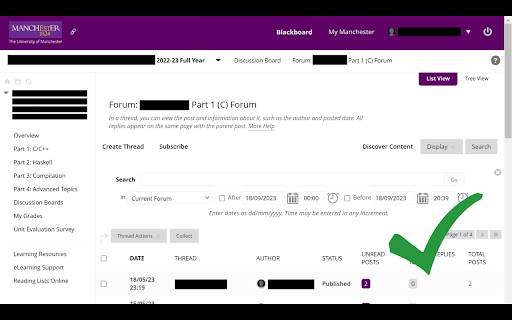
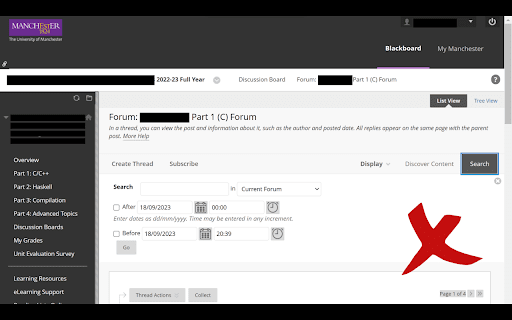
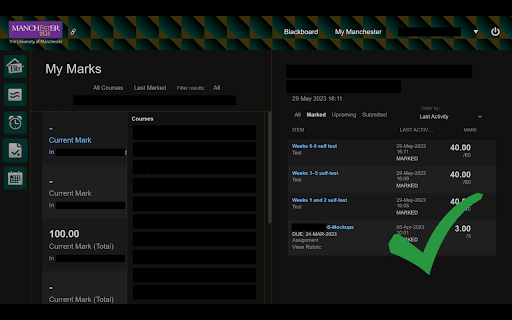

A cleaner interface for the University of Manchester Blackboard with custom themes and dark mode. This provides a universal design to Blackboard with consistent fonts, colours and styling. It fixes many of the resizing and positioning issues present in Blackboard. This redirects to the old homepage on loading. The new homepage can be accessed in the top right if needed. Any deadlines on the Blackboard system coming up in the next 30 days are displayed on the left of the home page. Navigation links to the following are displayed below this: Student System, Timetable, Lecture Recordings, Exam Timetable, Exam Results, Library, SPOT, My Learning Essentials and Evaluation Kit. The following themes are available in both light and dark mode: Default (Purple), Blackboard (Grey), Ocean (Light Blue), UoM Purple (Same Purple as UoM Logo), Art Deco (Green and Gold Pattern), Tron (Black and Neon Blue Pattern), Rustic (Reddish Brown), Camo (Brown and Green Pattern). Course units on the home page are filtered by semester. The semester you are currently in will display by default. When first using the extension, it will warn you that it can read and change your data at online.manchester.ac.uk. It needs this access to apply style changes to the loaded page. No personal data is changed or stored. The following URLs are whitelisted by the extension (Blackboard won't warn you that you're leaving the learning environment): https://zoom.us/, https://piazza.com/, https://www.sli.do/ and https://gitlab.cs.man.ac.uk/. Assessment paragraph entry boxes on dark mode by default display white text but will submit black text (clearly visible on standard Blackboard). If you change the text colour, the submitted text will be this colour. Be aware that a submission of white text is not clearly visible on Blackboard. This is an open source project available at: https://github.com/mattmcnee/uom-restyle-extension. Provide feedback at https://uom-blackboard-restyle.web.app/. Updates: 1.23 - Header links now underlined when hovered 1.22 - Fix for blackboard update 1.21 - Course units on the home page are now filtered by semester 1.20 - Improved styling on journal entry pages 1.19 - Fixed errors logging to console and improved styling coverage 1.18 - Embedded videos no longer exceed screen width on smaller screens 1.17 - Fixed Kortext link and improved course slide layout 1.16 - Replaced menu icons with new style

Canvas: Darkmode
Canvas: Darkmode is simple extension that applies a dark theme to Instructure's Canvas that saves power, prevents eye strain and provides a more modern feel. It collects does not collect any data and is open-source. Feel free to check it out and modify it if you have any issues!

Blackboard
Draw over webpages, capture and save full page screenshots Blackboard helps you live annotate web pages and take full length screenshot of your work! ✏️ Pencil tool 📷 Full page screenshot ✨ Textbox 🎚️ Size adjustor for drawing/writing ✨ Eraser tool 🎨 Colour Palette 🖌️ Colour Picker 📥 Download screenshot 🗑️ Reset 💁♀️Use cases: - Communicate better with your team by creating and sharing notes written on webpages, useful for code reviews, to explain with diagrams - Save personal notes or mark important sections in webpages while studying - Download screenshots and share your views with anyone - Save bandwidth while screen-sharing, by annotating using this extension ❌ Not supported - Chrome extensions do not work in the Chrome web store - Max canvas size allowed is 8000px for optimal browser performance - Download format is .png, further support will come in future releases 🆓Free - All features are free - Unlimited full page screenshots. - Unlimited downloads - No watermark - No login/sign-up required 📌 Stay tuned for more exciting features coming through! 🎁 🐛Facing bugs or have some suggestions to improve? Help me make this tool better by logging detailed bugs or feature requests in the Support section.

Canvas Assistant
Stay on top of your Canvas assignments and find new students to study with! Based on your feedback, Version 1.0.2 was updated to automatically save your Canvas Information on your browser. This data is not stored by the extension and is instead stored locally. ------ Are you tired of manually adding assignments to your personal calendars and to-do lists one by one? Are you looking for new people to study with? Canvas Assistant can help! Canvas Assistant provides students with a new way to manage their Canvas coursework in a more efficient and organized way. With the click of a single button, users can add their Canvas assignments to their personal calendars, generate to-do lists for their upcoming coursework, and find new study buddies. The extension offers three primary features: - Sync Your Calendar: Creates an .ics file of your upcoming Canvas assignments, which you can easily add to your iCalendar, Google Calendar, or Outlook Calendar! - Generate a To-Do List: Creates a .csv file of your upcoming Canvas assignments which can be used on its own or imported into the task-management application of your preference! - Find Study Buddies: Creates a .csv file listing students that you share common courses with, taking the hassle out of finding people to study with! Developed by students, for students. If you have any inquiries about the extension, reach out to us at canvasassistantinfo@gmail.com.

BlackBoard Extension
Blackboard Extension from HeXA blackboard 사용을 돕기 위해 만든 브라우저 확장 프로그램입니다. Blackboard Extension from HeXA blackboard 사용을 돕기 위해 만든 브라우저 확장 프로그램입니다. 더욱 자세한 사항은 아래 링크를 통해 확인해주시기 바랍니다. https://github.com/123wwwa/Blackboard-Extension
