
mmjmacphpamkgohndboacnjnlbflibbl

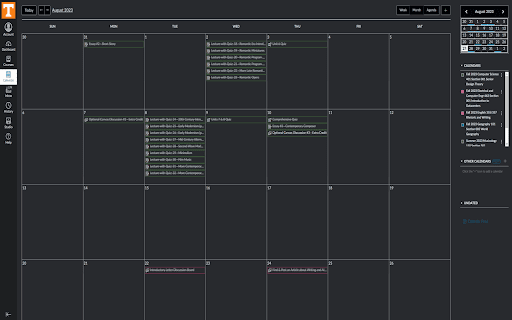
Canvas: Darkmode is simple extension that applies a dark theme to Instructure's Canvas that saves power, prevents eye strain and provides a more modern feel. It collects does not collect any data and is open-source. Feel free to check it out and modify it if you have any issues!

Canvas Darkish Mode
Makes the Canvas web page darkmode Makes adjustments to Canvas/Instructure page to be more user friendly and provide a more enjoyable experience.

Canvas Themeinator
This extension adds themes to Canvas. Currently, there are 10: -Dark -AMOLED Dark -Light -Aqua -Purple -Dark Purple -Blue -Dark Blue -Green -Orange +Custom Themes (currently in beta) This extension is open-source. The GitHub link is below: https://github.com/one23four56/canvas-themeinator This extension is a SIDE PROJECT of mine. Do not expect regular updates, I am only maintaining this because I use it. If you really want a feature, go onto GitHub and add it yourself.

Canvas Dark Mode
Dark Mode for Canvas. Dark mode for Canvas. Staying up late doing homework? Reduce your eye strain and keep your circadian rhythm with this Dark mode for canvas! Canvas dark mode should work for your school, if it does not, contact me and I can update the plugin to include your school's URL! Currently, dark mode for canvas works on any "instructure.com/*" domain. This is an open source project, if you would like to contribute, visit the repository.

Canvas Style
Makes the Canvas website look better This extension aims to make the UI of Canvas look more consistent and modern. It will also work nicely with the popular extension Better Canvas. There are various options and settings to customize the colors and other details of the UI. UPDATE 1.3 - Updated context menu UI - Overhauled assignment submission UI - Fixed broken file upload buttons - Fixed bugs with assignment descriptions not rendering italics correctly - Completely overhauled/fixed the dashboard list view - Updated hamburger menu/sidebar to be openable and closable - Dashboard cards can now be dragged correctly - Updated course discussions UI - Fixed bugs with duplicating icons in dropdown menus - Updated the main footer links - Added "Cavnas Mode" setting UPDATE 1.2 - Updated keyboard navigation outlines - Updated context menu UI - Made dashboard cards a more consistent height - Fixed the todo menu on the dashboard page - Updated button text that was unreadable in dark mode UPDATE 1.1 - Updated extension icon - Added new settings - Updated checkbox UI - Updated general UI colors
