
mjpaeljbciakgnigdligmdihfhnpbfla


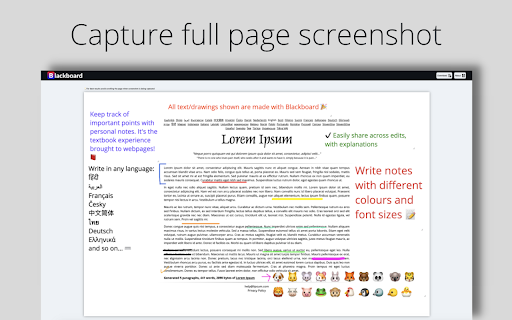

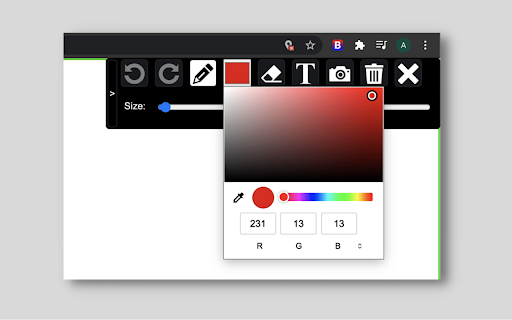
Draw over webpages, capture and save full page screenshots Blackboard helps you live annotate web pages and take full length screenshot of your work! ✏️ Pencil tool 📷 Full page screenshot ✨ Textbox 🎚️ Size adjustor for drawing/writing ✨ Eraser tool 🎨 Colour Palette 🖌️ Colour Picker 📥 Download screenshot 🗑️ Reset 💁♀️Use cases: - Communicate better with your team by creating and sharing notes written on webpages, useful for code reviews, to explain with diagrams - Save personal notes or mark important sections in webpages while studying - Download screenshots and share your views with anyone - Save bandwidth while screen-sharing, by annotating using this extension ❌ Not supported - Chrome extensions do not work in the Chrome web store - Max canvas size allowed is 8000px for optimal browser performance - Download format is .png, further support will come in future releases 🆓Free - All features are free - Unlimited full page screenshots. - Unlimited downloads - No watermark - No login/sign-up required 📌 Stay tuned for more exciting features coming through! 🎁 🐛Facing bugs or have some suggestions to improve? Help me make this tool better by logging detailed bugs or feature requests in the Support section.

Web Canvas
Web canvas allows you to draw freehand, write text, create shapes on any web page. You can select, cut, copy and paste object selections using standard shortcuts. You can also save/copy the canvas to your clipboard. Reload the page after install to make it work.

screenie
A tiny extension that takes a full page screenshot in one click. It's just takes a screenshot of entire page in one click.

Old Blackboard
Reverts Blackboard back to the old UI UQ has updated its Blackboard UI to something that doesn't feel great to use (animations and inability to open multiple tabs easily) and the link to the previous UI no longer has methods of navigating to courses and to the homepage. This extension builds on the old UI by adding back the header and course list.

Whiteboard Pro – Draw On Any Site
Turn any webpage into a whiteboard! Works on any site with full-page coverage. Perfect for notes, and teaching—fast. 🚀 Effortlessly draw / write on any webpage! Whether you're taking notes, brainstorming, or teaching, Whiteboard Pro gives you the freedom to sketch, highlight, and annotate without limitations on sites. you can work on the any site or on a separate tab ✨ New Features: ✅ Toolbar Minimization – Hide the toolbar to focus on drawing without distractions. ✅ New Tab Whiteboard – Draw freely in a dedicated space from the popup. 🖊️ Draw Freely – Sketch by hand or create straight lines with ease. 🎨 Fully Customizable – Adjust color, thickness, and opacity to fit your needs. 🌐 Works Everywhere – Covers the entire webpage, with a fix button if needed. ⚡ Lightweight & Fast – Designed for smooth, lag-free drawing. 🔄 Actively Developed – More features and improvements coming soon! 🔒 Privacy-Friendly – No tracking, no data collection—just a simple tool for you.
