
beopgcaficiodfbdcapkejlfledfhffg

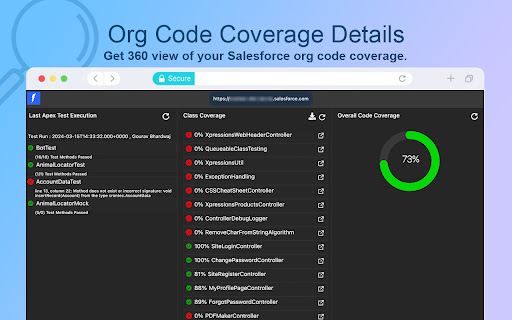
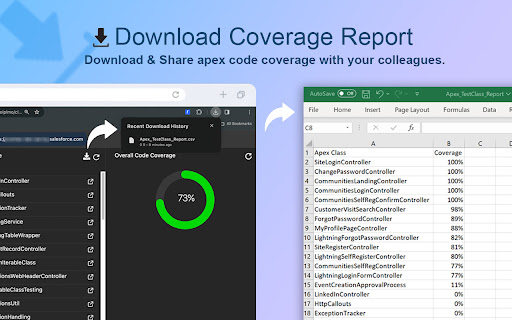
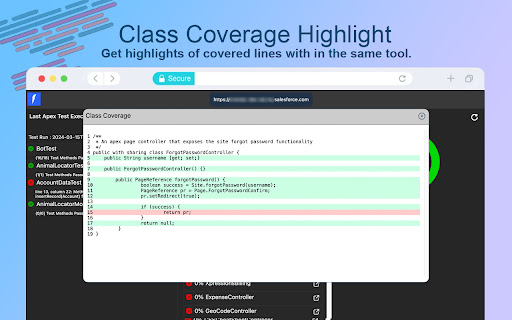

A suit of Salesforce tools to improve you productivity. Salesforce Dev Toolkit is a powerful Chrome extension packed with productivity tools designed for Salesforce developers and admins. It helps streamline your workflow, reduce repetitive tasks, and improve overall efficiency while working in Salesforce. -> Apex Test Class Coverage Viewer – Get a complete 360° view of Apex code coverage across your Salesforce instance. Easily export coverage details as a CSV file, including class names and respective coverage percentages. -> Debug Log Analyzer – Quickly analyze Salesforce debug logs with advanced filtering by log levels or custom regex patterns, making it easier to pinpoint issues and optimize performance. Whether you’re troubleshooting, testing, or optimizing your org, Salesforce Dev Toolkit saves time and boosts productivity by bringing essential tools right into your browser.

Salesforce DevTools
Salesforce DevTools is a powerful Salesforce developer chrome extension for doing the below things : ・Quickly generate Apex code / SOQL, exporting query results to Excel file. ・Quickly access to new record page, list page and object setting page of any object. ・Quickly search object fields and check its usage. ・Display fields API name on Salesforce object detail page. ・Exporting Objects Definition to Excel file. ・Exporting Objects Fields Definition to Excel file. ・Exporting Objects Page Layout Definition to Excel file. ・Exporting Objects List View Definition to Excel file. ・Exporting Flow Definition to Excel file. ・Salesforce data modal (ERDs) generator. ・All Check / Select on profile edit page and field permissions edit page. ・Mass edit, mass delete, mass clone custom fields (Only Classic). ++++++++++++++++++++++++++++ Release notes ++++++++++++++++++++++++++++ 2026/01/1 ・Added features of "Export Flow Definition". -------------------------------------- 2023/04/10 ・Added features of mass edit, mass delete, mass clone custom fields on Lightning. -------------------------------------- 2022/01/30 ・Added feature of searching object fields and show its usage. -------------------------------------- 2021/04/05 ・Added feature of exporting Object definition (FULL) and fixed bugs. -------------------------------------- 2020/09/07 ・Added feature of exporting List View definition and fixed bugs. -------------------------------------- 2020/06/07 ・Fixed Lighting active bug and Japanese language document exporting bug. -------------------------------------- 2020/04/12 ・Improved feature of Query Editor. -------------------------------------- 2020/01/06 ・Added feature of exporting object page layout. -------------------------------------- 2019/08/18 ・Added feature of Multi Check on field permission edit page. -------------------------------------- 2019/05/13 ・Added features of mass edit, mass delete, mass clone custom fields -------------------------------------- 2019/03/24 ・Fixed issues. -------------------------------------- 2018/12/17 ・Reactivated feature of Debug Log Viewer. ・Added feature of searching Debug Log. ・Fixed issues. -------------------------------------- 2018/11/12 ・Improved UX of feature exporting object API reference to Excel file. ・Added Query Editor feature to all Objects. ・Added feature of exporting query result to Excel file -------------------------------------- 2018/09/25 ・Added support for cloudforce orgs. -------------------------------------- 2018/09/03 Major Release ・ Added support for Lightning! ・ Improved UX of feature Object Reference Doc generating. ・ Improved UX of feature All Check. -------------------------------------- 2018/04/17 ・Improved ERDs UX, fixed bugs. -------------------------------------- 2017/10/11 ・Improved Debug Log Viewer UX. -------------------------------------- 2017/05/29 ・Added feature of query editor and csv data exporting. -------------------------------------- 2017/04/23 ・Added feature of ERDs generator. -------------------------------------- 2017/02/06 ・Fix bugs. -------------------------------------- 2017/01/30 ・Added features of SOQL generator and Apex debug log viewer. -------------------------------------- 2016/12/20 ・Fixed export excel bugs. -------------------------------------- 2016/12/06 ・Improved UI, fixed bugs. -------------------------------------- 2016/11/25 ・Added features that allows you to enable it on custom domain. -------------------------------------- 2016/08/21 Major Release ・Added features of exporting objects definition to excel file. -------------------------------------- 2016/05/18 ・ Added support for Visualforce Page. -------------------------------------- 2016/04/04 ・ Added the features of object searching and object quick access. -------------------------------------- 2016/03/31 ・ Added support for generating Apex Code include blank fields -------------------------------------- 2016/03/28 ・ Added support for RecordType ・ Added hint for Quick Access Menu Turned Off

Maven Tools for Salesforce
Uniquely architectured for Salesforce technical consultants, Maven Tools transforms how Salesforce implementations are being delivered. It offers features like an intelligent query editor, REST console, event hub and many more, giving you the power to deliver changes more quickly and effectively. 📨 Support ▸ Go to our service desk to get technical support, or to report bugs and suggest improvements : https://mavenmule.atlassian.net/servicedesk/customer/portal/6

Brobench
Brobench is an extension to boost your Salesforce productivity. It includes many utilities and features that saves you minutes each time you use it. Here are the noteworthy features. Features: ✅ Launch the app easily using Brobench icon inside Sfdc UI ✅ Show Field API Names ✅ Logins: Securely add connections and login to Salesforce Orgs with click of a button which is protected by a Master Password ✅ Records: View Record, its fields, edit, clone and delete if required ✅ Objects: Explore all objects, its fields, formulas and pick list values ✅ Search: Search for users including critical details like Profile, list of Permsets and do Login as that user in current, incognito and other browser profiles ✅ Shortcuts: Easily navigate across Salesforce setup with Shortcut URLs with ability to define custom Shortcut URLs ✅ Text Tool: Convert easily between 15 and 18 chars ✅ Beautiful Dark Theme support ✅ And much much more... Why should you install it: If you interact with Salesforce on a daily basis, it would save you at least 30mins per day and would make browsing objects, querying data and editing data a breeze. Usage: - If you want to login to Orgs, add one or more Connections and click on a Connection tile to login. - If you have already logged in an Org, click on the Brobench icon in the page to launch the window to interact with it Resources: Product Page: https://www.datasert.com/products/brobench Help: https://help.datasert.com/docs/brobench. Create Issue: https://github.com/datasert/brobench-community/issues Videos: https://www.youtube.com/@datasert/videos Support: support@datasert.com

SF DevX Console
Enhance your Salesforce development experience with our powerful browser extension. *** SF DevX Console: The Modern Salesforce Development Environment *** Re-imagine your Salesforce development workflow with SF DevX Console, the all-in-one toolkit designed for performance, efficiency, and a superior user experience. Built to overcome the limitations of standard tools, SF DevX Console provides a faster, smarter, and more intuitive environment—allowing you to focus on building, not wrestling with your tools. Advanced LWC & Apex Editing: Write cleaner code with an enhanced editor featuring intelligent file organization and seamless method navigation. Deploy instantly with a simple save (CTRL/CMD + S). Streamlined Debug Log Analysis: Pinpoint issues in seconds with a powerful, searchable log viewer. Utilize advanced filtering and a clean, organized layout to eliminate endless scrolling and accelerate your debugging process. Powerful SOQL Query Runner: Our advanced SOQL Runner features a beautiful, intuitive interface. Format results for easy analysis, access your query data history, and manage data with ease. Integrated Apex Test Execution: Run test classes with a single click and instantly visualize your code coverage. Clear, actionable feedback helps you identify testing gaps and ensure your code is production-ready. Essential Developer Utilities: Includes a suite of necessary tools, such as one-click access to the current Session ID for seamless integration with external APIs and services. Engineered for Speed: Optimized for a lag-free, high-performance development experience. Unified, Powerful Search: Instantly find what you need across all features and functions. Native Performance with LWC: Built entirely on Salesforce's Lightning Web Components framework for a seamless and responsive experience in your browser. *** Your Security is Non-Negotiable *** We believe privacy is a right, not an afterthought. Your code and data are yours alone. Period. Strictly Local: All processing occurs locally in your browser. Nothing is ever sent to an external server. Zero Tracking: We do not collect, store, or sell any personal information or telemetry data. 1. Click "Add to Chrome". 2. Log in to your Salesforce org. 3. Click the extension icon. Welcome to a better workflow. We’re constantly improving and love feedback. Let us know how we can make your development life even easier.
