
bdkpinfdldjdngmgfbifbdbgaoampkan
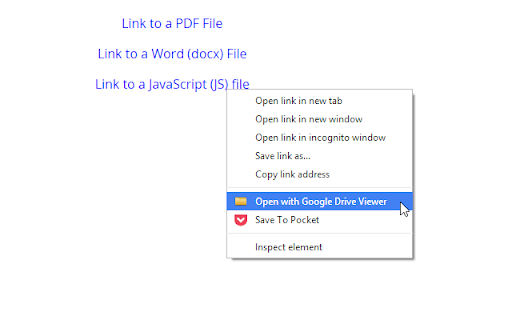

Open online resources with Google Drive Viewer. Supports various formats including DOC, XLS, PDF, PPT, ZIP, HTML, TXT, JS etc. Supports Word, Excel, PowerPoint, PDF, ZIP and more formats. File should be online and publicly accessible. Opened files can be easily saved to your Google Drive. Test extension on this page: http://browsernative.com/test/drive.php Extension by BrowserNative. Not created by or affiliated with Google.

PDF Editor Extension - PDFzorro
Open PDF files with Google Chrome™ and edit them with this PDFzorro Extension With this extension you can edit PDF files, that are opened in Google Chrome™. You also can open the free Online-PDF-Editor to edit PDF in the browser. You can rotate, split, sort pages. Secure or unsecure PDF files. Add text, annotation, draws or marks into the PDF. You also can add images to the PDF. Convert PDF to Word, Excel or PowerPoint. Enjoy PDFzorro, for free!

Quick Create Plus
Create new files for Google Drive from your browser bar. Links include Docs, Sheets, Slides, Drawings, Forms, and Scripts. Create new files for Google Drive from your browser bar. Links include Docs, Sheets, Slides, Drawings, Forms, and Scripts. Now updated to Manifest 3!

Shortcuts for Google™ Products
The "Shortcuts for Google Products" extension lists all Google products in your browser's toolbar popup. Clicking on an icon will open the product in a new tab. Operation: Click: Opens in a new active tab next to the current tab Shift + Click: Opens in a new window Ctrl + Click or Command + Click: Open in a background tab next to the current tab Updates: 1. Drag & drop to re-arrange your icons. 2. Re-size popup and also icons. 3. Add a new custom product to the list Notes: 1. In order to change the popup width, please enter an integer value from 5 to 24 in the designated space. This value represents the number of columns in the popup. 2. In order to change the icon's size, please enter an integer value from 16 to 64 in the designated space. This value represents the icon size in pixels. 3. in order to see the new icons after each update (not for the first install), you need to reset the toolbar popup once. To do so, open the toolbar popup, click on the settings icon at the bottom left corner, and then click on the reset button.

Notes: Keep Sticky Thoughts in Google Drive
Simple and useful notes that sync with Google Drive. Keep sticky thoughts in notes. Keep notes in Google Drive. Keep your mind calm. Sick of emailing yourself notes, links and ideas? Want to keep everything in Google Drive? Notes extension lets you keep all your notes in Google Drive and get access to them in one click. FEATURES • Automatically saves your notes to Google Drive as soon as you start typing. • Automatically generates a note title from the first line. • Drag and drop reordering of notes. • Text formatting: bold text, italics, lists. Make each of your notes unique. • Quick access buttons for opening the Google Drive folder where keep your notes. Made with ❤️ by BrowseCraft gang. Stand with Ukraine 💙💛. DISCLAIMER Please note "Notes: Keep Sticky Thoughts in Google Drive" is not made by Google™ or affiliated with Google™. Google™ and Google Drive™ are trademarks of Google LLC.
