
bdghamogdpljmfcnhchdcfmgennokdoj
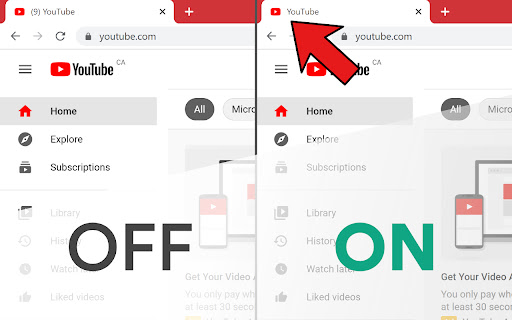
Chrome extenstion that removes the notification counter in tab titles If you don't like when websites like YouTube and Facebook show the number of notifications you have on the tab bar then this is for you. No Notif Counter is a chrome extension that hides the notification counter on the tab bar so you aren't distracted from the important things.

Remove YouTube™ Tab Number
Removes the number of notifications in parentheses that YouTube displays on tabs Would you prefer not to have your number of YouTube™ notifications on every YouTube™ tab? Do all of your YouTube™ tabs look the same when you have many tabs open? Don't want the number included in your bookmarks or saved links? Is it information that you don't need to be reminded about? If so, this simple Chrome extension will dynamically remove the number (and the parentheses) from any new YouTube™ tabs that you open after installing it. I'm finding it useful while there (currently) isn't an official setting to turn this number off. I've uploaded it here in case anyone else was also looking for the "off switch". Hope it helps.

Notion Spacer
Gain control over paragraph spacing in Notion. No more poor readability with tight spacing between paragraphs. Why did we make this? We saw people (rightly) taking issue with the tiny paragraph spacing in Notion and wanted to help.

Only One Window!
Moves all tabs into the active window. This extension group all tabs in only one window. You can do this by pressing CTRL + SHIFT + L, or by clicking on the extension icon.

Advanced Browser History
View history as a tree, skip URLs from history, bulk-delete visits, search by URL or title, filter by domain or day, and group sites Advanced Browser History, your all-in-one tool for exploring, filtering, and managing your browser's history with ease. Below you'll find everything you need to know to get started and make the most of all features. Features: 1. Browse your history by day, then drill into each domain and its path hierarchy. 2. Find any visit by keyword in the URL or page title.. 3. Delete all visits at once—by day, domain, or path. 4. Create named groups of URL patterns to organize visits. 5. Automatically prevent matching domains or URLs from ever being recorded. 6. Optionally sync your URL groups across all signed-in devices. 7. Add any URL or sub-URL to a group in one click, then bulk-remove or skip them.
