
bcfgcokeemmbilmcfepjpfelbjfbnkpa

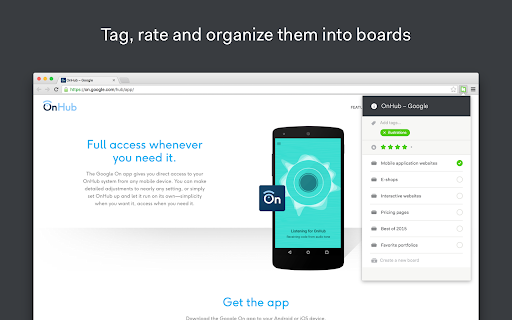

Capture fullpage snapshots of your favorite websites & organize them. Hypershoot is a bookmarking tool made for designers. Save and manage your favorite pages on Hypershoot easily with our extension. Organize your favorite websites Organize your inspiration by boards, tag websites with your own keywords, rate the pages to quickly find what you need when you need it. Find and save your inspiration You can count on Hypershoot and its community of designers to discover the best websites and designs. With this Chrome extension, save websites to Hypershoot directly from your browser. Benchmark and share your library Use the boards to group your inspiration by project, client, team, etc. Every board can be shared and be viewed by anyone.

Elink - Bookmark Manager
Best visual Bookmarker for creating content for your Gmail Newsletters, HTML Newsletters, Website/Blog and Social bio links. elink bookmark extension for Chrome is the best bookmarking tool for saving & organizing visual bookmarks in one place. When you save a bookmark or a link you can can choose an image, capture a screenshot or upload your own image. You also have the ability to edit the title and description to add your own voice or notes and even bundle links together and share your link collection with others. More than 70,000 users use elink everyday to collect and share digital information professionally. From these bookmarks you can create beautiful Gmail newsletters, HTML email newsletters, content for your websites and blogs, RSS Feed powered website content, bookmark powered website content, social bio links, automated content publishing and more. Elink bookmarking tool is a must use tool for just about everyone. • Simple - Click the elink logo in the browser or right-click on any web page, link or image and save it as a bookmark with elink’s Chrome Extension. It’s a fast and easy way to collect and organize your bookmarks while you browse. • Multiple Templates– elink lets you choose from 50+ beautiful modern templates with single, grid, masonary, e-commerce, carousel, etc. style layouts to display your visual bookmarks. • Real-Time Editing – Quickly edit or update any information you have published and it will update in real-time. • Unlimited elinks - There are no limits to how many elink web pages and newsletters you can create. • Analytics – You can track engagement levels, referral sources and the location of your audience for each of your elinks. • Responsive Templates – Our responsive templates make your web page, newsletter, and website embed look great on all devices. Display your bookmarks professionally when sharing with others. • Bookmark Any Web Content – elink’s powerful tool allows you to curate and share any online content that has a link. Which includes articles, websites, videos, webinars, podcasts, articles, pictures, infographics, PDF’s, Google Docs, Dropbox files and more. You can pretty much bookmark anything on the web. How Does elink’s Bookmarking Extension Work? Use elink’s bookmarks icon or right click your mouse to collect any type of web content. You can right-click on any web page or link and save it as a bookmark with elink’s Chrome Extension. It’s a fast and easy way to collect and organize anything while you browse! Don’t just save bookmarks for yourself anymore, start collecting and sharing them with your customers, teammates, followers or whoever your audience is. • Websites • Articles • Videos (YouTube, Vimeo, Ted, etc.) • Slideshares • Google Docs • Dropbox Files • PDF’s • Images • Any content with a weblink can be saved and shared with elink! • You can even create image galleries by bookmarking photos from your Google Drive, Dropbox etc. Creating email newsletters can be time-consuming. With elink you can quickly curate and turn your elinks into email newsletters in minutes. Simply collect links around any topic and export them to Gmail, MailChimp or copy and paste the HTML code to your 3rd party email platform. elink works with nearly every email provider. You never have to worry about the design of your newsletter and can easily switch between various newsletter templates with a simple click of a button. Share the best online resources, products, tools, videos, news articles and much more with your audience. Curated email newsletters are a fantastic way to communicate with your clients, teammates, and followers. Catch their attention with a stunning email newsletter that you can send in minutes! It’s the fastest way to create a email newsletter on the planet. Elink bookmarks browser extension makes it a breeze to save and organize your content for the newsletters while you browse the web. ---------------------------- Can I Use elink for Content Curation? elink is the best tool for your content curation needs. Content curation in simple terms means finding the best content online and then sharing it with your audience in a professional manner. With elink you can save your bookmarks and curate content on the go. There are tons of content curation tools out there. However, there are some key features you must look for when choosing the right platform: How easy to use is the content curation tool? How is the curated content presented? Can you add your notes to the content you're curating? How can you share your curated content? The ease of use and the ability to present content in various formats makes elink the best content curation tool for any industry. Who Can Use elink Bookmarks for Curation? elink.io is great content curation for any industry – tech, retail, finance, health, real-estate, travel, legal, manufacturing, arts, construction, education, agriculture, governments, etc. elink.io is great for content curation nearly in every profession: marketers, management, techies, brokers, bloggers, website builders, realtors, administrators, human resources, accountants, lawyers, educators, engineers, insurance agents, etc. Even though elink.io is considered the Pinterest for business, you can also use elink's bookmarking tool for your personal needs! Download Elink Bookmarking Extension Today and Start Saving Your Bookmarks! If you have any questions on how to use elink bookmarks or want to get in touch with us, email us at info@elink.io. * Quick Save Panel * Choose the image for your bookmarks from a gallery of images like Pinterest. * Capture a screenshot for your bookmarks * Add tags to your bookmarks * Organize bookmarks in folders & subfolders * Smart search for your bookmarks in the link library * Advanced filter options for your bookmarks (time duration, used in post, tags, etc.) * Add bookmarks to collections directly from the bookmark extension * Edit images when saving bookmarks * Customize the text and description for your bookmarks * Faster uploading of images for your bookmarks * Save bookmarks directly to your published posts * Create automated scheduled content from bookmark folders. * Create website powered content from bookmark folders.

Bookmarkify - Bookmark Manager
Save, organize, and revisit your favorite websites. Bookmarkify is a visual all-in-one bookmark manager for the web. The Visual Bookmark Manager Built for Designers & Creatives Stop losing great design inspiration. Bookmarkify helps you save, organize, and rediscover websites, images, and videos — all in one beautiful visual library. Unlike boring bookmark lists, Bookmarkify shows you full visual previews of your saved content. Find exactly what you need, when you need it. Team Collaboration Save bookmarks together with your design team. Share inspiration in real-time and build a shared reference library. Design Analysis Extract color palettes and typography from any bookmarked website. Instantly see fonts, brand colors, and design systems. Keyboard Shortcuts Navigate faster with hotkeys: G (Grid), F (Fullscreen), M (Mobile), T (Three-column), L (Long), I (List), A (Assets) Redesigned Interface A cleaner, more intuitive UI that stays out of your way while you work. Save More Than Websites Bookmark websites, images, and videos. Right-click any image to save it instantly to your collection. 7 View Modes Grid • Fullscreen • Three-column • Long • Mobile • List • Assets/Moodboard Customize how you browse your bookmarks for different workflows. Bulk Download Export all images from your collection as a ZIP file — perfect for moodboards and presentations. 💼 PERFECT FOR → UI/UX Designers collecting interface inspiration → Graphic Designers building visual references → Web Designers saving layout ideas → Brand Designers analyzing color palettes and typography → Creative Directors curating team moodboards → Freelancers organizing client projects → Design Teams collaborating on shared inspiration 1. Click the Bookmarkify icon or press CTRL+D (Cmd+D on Mac) 2. Add tags and notes to organize your bookmark 3. Access your visual library anytime from the extension 4. Collaborate with your team or keep it personal Join thousands of designers who've replaced messy bookmark folders with a visual inspiration system that actually works. 📌 Install Bookmarkify now — your future self will thank you. 🔐 Privacy First Your bookmarks are stored locally by default. Team features use secure cloud sync only when you choose to collaborate. 💬 Questions or Feedback? Visit bookmarkify.io or reach out — we'd love to hear from you!

Are.na
Assemble and connect information. Are.na is a platform for connecting ideas and building knowledge. You can build simple collections of content by adding links and files of any kind. Connect ideas with other people by collaborating privately or building public collections for everyone. With no ads, likes, or recommendations, Are.na is a more mindful space where you can work through any project over time. It's a place to structure your ideas and build new forms of knowledge together.

Add to Dropmark
A quick way to add links, images, and screenshots to your Dropmark collections. The "Add to Dropmark" extension is the quick way to add links, images, and screenshots to your Dropmark collections. Click the Dropmark toolbar button, right-click anywhere on a page, or drag and drop to quickly add an item to Dropmark. Dropmark is the smart way to organize all your links, files, and notes into visual collections.
