
foiapgoppijipmmgkaibacckkhbngfhp

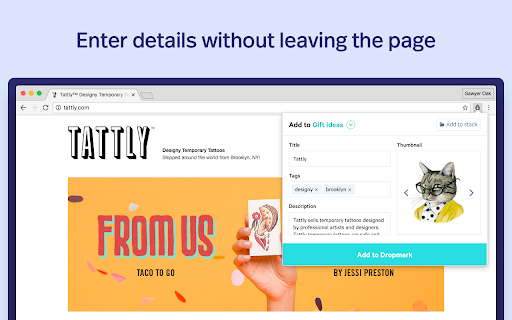


A quick way to add links, images, and screenshots to your Dropmark collections. The "Add to Dropmark" extension is the quick way to add links, images, and screenshots to your Dropmark collections. Click the Dropmark toolbar button, right-click anywhere on a page, or drag and drop to quickly add an item to Dropmark. Dropmark is the smart way to organize all your links, files, and notes into visual collections.

Screenshot & Bookmark Manager by Lasso
Collect ideas to inspire your creativity. Save screenshots, web links and more. Save time by quickly capturing screenshots with the Lasso extension. You can capture the visible area, the full page, or custom area. You can then add comments, lines, shapes to easily communicate your thoughts on the screenshot. Save the screenshot to a cloud service (lasso) or slack, or anywhere else by copying and pasting the screenshot. When you save the screenshot to Lasso, you can optionally create a shareable web page for your image. You can then copy and paste the shareable URL. All of these capabilities reduce the steps require to communicate your thoughts to others or save for yourself. Save up to a thousand screenshots for free or upgrade for advanced features and storing more screenshots. Lasso also offers team capabilities.

Hypershoot
Capture fullpage snapshots of your favorite websites & organize them. Hypershoot is a bookmarking tool made for designers. Save and manage your favorite pages on Hypershoot easily with our extension. Organize your favorite websites Organize your inspiration by boards, tag websites with your own keywords, rate the pages to quickly find what you need when you need it. Find and save your inspiration You can count on Hypershoot and its community of designers to discover the best websites and designs. With this Chrome extension, save websites to Hypershoot directly from your browser. Benchmark and share your library Use the boards to group your inspiration by project, client, team, etc. Every board can be shared and be viewed by anyone.

Savee
Savee is where over a million designers and creatives find and save inspiration. Our Chrome extension is the fastest way to bring anything you love on the web into your feed. Four ways to save: -Open Savee on any site. We scan the page so you can save any image or video in one click. -Hover over any image or video. A Savee button appears. Click it and it lands in your feed. -Right-click any image or video and choose "Add to Savee" from the menu. -Use the screenshot tool to capture any part of a page straight to your profile. Every save can go to the board you choose: client work, moodboards, private collections, whatever you're building. Prefer a quieter browse? Every save method can be toggled on or off in settings, so the extension works the way you want.

Are.na
Assemble and connect information. Are.na is a platform for connecting ideas and building knowledge. You can build simple collections of content by adding links and files of any kind. Connect ideas with other people by collaborating privately or building public collections for everyone. With no ads, likes, or recommendations, Are.na is a more mindful space where you can work through any project over time. It's a place to structure your ideas and build new forms of knowledge together.
