
bcenajpoioobmbmakldolfepddgioegm

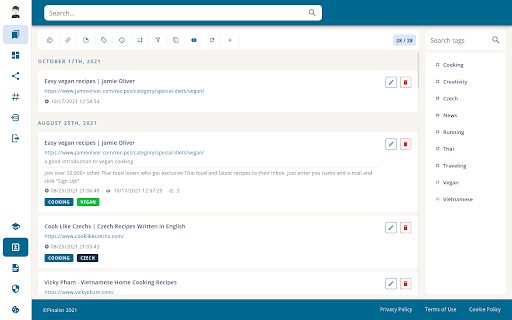
Pinalist is a cloud-based all-in-one bookmark manager that helps with managing, organizing and searching your bookmarks. Pinalist extension connects your Chrome browser with https://pinalist.com app so you can save your bookmarks with ease. Build your bookmark library in just a few clicks Pinalist is aimed at those who want to browse the internet more efficiently. It provides a fast and easy way to collect and organize your bookmarks while browsing. The best way to stay organized Pinalist is designed to make bookmark organization a seamless experience. The app provides a simple way to save and categorize bookmarks using advanced tag management. Quickly access hundreds of links for different resources, projects and for personal use. Capture your thoughts Leave notes along with your bookmarks so you can remember, understand and learn as you read. If you find a piece of text particularly interesting, just save it along with your bookmark. Searching, filtering and sorting Pinalist is designed to make the process of finding bookmarks as simple and intuitive as possible. Search through your bookmark library using keywords and tags as well as sort the results using a number of criteria. Pin your favorite bookmarks Use the dashboard to group and highlight the bookmarks you visit on a daily basis. Drag and drop the groups according to your needs. Share bookmarks with others Create a page with your personal bookmark collection and share it with friends and co-workers. Let others collect their thoughts and have an open discussion in the comments section.

Bookmark Ninja - Bookmark All Tabs
Bookmarks all tabs in the browser with once click - Access your bookmarks on any device (desktop, notebook, mobile) in any browser - All bookmarks are private by default, sharing is available optionally - Import your current bookmarks from your browser or any other bookmark manager - Quick access support for frequently used bookmarks - Support for handling and organizing large number of bookmarks with advanced tag management - Clean and simple UI with optional Dark Mode for a user friendly experience

online / offline Bookmark Manager
I am a software developer and this is a project that I created as part of my profile. I update this from time to time - as I learn new skills. I also fix reported bugs. This extension does not upload any data online - neither does it fetch / download anything. Feature summary: - 1. USE SHORTCUT - Ctrl+Shift+F - it is default for this extension (set shortcut in chrome if it not working). To open a link in new tab, hold Ctrl key while clicking on the link. 2. This is just an editor - it doesn't mess up your data or store it anywhere - nothing is uploaded online. Turn on sync in your browser if you want to see your mobile bookmarks here. 3. You can change theme using icons on top left - you can also CREATE a new one from there. You can only edit the themes you yourself create. 4. Hover on icons for tips. 5. Interface is easy to understand and support drag/drop. You can go into edit mode (by clicking pencil icon on top right) - then you can select multiple things and then drag drop them at the same time. 6. You can drop folders on left panel / menu - then you can open them in full view as shown in screenshots. Then you can also move things into those folders using drag / drop or you can set a home folder. 7. Use right click options - you can rename, hide names to show only icons on bookmark bar. 8. No undo yet - you can undo anything by going to chrome's bookmark manager and then using Ctrl + Z. Will maybe add undo sometime in late 2024. 9. Please report bugs and share any feedback. Some detailed explanations: - The extension is mostly useful if you have a lot of bookmarks. I appreciate feedback (especially positive ones) - I do get to things eventually. Please report bugs - via comments/emails. BASIC IDEA: To view and manage bookmarks on full screen. It shows and edits in chrome bookmarks - move / rename / delete etc in a full tab view like a website. HOW I USE THIS: I personally use it to view my mobile and other bookmarks occasionally and to hide some of their names so that they show as simply icons on the bookmarks bar(use right click). Also I have pined a few folder onto side - then I just DRAG and DROP bookmarks onto the pinned one - to quickly move things. Also when searching for some projects, I tend to create its separate folder. Pin it to side and set it as home. Whenever if I have to check links later, just press shortcut and all the links show up on screen in full page. SYNC DATA across devices: It does not interfere with chrome's built-in data synch-up process. So you can bookmark something on phone and after google syncs your data it will show up in the extension. GROUP: To show folders together and bookmarks sorted alphabetically (by url). It has a button on top right. DUPLICATES: Button on top-left side to check if you have any. RIGHT CLICK: things such as rename, delete, hide name in bookmark bar, show in parent folder (can be useful when clicking something you found through search). DRAG/DROP: You can use it to move bookmarks/folders to another folder. Or pin a folder to side bar (maybe set it as home later - right click). ROW-WISE / COLUMN-WISE: Button in top right. Its used to switch the direction in which the bookmarks are arranged. Whether the rows are filled first or are the columns filled first. Tips: 1. Use Ctrl + F (chrome's feature) to find bookmarks from time to time. 2. Use Right click menus. They have features like show in folder (in search). 3. Edit Mode : Button in top right. It just allows you to select and apply simple operations - move, delete - to multiple bookmarks/folders at once.

Pau | Bookmark Manager
Organize your bookmarks fast and easy with Pau bookmark manager A powerful browser extension to boots your productivity on your day-to-day, it's the easiest way to save, access, organize and manage your most used links and bookmarks Group your bookmarks by collections Create collections by context to stay organized. - set it once and forget about it. Multiple Layouts Customize the layout to make it work the way you want it to. - take advantage from each one. Share Collections Share your collection easily with your team/clients. - it's like givint them the whole context Use the theme that fits you Choose the best theme that better fits your personality. - try out the featured ones! Check out trending themes in here: https://www.pauapp.com/themes

Bookmanize - Advanced bookmark manager
Advanced bookmark manager provides tagging, instant sorting, and filtering among all bookmarks on a full list view. Bookmark manager with a clean user interface where all bookmarks can be easily accessed in one full list view with tagging, instant sorting, and filtering. Organize your bookmarks with custom tags and faster navigates between them. We are an independent team of developers who love what they do:) If you want to improve or expand anything - email us bookmanize@gmail.com Support us with a cup of coffee - https://www.buymeacoffee.com/bookmanize ★ All bookmarks on one screen ★ Fast access to all main functions ★ Instant searching, filtering, sorting, adding, deleting bookmarks ★ Drag n drop bookmarks and folders All the features that the default bookmarks have (add, delete, sort, drag and drop bookmarks) in a more user-friendly interface with high performance for a large number of bookmarks Note: Your data (history and bookmarks) is not saved or stored anywhere else but on your computer. Hotkeys: - ctrl+shift+f or command+shift+f — focus the search field
