
bboobhaeifmkebdnagpdjdhbdjacabag

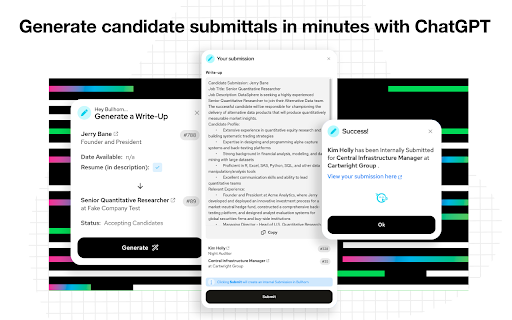


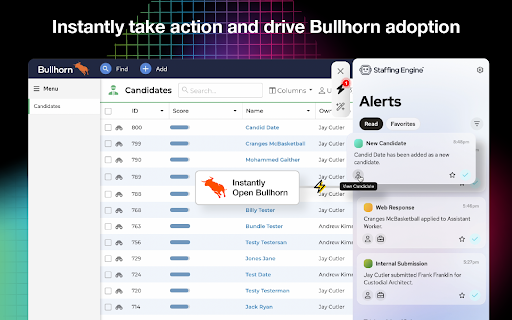
Give your recruiters and sales reps an AI Assistant to increase productivity and accelerate your staffing firm’s growth. Get your team out of messy email inboxes where things get lost. With the Staffing Engine AI Assistant, your team will get real-time alerts to enable them to respond faster to hot opportunities, increase productivity, and place more candidates. Whether you’re sourcing talent on LinkedIn, searching for that perfect resume on a job board, or checking your email, the Staffing Engine AI Assistant will alert you to new activity from your Staffing Engine in Bullhorn so you can take immediate action on important items. Instantly take action and drive Bullhorn adoption Getting your team trained and tuned into your recruiting process can be tricky. With real-time alerts from activity in Bullhorn, your team can stay in the loop and take immediate action. Increase productivity and react to opportunities faster Emails get lost in messy inboxes and should be for communication, not notifications. With Engine Alerts, your team can instantly open Bullhorn from any webpage. Motivate with team-wide placement alerts Giving shoutouts to team members for performance is motivating. With Engine Alerts, you can centralize your notifications and send placement notifications to your entire team. Choose alerts that matter most to you Opt-in to the alerts you’d like to see including candidates and jobs added, client submissions, interviews, submissions, placements, and more. Get a window into your recruiting process Email inboxes aren’t made for real-time notifications. With Engine Alerts, you can filter alerts in your activity to easily see exactly what’s been happening all in one easy-to-read feed. Route new candidates and clients faster “Time kills all deals.” If you don’t respond fast enough people will go to the next competitor that does. With Staffing Engine, you can use smart logic to distribute new candidates and leads to the right team member and alert them in real-time. Stay on top of every detail of the process Staying on top of everything happening in the recruiting process can be tough. By favoriting alerts, you can easily remember and come back to them later. Close the loop on remote work Now that we’re remote it can be hard to stay connected. With Staffing Engine, you can integrate MS Teams or Slack with your Bullhorn database to keep everyone on the same page. To learn more about our Engine AI Assistant and the Staffing Engine Recruiting Acceleration Platform visit staffingengine.ai

CloudCall Unified Communications for CRM
Make, record, categorize and replay calls directly in Google Chrome Provides a single point of access that allows you to call, text and send instant messages, streamlining your user experience. CloudCall: Bringing Together IM and SMS with your CRM Send SMS and instant messages and capture these conversations in the CRM contact record. CloudCall brings together the many voices of your company’s communications by integrating Instant Messaging, SMS and Voice into a single interface. We are proud to have helped hundreds of businesses maximize their experience and CRM capabilities. Be more efficient with single click-to-dial from your CRM or expand your reach by expediting outbound calling activities with the power dialer * Capture all interactions by sending text messages within your CRM and easily search by keywords. Ensures that records are complete and that project handoffs are seamless. * Drive instant collaboration with instant messages to colleagues or teams. Toggle with one click to begin saving pertinent details to candidate, job and contact records. * Capture best practices by monitoring or joining calls in real-time to provide guidance. Share recordings of successful calls and best practices, for more effective onboarding, training, and employee retention. * Personalize the caller’s experience with inbound screen notifications, which open the caller’s record so that you’re aware of the caller and their experience with your business. * Easily capture all interactions. With each conversation, details are automatically saved in your CRM. Access call recordings and messages directly from the contact's record. * Access valuable business insights by creating and analyzing real-time reports and dashboards around team’s activities.

Dialpad Chrome CTI
Embed the Dialpad CTI to make phone calls and send messages without leaving Chrome. The Dialpad Chrome Extension makes calling and texting in your Chrome browser a breeze. Seamlessly click to call or text any phone number that appears in your browser and access powerful Dialpad features including your communications history, contact profiles, and call center status without leaving Chrome. Users can set up the Chrome extension in minutes and choose to use the extension in multiple preset apps without any additional configuration. Click to call and text: Hover over numbers within your chrome browser tab to seamlessly dial and send messages with Dialpad. Click on Dialpad links even when they are not recognized as hyperlinks. Chrome CTI dialer: Use the CTI to make and receive calls without leaving Chrome. Choose to set your call center status, set yourself to do-not-disturb, manage your contacts, and view all your recent communications history all within the dialer. Effortless setup: Use the CTI with preset websites. No additional configuration needed. Customizable settings: Opt out of preset websites or set up your own through your Dialpad web settings. Getting started: 1)Download the extension 2)Click on the Puzzle Icon (Extensions) on the top right 3)Click on Dialpad CTI Extension 4)Log-in 5)Make sure you are on a Google website/domain* and refresh your browser tab 6)Click on Dialpad CTI Extension again and ‘Launch CTI’ Note: For websites that are not included with the package, like your own company page or preferred website/email/system, you’ll need to add the domains to your Dialpad Settings first. Please refer to this article (https://help.dialpad.com/hc/en-us/articles/4496324816795) to get started.

Sense Messaging for Chrome
Popover view of the Sense Chat application You're a human, text like one. Text Messaging built just for staffing Text anyone—contractors, candidates, clients, and prospects—directly from your ATS, right on the web The Sense Messaging Extension for Google Chrome allows you to instantly communicate via SMS with all of your contacts directly from your desktop. Communicate and engage with talent in the channel your candidates prefer. All of your messages and contacts are synced between the Chrome Extension and Sense Web, iOS, and Android apps to allow you to easily manage texting conversations from your desktop. All with full visibility back into your ATS and Sense Engage Platform with full and native integration. - Send and receive text messages right from the web - Manage multiple conversations all in one inbox - Showcase your personality with images, emojis, gifs and more - See full candidate communication history - Schedule broadcast messages and transition to one-on-one conversations from your ATS - Click to start conversations from directly within your ATS with phone number detection - and so much more!

Ebsta for Bullhorn
ebsta for Bullhorn connecting you to Bullhorn in Google Chrome. Ebsta for Bullhorn Easily manage all your contacts, candidates and sales efforts in Bullhorn without interrupting your day. BENEFITS • Retain and share more knowledge across your business • Significantly reduce workflow and improve company performance • Increase the ROI of Bullhorn, LinkedIn and Job boards • Identify more sales opportunities FEATURES • Search, view and edit Bullhorn records without logging in. • Create client, contact and candidate records from any web page • Attach people found on the web to shortlists and distribution lists • Create tasks and notes on the fly Ebsta doesn't try to change the way users work. Instead we make it super easy to engage with Bullhorn whilst browsing websites in Chrome.
