
jfeiiafdlajdfijkagdncomkjjpadogg

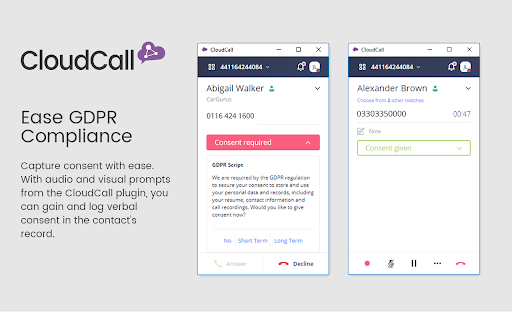
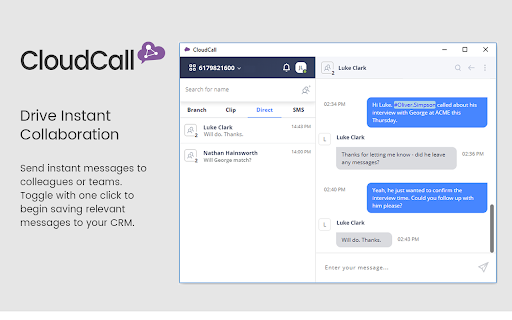
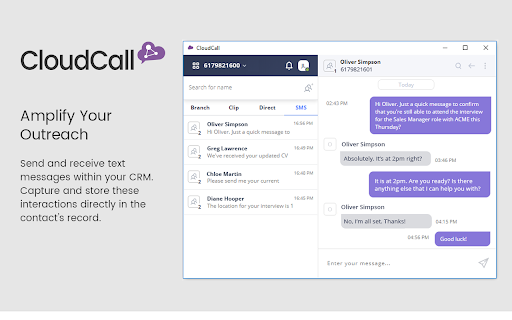
Make, record, categorize and replay calls directly in Google Chrome Provides a single point of access that allows you to call, text and send instant messages, streamlining your user experience. CloudCall: Bringing Together IM and SMS with your CRM Send SMS and instant messages and capture these conversations in the CRM contact record. CloudCall brings together the many voices of your company’s communications by integrating Instant Messaging, SMS and Voice into a single interface. We are proud to have helped hundreds of businesses maximize their experience and CRM capabilities. Be more efficient with single click-to-dial from your CRM or expand your reach by expediting outbound calling activities with the power dialer * Capture all interactions by sending text messages within your CRM and easily search by keywords. Ensures that records are complete and that project handoffs are seamless. * Drive instant collaboration with instant messages to colleagues or teams. Toggle with one click to begin saving pertinent details to candidate, job and contact records. * Capture best practices by monitoring or joining calls in real-time to provide guidance. Share recordings of successful calls and best practices, for more effective onboarding, training, and employee retention. * Personalize the caller’s experience with inbound screen notifications, which open the caller’s record so that you’re aware of the caller and their experience with your business. * Easily capture all interactions. With each conversation, details are automatically saved in your CRM. Access call recordings and messages directly from the contact's record. * Access valuable business insights by creating and analyzing real-time reports and dashboards around team’s activities.

Streak CRM for Gmail
Manage sales and customer relationships directly inside Gmail. Streak is the CRM that lives in your Gmail inbox. Track deals and relationships inside Gmail with Streak CRM. Whether you're a sales professional, business owner, or freelancer, Streak helps you organize emails and close deals without leaving your inbox. ➤ Key Features: 📧 Gmail Integration: Fully embedded in Gmail. Syncs with Google Calendar & Drive. 📊 Customizable Pipelines: Track deals, support tickets, orders, fundraising, and more. 📈 Reports & Analytics: Pipeline status, conversion rates, activity trends, exported for deeper insights. ✅ Task Management: Set reminders, to‑dos, and deadlines. ⚙️ Integrations & Automation: Connect with the apps that power your business and automate repetitive tasks. 💼 LinkedIn Integration: Instantly add leads from LinkedIn to Streak. 🤖 AI Co-pilot: Smart data entry, deal summaries, Q&A, and call & meeting agenda generation. 📬 Email & Link Tracking: See when emails are opened and links are clicked. 📨 Mail Merge + Auto Follow-Up: Send personalized emails to multiple recipients and boost reply rates. 👥 Team Collaboration: Share pipelines, track team progress, and work together in real time. 📱 Mobile Access: Use Streak on the go with Android & iOS apps. 🔒 Enterprise-Grade Security: Built on Google Cloud with rigorous privacy standards. Join 750,000+ professionals who trust Streak to manage their customer relationships and close more deals - right from their inbox. 📌 Install & Get Started 1. Click “Add to Chrome.” 2. Authorize Streak in your Gmail account. 3. Pick a pipeline (sales, hiring, support, fundraising). 4. Import or add leads from your inbox to start tracking conversations and deals

Confluence Chrome Extension - Meetical
Chrome Extension for Confluence to create Meeting Notes directly from your Google Calendar. Quick and easy meeting management. Meetical is your ultimate calendar and meeting productivity tool for Confluence & Jira! Instantly generate Meeting Notes from your Calendar and automate recurring Meeting Notes. Efficiently manage Tasks, perform quick searches, and seamlessly open Jira issues—all while minimizing context switching. 1) 👉 CREATE Meeting Notes in Confluence with a click of a button, directly from your Google Calendar. 2) 🦾 AUTOMATE -> Automatically create pages for recurring meetings. Mention and notify participants automatically to gather input more effectively. Automatically structures meeting notes hierarchically and keeps naming consistent. 3) 🔗 DIRECT LINK from any event on Google Calendar to the corresponding Confluence page. You and all participants will find the page faster. Preparing and making contributions becomes a breeze and a habit for everyone! 4) 📊 TEMPLATES to standardize and save time! Create your own or use built-in templates For Retrospectives, Daily, Team Meetings, 1-on-1 Meetings, Weekly Tactical Meetings, Strategy Meetings, Executive Meetings, 5) 🧩 DASHBOARD to manage all your Confluence tasks, see recent meeting pages, search Confluence and manage all your tasks! New Notification Badge for overdue tasks to keep you on track. NEW: 🔀 Link Events to Existing Pages! 🔓 Restrict page access to "participants only" for confidential meetings. 1️⃣ Use a Single Page to track Meeting Series, or use 🔢 One page for each Meeting occurrence 🙋♂️ Important: Requires the following Confluence App to be installed from the Atlassian Marketplace: https://marketplace.atlassian.com/apps/1222405 (Free for under 10 users, Free 30-day trial for Standard) Save time, organize meeting notes faster, find information instantly, keep everyone more accountable and keep your team productive. Get Meetical! ✅ Create meeting notes faster ✅ Use powerful automations to free your mind from recurring admin tasks ✅ Find meeting notes faster (by direct link, full-text search, meeting report macros) ✅ Consistent page titles, attendee lists, everything up-to-date with your calendar ✅ Drastically reduce context switches between Apps ✅ Don't miss important tasks, action items, past decisions and keep everyone on the same page Every key meeting you automate or for which you instantly create a note will be linked to a Confluence page right in the calendar invite and include up-to-date meeting information. With this chrome extension you can create and link a Confluence meeting notes pages directly from your calendar. It's easy and fast and does not require you to switch between different tools or manually enter the same information over and over again. The meeting page will get created instantly and a link will be added to the calendar invite. Better meeting notes, create more frequently and the whole process is much more user-friendly. Meeting notes get much easier to find for everyone. Additional features ⭐️ Use amazing templates for team meetings, tactical meetings, 1-on-1 meetings and much more. You can even build and use your own templates! ⭐️ Recurring Meetings can get auto-created for you, by a number of days in advance you define. ⭐️ Recurring Meetings are automatically grouped under a parent folder which contains useful reports. ⭐️ Every recurring meeting contains a macro with all open action items in the series. Reviewing any open action items in a series becomes easy. ★ How the Confluence Chrome Extension works: - Adds a new button to create Confluence pages base on any event on your calendar directly from your Google Calendar. - Choose the target space, parent page, and a page template. - All event details such as date, time, location, attendees and description are synced for you to the Confluence Page. Everything stays up to date with the calendar event. - A link to the page is added at the bottom of the event description. Optional. We recommend this to give all meeting participants immediate access to the Agenda and Meeting Minutes. - If an existing Confluence Meeting Page for an event could be found, a link to open the page will appear to find pages quickly and avoid duplicate pages for the same event across users. ★ Installation Guide: - Installation guide: https://www.meetical.io/learn/setup-confluence-chrome-extension - Quick start: https://www.meetical.io/learn/confluence-chrome-extension-quick-start - Complete Documentation: https://www.meetical.io/learn ★ New to Confluence, Jira, Templates and Meeting Notes? 🤓 Check out our Introduction and Ultimate Guide to Confluence Meeting Notes: https://www.meetical.io/learn/confluence-meeting-notes-guide 📕 All you need to know about Confluence Templates and how to create Templates: https://www.meetical.io/learn/create-your-own-custom-confluence-templates ★ Setup of the Confluence Chrome Extension 1. After you install the Extension, navigate to the edit screen of any existing event on your Google Calendar or create a new event. 2. The edit event screen will show a new section under the location of the event, asking you to "Login" in order to use the Extension. 3. Simply log in with your Atlassian Account and follow the quick start setup. ★ More on the philosophy behind Meetical: For every important meeting have a collaborative document, to gather input and share results and minutes. How can you keep meetings small and effective and at the same time avoid conflicts and involve all interested parties? Meetical helps you to keep your meetings effective. For every important Meeting, create a Meeting Page on Confluence and make it accessible to all interested parties. Include all essential information on that page and link the page in the the event description. We recommend to create a meeting page with the agenda at least 2 or 3 days in advance to the meeting to gather input and refine the meeting participant list. Only include who can make active contributions. Make the meeting goals and agenda clear. During the meeting, do live collaborative note taking and if possible make the notes visible to everybody on a separate screen. After the meeting, share the results with all participants and also with all interested parties to help your company embrace an open work culture. Keep spectators out of the meeting and make nobody feel excluded by sharing the agenda and meeting results beyond the participant list. Get Meetical from the Atlassian Marketplace! *** - Firefox user? Check our Firefox Add-on for Confluence https://www.meetical.io/learn/setup-confluence-firefox-add-on - Outlook user? Check our Confluence Outlook Add-in for Microsoft 365 https://appsource.microsoft.com/en-us/product/office/wa200002105 *** What's Meetical? Meetical is a Meeting Management App, based on the Atlassian tool stack. It enhances both Confluence and your Calendar, and makes Meeting Notes collaborative, easy and effective. The full name of the App is "Meetical Meetings for Confluence". Do I need Confluence to use Meetical? Yes you need Atlassian Confluence. You can get started for free: https://www.atlassian.com/software/confluence Do you offer a free solution? We do no longer offer the Free Basic Version as of October 1st 2023. But the App remains free for instances with under 10 licensed users and you can start a free 30-day trial which can be extended if needed. https://marketplace.atlassian.com/1222405 How is it different from other Meeting Management Software? Other vendors like Fellow or Hypercontext ship an entire new software stack which comes with a proprietary editor, limited integrations compared to Atlassian tools, mostly rudimentary templates, disconnected permission management, and yet another expensive software priced per user. Meetical delivers a Meeting Management tool based on your existing Atlassian toolchain, with seamless Google/Microsoft integration at a highly competitive price. With a better editor, automations for meeting series, a huge app ecosystem for many more use cases, best-in-class data security and permission management based on Atlassian/Microsoft/Google, more seamless integration, templates, powerful macros and advanced reports. Does Meetical help with transcriptions and support Google Docs? While other tools like Supernormal or Transkriptor focus on providing transcriptions, automated summaries and AI buzz, we focus on helping teams to take less, but better notes. And we help teams make results traceable and actionable. How does it compare to Hypercontext? While Hypercontext is mostly focused on Leaders managing their 1-on-1 Meetings, Meetical supports the entire spectrum of tactical meetings, including Scrum Meetings, while still being great for 1-on-1s. Do I need Atlassian Jira to use Confluence and Meetical? You don't need Jira, only Confluence is required, but you can certainly link any Jira issues on the pages etc. Our Chrome Extension also recognised Jira issues in Confluence Tasks and renders Links to those issues. Is my data secure? Yes, your meeting data at rest is protected by Atlassian's world class, enterprise ready cloud security infrastructure. We only act as data processor and are committed to keep your data secure on our side with industry standards and security best practices. Find out more: https://www.meetical.io/product/security How much does Meetical cost? Meetical is free for under 10 users and is priced around ~1$/user/month, please find all details on the app's pricing page: https://marketplace.atlassian.com/apps/1222405/meetical-meetings-for-confluence-outlook-google-calendar?tab=pricing&hosting=cloud Do you offer more Apps for Atlassian Jira/Confluence? Yes, we offer two more apps at current point in time. The first is Task Reports for Jira, which allows you to create Confluence Task Reports right in Jira Dashboards, and also embed complete Confluence pages on Jira Dashboards. Marketplace Page: https://marketplace.atlassian.com/apps/1229490/task-reports-for-jira-confluence-gadgets-calendar-gadget The second App can sync your Jira Issues and Tasks right into your calendar to help you and your users stay on top of planned changes, features, releases and much more. Marketplace Page: https://marketplace.atlassian.com/apps/1229489/easy-calendar-integration-for-jira-sync-issues-ics-export Ready to get Meetical? Start today and level up your meeting productivity!

Salesforza Gmail Mail Merge & CRM on GSheets
Chrome Extension CRM for Gmail leveraging Google Sheets with ability to create mail merges Increase sales 📈and improve customer relationships 🤝by managing Gmail with SalesForza: 🔄 Always in Sync (between Google Sheets & Extension): No time wasted importing/exporting csv files 💰Enrich your CRM: Add priority, stage, notes plus more fields (ex. Location, Firstname...) 🤖Automatically capture Email’s subject line, email of the sender or recipient 🔐Your data is stored directly in the same cloud as Gmail and Google Sheets 🔮We plan to build more features which you can vote on our public roadmap so that we can prioritize them together with all of you → Invite link: https://trello.com/invite/b/qZcER0wq/64162b342418211b3dcce39d62c90d21/public-salesforza-crm-main-chrome-extension-youtube-influencers-etc ⛓Integrate with other apps and services via Zapier and similar tools 📤 Automatically schedule emails to more recipient with personalization 📅 Integrate with Google Calendar ⏰ Set to dos and actions potentially synching with Google Tasks 🔔 Set reminders and snoozes for emails ❤️ Quickly favorite emails with one touch 💰 Easily send invoices and business proposals

Auto BCC for Gmail™ by cloudHQ
Setup automatic blind copies to your CRM or any other email address With the Auto BCC for Gmail by cloudHQ Chrome extension, you can automatically blind copy (or copy) specific people on specific emails so that you can rest assured that whoever should have a copy of your email, automatically does. ✅ Automatically CC or BCC another email address (like another one of your email addresses, your boss, your assistant, etc). ✅ Multiple rules based on your "from" email address: —Only email messages that you send from your professional email address will be CC or BCC'ed to an email address of your choice. ✅ Multiple rules based on your receiver's email address or domain: — Emails sent to certain contacts (for example, important clients) automatically have a CC or BCC included in your emails. ✅ Exclusion rules based on your receiver's email address or domain: — Emails that you send to your private contacts or internal company contacts do not get CC'ed or BCC'ed to anyone. ✅ Full support for Salesforce CRM, HubSpot CRM, and other major CRMs. Website: https://www.auto-bcc.com/ Pricing: https://www.auto-bcc.com//pricing Support page: https://support.cloudhq.net/category/browser-extensions/auto-bcc-for-gmail/ Blog: https://blog.cloudhq.net X: https://x.com/cloudhq Facebook: https://www.facebook.com/cloudHQ
