
febgikmgbjnbmpodlhljpnnoeappdeck
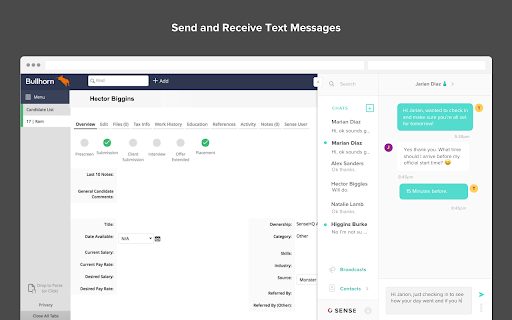
Popover view of the Sense Chat application You're a human, text like one. Text Messaging built just for staffing Text anyone—contractors, candidates, clients, and prospects—directly from your ATS, right on the web The Sense Messaging Extension for Google Chrome allows you to instantly communicate via SMS with all of your contacts directly from your desktop. Communicate and engage with talent in the channel your candidates prefer. All of your messages and contacts are synced between the Chrome Extension and Sense Web, iOS, and Android apps to allow you to easily manage texting conversations from your desktop. All with full visibility back into your ATS and Sense Engage Platform with full and native integration. - Send and receive text messages right from the web - Manage multiple conversations all in one inbox - Showcase your personality with images, emojis, gifs and more - See full candidate communication history - Schedule broadcast messages and transition to one-on-one conversations from your ATS - Click to start conversations from directly within your ATS with phone number detection - and so much more!

ChatGPT Bulk Delete
A Chrome extension to bulk delete ChatGPT conversations This Chrome extension is designed to help users quickly and efficiently delete conversations in the ChatGPT’s left sidebar. With the extension installed, users can add checkboxes to each conversation in the sidebar, select multiple conversations to delete or archive, and accomplish this with just a few clicks. Hold Shift and click to select multiple conversations for efficient bulk actions. This extension is particularly useful for users who frequently use ChatGPT and need to manage their conversations efficiently. Instead of deleting conversations one by one, users can remove multiple conversations at once, saving both time and effort. Additionally, this extension now offers a “bulk archive” feature for a one-time fee of $0.99 USD. This paid feature allows users to archive multiple conversations simultaneously, further enhancing the tool’s utility and convenience. The extension popup includes a small advertisement labeled “Ad” in the footer, linking to TubeVocab (https://www.tubevocab.com/), a third-party language-learning product. This ad helps support the continued development and free distribution of ChatGPT Bulk Delete. Clicking it is entirely optional and does not affect any of the extension’s core functionality.

HelloScreen Screen Sharing for Chrome
Instant, multi-cursor screen sharing for Chrome. ⚡ Superfast screen sharing for anyone who sells over the phone. Salespeople rely on HelloScreen to show, not just tell. No Zoom setup, no back-and-forth — just a simple way to add real-time visuals to your calls. ✅ Share your screen in seconds Click "Share Tab" and send a single link. Your customer opens it on any device with no installs or friction. 👀 Make your calls more engaging Explaining next steps, pricing, or a product demo? Show your screen in real-time so customers get the clarity they need to move forward. 🔒 Secure and high-quality Only share the tab you choose — no risk of exposing other screens. HelloScreen delivers a crisp, lag-free viewing experience. 📈 Faster decisions, fewer follow-ups Sales teams use HelloScreen to gain trust faster, reduce follow-ups, and convert 2x more customers — without adding complexity. 💡 Built for sales teams, trusted by thousands of businesses. HelloScreen is brought to you by Upscope, a leader in screen sharing and co-browsing technology. Try it today and see the difference on your sales calls.

Flow Chat for YouTube Live
Chrome Extension for Flow Chat Messages on YouTube Live. - Flow messages over the video. - Change color, size and speed for messages. - Show author and avatar on messages. - Show super chats and super stickers. - Filter banned words. - Add helper menu buttons on the chat list.

Chat Filter for YouTube Live
Chrome Extension for Filtering Chat Messages on YouTube Live.
