
bakbkfnfpkaidfipoedofcbbaebgbooa
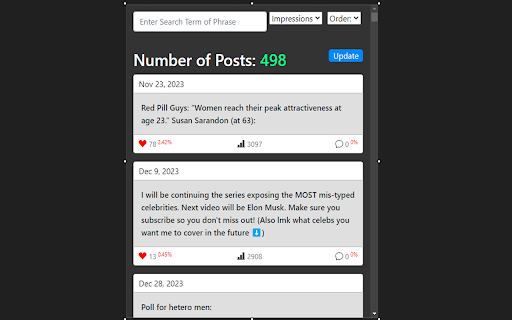


This extension is for YouTube creators who have years of community posts to search through. It allows quick search and filtering of all past community posts. I created it because I conduct a lot of polls and question posts on my YT community page, but if I want to get access to a poll or post older than a few months or years, there's no way to do that without sitting there scrolling and scrolling. IMPORTANT: FOLLOW INSTALLATION INSTRUCTIONS BELOW (Or watch the demo video) Since YouTube doesn't provide post data through their API, I had to create a workaround that downloads the lastest zip file containing your post data. This is why the following instructions are vital to setting up your extension for use. To install this extension, follow these steps (Or watch the demo video): 1. Once downloaded, you will have no post data loaded. Click the "update" button to the right --> "Get Latest Data". 2. This will request your YouTube Channel Id. This can be found in the web url after navigating to your youtube channel in the browser. It usually starts with 'UC' and should be right after "youtube.com/channel/". 2a. Identify the Channel ID: - If the URL follows this format: https://www.youtube.com/channel/UCxxxxxxxxxxxxxxx, the part after /channel/ is your channel ID. - Copy the entire string after /channel/. For example, in https://www.youtube.com/channel/UC1234567890abcdef, the channel ID is UC1234567890abcdef. 2b. For Custom URLs: - If you have a custom URL (e.g., https://www.youtube.com/c/YourCustomURL), click on your profile picture, select "YouTube Studio," then navigate to the "Customization" tab, and find your channel ID in the "Basic info" section. - Alternatively, in YouTube Studio, go to the "Settings" gear icon at the bottom left, then "Channel" -> "Advanced settings." Your User ID and Channel ID will be listed there. 3. After entering your ID, your will be taken to your post information in YT analytics. Wait a few seconds for the page to fully load, as there's often a lot of data to load, then click "Download Post Data." 4. You will be notified when your post data is finished downloading with a red "Download Complete!" message. 5. Click "Select File" and select the zip file that was just downloaded. It should have the word "Post" in the file name. This will unzip the file in the background, and parse the data for use in your extension. It will also show a preview of the raw data downloaded. 6. Click "Finish." This will load your posts into your main extension popup. 7. After you complete this setup, your posts will now load automatically upon use of the extension. 8. If you ever want to update your post data, simply click Update -> "Get Latest Data" again. 9. You can also upload your own zip file with Update --> "Upload Zip File" if you want to get your posts zip file yourself (some users may want to select a different time period than 'lifetime,' like 'last 90 days,' or 'past year.' This also affords better accuracy for more recent posts, since 'lifetime' doesn't show some recent posts, since they often have few impressions).

YCS - YouTube Comment Search (Continued)
Search comments, replies, chat replay, video transcript for the current video on YouTube by contents, authors, time. ❗️ This extension is a continuation of the original YouTube Comment Search (YCS) extension ❗️ Original YCS extension: https://chromewebstore.google.com/detail/ycs-youtube-comment-searc/pmfhcilikeembgbiadjiojgfgcfbcoaa ❗️ What's new / fixed in this version ❗️ ▸ Fixed comment and video transcript loading issues that stopped working around late March 2024. Related issue: https://github.com/sonigy/YCS/issues/56 ▸ Fixed reply count sorting ▸ Prevented potential XSS vulnerabilities ▸ Made filter buttons work properly with text search results ▸ Improved cache-loading performance ▸ Fixed video transcript loading (May 2025) ▸ Fixed chat replay loading (October 2025) ▸ Added YouTube Shorts support ▸ Added real-time live chat recording for YouTube live streams ▸ Added optional YouTube Data API v3 integration as an alternative to the Innertube API ▸ Added member-only streams/videos support ▸ Added support for YouTube nested comments (December 2025) For more detailed change log, visit: https://github.com/pc035860/YCS-cont/releases Features: ✅ Quick search by timestamp, author, content ✅ Export comments, replies, chat replay, video transcript ✅ Flexible (fuzzy) search ✅ Multilingual search ✅ Search by Emoji ✅ Works in incognito mode ✅ Unlimited load comments ✅ Time stamps - show comments, replies with time stamps ✅ Author - show comments, replies and chat comments from the author ✅ Likes - show comments, replies by number of likes (sort largest to smallest) ✅ Replied - show comments by number of replies (sort largest to smallest) ✅ Members - show comments, replies and chat comments from channel members ✅ Donated - show chat comments from users who have donated ✅ Show random comment ✅ Small size, low use CPU and memory Instructions: 1. Open video on YouTube 2. Find the YCS extension under the current video and click the button "Load all" or choose to load the categories 3. Write the search query, press Enter or click the button Search 1) How to like, reply to a comment? In the search results, click on the date (like, "2 months ago") of the comment, reply and will open a new window with an active comment or reply under the video, where you can do any action. 2) How do I find all timestamped comments and replies on a video? Click on the "Time stamps" button under the search bar. 3) How can I find addressed to user's comments, replies? Write " @ " in the input field. 4) How can I view the contents of the video transcript at a specific minute? You can write a search query for Trp. Video, in the " mm:ss " format. For example: " : " - all the text of the video transcript. " 15: " - all the text in the 15th minute. And etc. 5) How can I view the comment for a found reply? Click on the " ▼ " button. 6) How can I see the all replies to the found comment? In the header of the found comment, you can find the reply icon and the count, to see the replies click on the " + " button. 7) How to use search in YouTube shorts? Open a YouTube video short. Click badge YCS (right of the address bar) and click on the button Open YT short. You can use the search engine (YCS), while loading comments, chat, transcript video.

YouTube Channels Tab Alternative
An alternative to the YouTube 'Channels' tab that was removed by YouTube. Missing the 'Channels' tab on YouTube channel pages? Look no further, this extension offers an alternative to bring this tab back! 🤩 👀 Instantly view all channels added by a YouTuber with just one click. 🚫 No more hassle of scrolling to find the 'Channels' section. 🛈 Background YouTube removed the 'Channels' and 'About' tabs from all channel pages in November 2023. Instead, YouTube channels can now showcase channels by adding them as a section on their homepage. Please note that this extension currently only works on the 'Home' tab for YouTube channels that have added this 'Channels' section.

Internet Archive + Video Player
Now, YOU OWN the Internet!! Save & download your favorite imgs/vids from the web, Enjoy! ⊙⊙⊙(BIZNet Extension Catalog): https://biznet-1.square.site/ ⊙⊙⊙ - check out our other awesome extensions! The BEST (and ONLY) source URL File Explorer for the web! Save thousands of files and hundreds of gigabytes using this software. The internet is now YOURS for the taking!!! So what are you waiting for — TAKE IT :) This extension allows a user to locate any video or image on the web that he/she wishes to save as a bookmark, lets them save the url/link (as opposed to the video or image file itself), and subsequently store and export/download their url collection(s).

Show YouTube Video Upload Date
Also display the upload time, customize the date format, show dates of comments, Shorts, live videos and end-of-video Suggestions and Grid with a $1/mo in-app purchase. Free and paid version replaces dates on all pages: - Video page description - Video page sidebar - Search page - Topic sidebar in search - Homepage videos - Subscription page - Channel page home - featured video - Channel page home - For You videos - Channel page home - playlist videos - Channel page videos - Channel page video search - Playlist videos - Explore pages - Music, Gaming, News, Sport Free and paid features: - Replace all relative dates with full dates in local format - Option to show relative date if video was published less than a specified number of days ago Paid features: - Show the time - Show dates and times of comments - Custom date and time formats - Show video date below title in Shorts player - Below Shorts thumbnails - Home, Subscriptions, search, channel pages, playlists, etc - Below thumbnails for live videos and in Watch History - End of video - suggested videos and video grid See website for more information: https://uploaddate.com
