
amdebbajoolgbbgdhdnkhmgkkdlbkdgi
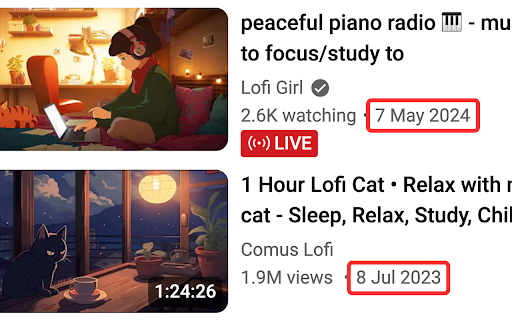


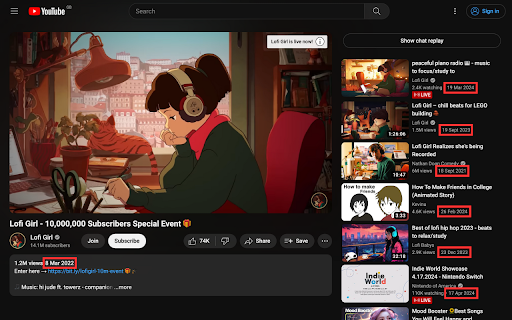
Also display the upload time, customize the date format, show dates of comments, Shorts, live videos and end-of-video Suggestions and Grid with a $1/mo in-app purchase. Free and paid version replaces dates on all pages: - Video page description - Video page sidebar - Search page - Topic sidebar in search - Homepage videos - Subscription page - Channel page home - featured video - Channel page home - For You videos - Channel page home - playlist videos - Channel page videos - Channel page video search - Playlist videos - Explore pages - Music, Gaming, News, Sport Free and paid features: - Replace all relative dates with full dates in local format - Option to show relative date if video was published less than a specified number of days ago Paid features: - Show the time - Show dates and times of comments - Custom date and time formats - Show video date below title in Shorts player - Below Shorts thumbnails - Home, Subscriptions, search, channel pages, playlists, etc - Below thumbnails for live videos and in Watch History - End of video - suggested videos and video grid See website for more information: https://uploaddate.com

YouTube Full Title For Videos
This extension shows the headlines of the video entirely without hiding them partially, as by default. This extension shows the headlines of the video entirely without hiding them partially, as by default. It add a CSS that change height of title, so it is easier to use YouTube.com, because you can see all title and don't need to hover on a title to see it all. The plugin doesn't have any JS, just simple CSS.

YouTube Timestamps
The extension shows timestamps that YouTube users leave in comments. It shows timestamps from the top 100 comments. If YouTube video doesn't have comments with timestamps or the timestamps are not in the top 100 comments the extension doesn't show anything. Timestamps are placed right on YouTube's video timeline. Hover a timestamp on the timeline to preview the corresponding comment. Key features: - Shows timestamps from YouTube comments on timeline. - Works in Fullscreen and Theater modes. - Works for embedded videos. - Dark theme support. - Open Source https://github.com/ris58h/youtube-timestamps NOTE: To scroll a long comment preview scroll on the timestamp you are hovering over. LIMITATIONS: Only timestamps from the first 100 comments are shown.

YCS - YouTube Comment Search
Search comments, replies, chat replay, video transcript for the current video on YouTube by contents, authors, time. The YCS (YouTube Comment Search) is a chrome extension. Search comments, replies, chat replay, video transcript for the current video on YouTube by contents, authors, time. Features: ✅ Quick search by timestamp, author, content ✅ Export comments, replies, chat replay, video transcript ✅ Flexible (fuzzy) search ✅ Multilingual search ✅ Search by Emoji ✅ Works in incognito mode ✅ Unlimited load comments ✅ Time stamps - show comments, replies with time stamps ✅ Author - show comments, replies and chat comments from the author ✅ Likes - show comments, replies by number of likes (sort largest to smallest) ✅ Replied - show comments by number of replies (sort largest to smallest) ✅ Members - show comments, replies and chat comments from channel members ✅ Donated - show chat comments from users who have donated ✅ Show random comment ✅ Small size, low use CPU and memory Instructions: 1. Open video on YouTube 2. Find the YCS extension under the current video and click the button "Load all" or choose to load the categories 3. Write the search query, press Enter or click the button Search 1) How to like, reply to a comment? In the search results, click on the date (like, "2 months ago") of the comment, reply and will open a new window with an active comment or reply under the video, where you can do any action. 2) How do I find all timestamped comments and replies on a video? Click on the "Time stamps" button under the search bar. 3) How can I find addressed to user's comments, replies? Write " @ " in the input field. 4) How can I view the contents of the video transcript at a specific minute? You can write a search query for Trp. Video, in the " mm:ss " format. For example: " : " - all the text of the video transcript. " 15: " - all the text in the 15th minute. And etc. 5) How can I view the comment for a found reply? Click on the " ▼ " button. 6) How can I see the all replies to the found comment? In the header of the found comment, you can find the reply icon and the count, to see the replies click on the " + " button. 7) How to use search in YouTube shorts? Open a YouTube video short. Click badge YCS (right of the address bar) and click on the button Open YT short. You can use the search engine (YCS), while loading comments, chat, transcript video.

YouTube Redux
Replicate old YouTube look and features within the modern layout! Tired of looking for working alternatives to restore old Youtube layout? Embrace the current one modified in order to replicate multiple old styles while still actually using the modern Youtube interface. Features include: ★ Customizable settings! ★ Classic video page layout along with its alternative version that mimics even older layouts ★ Small video player with size presets and pillarboxing ★ Disabling infinite scrolling for comments and related videos ★ Custom number of videos per row on the home page (from default 4 to 1-10) ★ True fullscreen mode ★ Automatic video unpausing during long sessions ★ Ability to restore classic YouTube logo and favicons ★ Precise, non-truncated values for likes/dislikes on the video page ★ Dark theme for playlists that matches old design ★ Hide the 'Autoplay' or 'Play on TV' button ★ Visual changes to home page, search results, channel page, explore pages and others ★ ...and more!
