
baiglioplcbfbnpnlbfjlkcfcllplkbg

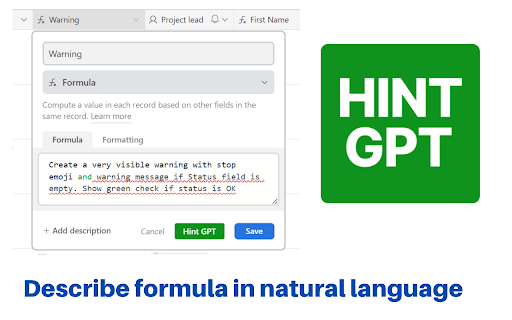
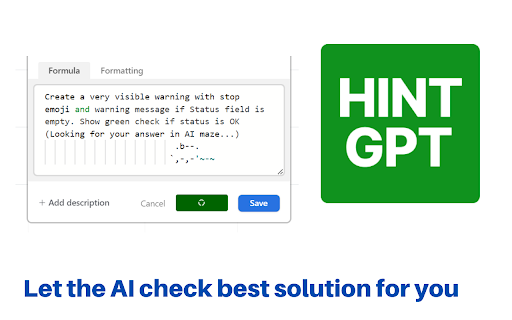
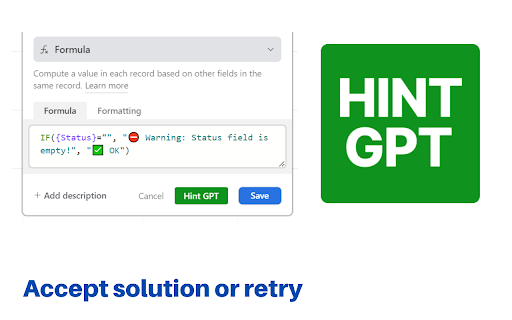
GPT hints for Airtable formula field Sometimes, even those of us who are well-versed in formulas (like we are at Business Automated! 😁) struggle with creating the right Airtable formulas. Writing a new formula can be mentally taxing at times 😉. But don't worry, we're here to help! Whether you're a newbie or an Airtable expert, this Chrome extension can speed up the process of creating formulas in Airtable. If you're just starting with Airtable formulas, this tool can help guide you in the right direction and even provide the final complete formula. For Airtable experts, having an AI robot change all variables in nested IF statements to other ones can be a huge time saver. This tool can also help rewrite formulas, such as from IF to SWITCH. The Airtable Hint GPT Chrome extension Our Airtable Hint GPT extension is based on Open AI's GPT language model. This model uses deep learning techniques to generate human-like text based on a given prompt. Our extension utilizes this technology to help users create Airtable formulas more efficiently. You are able to type what you want the formula to do and see result Type your instruction and get back formula! You can download the extension from the link on the right . The source code of the extension is available publicly via my open source Github repository. Contributions are welcomed. and try couple of ideas for formula like: - Create a very visible warning with stop emoji and warning message if Status field is empty. Show green check if status is OK - How many days between Due date and Kick off - Check if emails in Email field have correct format using REGEX_MATCH() function. Display visible warning in case emails are not correct - If Status is Complete display Task name in capitals with excited emoji at the start Watch full description and walkthrough in this video: https://youtu.be/QEPW_A93_GI

Powersave
Save ASAP with AI. Save more, categorize & analyze as you browse to Airtable, Coda, Notion and elsewhere. 𝗙𝗲𝗮𝘁𝘂𝗿𝗲𝘀 - Extract data and save it to your preferred platform, such as Airtable, ClickUp, Notion and others - Use AI to extract and categorize information for you, no matter where you save - Update corresponding records in your database while you browse the web - Create new Airtable tables in seconds with AI assistance - Autofill URLs, images, headers, descriptions, and more - Take screenshots - Select and focus on specific areas of your screen to achieve more accurate data extraction - Run autofills quickly with keyboard shortcuts - Format text quickly using Markdown shortcuts 𝗨𝘀𝗲𝗰𝗮𝘀𝗲𝘀 ⚡ Save and organize websites, including portfolios, competitor sites, and more ⚡ Content management - quickly add new content and update existing content. Manage Airtable / Coda / Notion content for Softr, Glide and other websites using such database as backend ⚡ Enhance your Airtable CRM by seamlessly updating contacts and organizations when visiting their websites, social media profiles, or communicating across various platforms ⚡ Research - save websites as notes to Obsidian together with custom properties ⚡ Messaging - save websites as formatted Slack messages ⚡ Content auditing - review content under different URLs and save notes ⚡ Social media - save information about followers, posts ⚡ Products - save products of any kind and categorize it to your database ⚡ Migrations - transfer content from legacy websites and migrate to new structures ⚡ Easily add records to your database directly from your web browser ⚡ Trigger automated workflows in platforms like Zapier, Make others

rtlAirtable
An extension to add RTL support for AirTable.com This is still the initial version, it's a very simple, just adding a "direction: rtl" to specific classes in CSS ) , No need to collect any data If you use (airtable) and write in Arabic or other RTL languages, this extension will make you able to read and write texts in the right direction.

Autosave Make & Integromat by MakeMarket.io
Autosave Make.com (former Integromat) Scenarios. You can define prefered saving interval and this extension will automatically save… Autosave Make.com (former Integromat) Scenarios. You can define prefered saving interval and this extension will automatically save the scenarios for you.

LinkedIn to Airtable
Easily add LinkedIn profiles to Airtable with just one click Our browser extension simplifies adding LinkedIn profile data by allowing users to effortlessly store it in Airtable. With just one click on the LinkedIn profile page, customers can quickly and easily organize their information, streamlining their workflow. Our extension is perfect for anyone who regularly uses LinkedIn to collect professional information. Whether you're a recruiter, salesperson, or researcher, our tool saves you time and effort by automatically capturing essential profile data and sending it directly to Airtable. To use our extension, simply navigate to any LinkedIn profile page and click the "Add to Airtable" button. The extension will automatically pull the individual's name, avatar, job title, location, and other relevant information and add it to your Airtable base. With our browser extension, you can effortlessly add LinkedIn profiles to your Airtable base and manage your professional contacts with ease. Effortlessly Add LinkedIn Profiles to Airtable with our Browser Extension in 4 Simple Steps: 1. Install the browser extension from the Chrome Web Store. 2. Grant the extension access to your Airtable account by signing in. 3. Select the Airtable base and table where you want to store the profile information. 4. Navigate to a LinkedIn profile page. and click the "Add to Airtable" button on the top of the page. the extension will automatically extract the individual's name, job title, company, location, and other relevant information from the LinkedIn profile. If you have any questions, please feel free to contact us anytime via email at support@linkedintoairtable.com.
