
cnbfnjnfadkcidlmddmmhkbfbngephmk


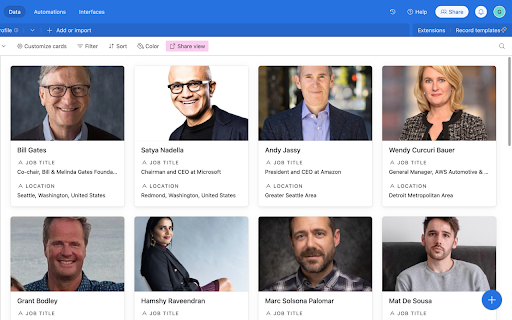

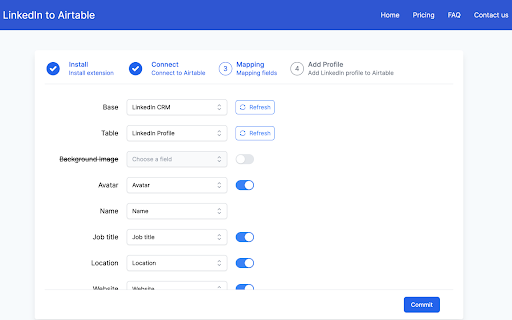
Easily add LinkedIn profiles to Airtable with just one click Our browser extension simplifies adding LinkedIn profile data by allowing users to effortlessly store it in Airtable. With just one click on the LinkedIn profile page, customers can quickly and easily organize their information, streamlining their workflow. Our extension is perfect for anyone who regularly uses LinkedIn to collect professional information. Whether you're a recruiter, salesperson, or researcher, our tool saves you time and effort by automatically capturing essential profile data and sending it directly to Airtable. To use our extension, simply navigate to any LinkedIn profile page and click the "Add to Airtable" button. The extension will automatically pull the individual's name, avatar, job title, location, and other relevant information and add it to your Airtable base. With our browser extension, you can effortlessly add LinkedIn profiles to your Airtable base and manage your professional contacts with ease. Effortlessly Add LinkedIn Profiles to Airtable with our Browser Extension in 4 Simple Steps: 1. Install the browser extension from the Chrome Web Store. 2. Grant the extension access to your Airtable account by signing in. 3. Select the Airtable base and table where you want to store the profile information. 4. Navigate to a LinkedIn profile page. and click the "Add to Airtable" button on the top of the page. the extension will automatically extract the individual's name, job title, company, location, and other relevant information from the LinkedIn profile. If you have any questions, please feel free to contact us anytime via email at support@linkedintoairtable.com.

LinkMatch For CSV
Automated profiles export into to CSV and Excel Profile export + enrichment to CSV and Excel LinkMatch Chrome extension allows you to enrich and save profiles into CSV and Excel files. You can later import the CSV file into your CRM. Instructions for usage: 1. Install the extension and login. 2. Go to linkedin page, and click "add to queue" near the profiles that you want to save. 3. Click "Start" button at the top right corner. 4. After the parsing is done, go to the options page -> URL Parsing -> Export To CSV By installing this Chrome Extension you agree to the Terms of Service - linkmatch.net/terms

Airtable Hint GPT
GPT hints for Airtable formula field Sometimes, even those of us who are well-versed in formulas (like we are at Business Automated! 😁) struggle with creating the right Airtable formulas. Writing a new formula can be mentally taxing at times 😉. But don't worry, we're here to help! Whether you're a newbie or an Airtable expert, this Chrome extension can speed up the process of creating formulas in Airtable. If you're just starting with Airtable formulas, this tool can help guide you in the right direction and even provide the final complete formula. For Airtable experts, having an AI robot change all variables in nested IF statements to other ones can be a huge time saver. This tool can also help rewrite formulas, such as from IF to SWITCH. The Airtable Hint GPT Chrome extension Our Airtable Hint GPT extension is based on Open AI's GPT language model. This model uses deep learning techniques to generate human-like text based on a given prompt. Our extension utilizes this technology to help users create Airtable formulas more efficiently. You are able to type what you want the formula to do and see result Type your instruction and get back formula! You can download the extension from the link on the right . The source code of the extension is available publicly via my open source Github repository. Contributions are welcomed. and try couple of ideas for formula like: - Create a very visible warning with stop emoji and warning message if Status field is empty. Show green check if status is OK - How many days between Due date and Kick off - Check if emails in Email field have correct format using REGEX_MATCH() function. Display visible warning in case emails are not correct - If Status is Complete display Task name in capitals with excited emoji at the start Watch full description and walkthrough in this video: https://youtu.be/QEPW_A93_GI

CRM, Phone Number & Email Finder for LinkedIn
Search, tag, find, and recall every email, phone number, and connection – solo or as a team. LeadDelta is a LinkedIn CRM for networking and LinkedIn phone & email finder. It allows you to manage and organize your network as well as instantly enrich LinkedIn contacts with verified business and personal emails and phone numbers. Built for salespeople, marketers, executives, and recruiters who want to turn LinkedIn connections into revenue. Unlike bulky, generic CRMs, we auto-import, enrich, and let your whole team collaborate—right in your browser, without extra apps or spreadsheets. 🗂️ Centralize and organize your entire network in a lightweight CRM 🤝 Collaborate effortlessly with your team 🔍 Find business & personal emails and phone numbers from LinkedIn in one click 🎯 Create lead lists directly from LinkedIn ☰ Filter your network with over 15 customizable data points 🏷 Sort, tag, and add personalized notes to your connections ✅ Create tasks & reminders 📥 Organize your messy inbox to never miss an opportunity 📧 Send personalized messages at scale and save time 🤖 Leverage AI to enhance your messaging ⬇️ Export and bulk-remove connections in seconds ⬆️ Import contacts easily and streamline your workflows ⚙️ Integrate seamlessly with Zapier and HubSpot (beta) 🗝 Unlock valuable data & signals from your network ⚡️ Build custom workflows to automate processes and boost productivity NEW feature You can now instantly get: ✅ Business emails ✅ Personal emails ✅ Phone numbers Find all essential contact data directly within LeadDelta—no switching tabs, no manual research, no wasted hours. Our smart Waterfall Enrichment leverages multiple top-tier sources, delivering the best verified results every time. ✔️ Say goodbye to manual research ✔️ Stop bouncing between tools ✔️ Works with the contacts you already have ✔️ Flexible, pay-as-you-go credit system ✔️ We charge credits only if we find email/phone Whether prospecting, recruiting, or doing outreach, this will save you hours a week. Build powerful lists: - Find verified Emails and phone numbers directly in LeadDelta - Get contact data from targeted LinkedIn Search lists - Prospect and Enrich decision-makers at target accounts - Find Emails and Phone from LinkedIn Event Attendees Instantly enrich your connections with verified data, simplifying direct outreach and boosting engagement and response rates. Ideal for nurturing relationships, targeted follow-ups, and maximizing your existing network’s potential.

Attio
Bring relationship insights into Attio from Twitter, Google Meets, and more. Attio’s browser extension does all the heavy-lifting for you, wherever you are on the web. With a click, you can add a lead from Gmail, Twitter, or even your Google Meets call, straight into your workspace, all enriched with valuable data. You can do so much more with Attio’s browser extension: • Run automations to speed up your workflow • Edit custom attributes • Edit data from associated lists and companies • And everything’s synced in real-time
