
icahgdmgclkaefekamnnjhpgpphjlmib
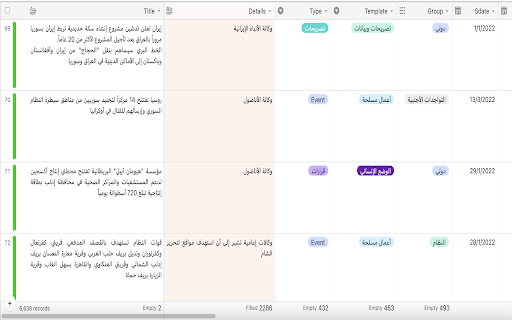
An extension to add RTL support for AirTable.com This is still the initial version, it's a very simple, just adding a "direction: rtl" to specific classes in CSS ) , No need to collect any data If you use (airtable) and write in Arabic or other RTL languages, this extension will make you able to read and write texts in the right direction.

Airtable web clipper
Clip web content to your Airtable bases. Clip text, links, images, and more directly from the web to Airtable with just a few clicks. Customize your web clipper to meet your needs and get the information that matters most to you: if you want to save screenshots, pull images directly from a page, label content with custom tags, or assign clips to team members, you can do it all—without leaving your current browser window. Best of all, every clip you make is automatically stored in a flexible database that you can filter and sort in seconds. The Airtable web clipper is part of Airtable Extensions, a Teams plan feature. Extensions let you extend the functionality of your bases: you can use extensions to bring new information into Airtable, visualize and summarize your records in colorful ways, and even directly integrate your Airtable bases with your favorite apps. To use this extension, you need to have at least one web clipper extension added to one of your Airtable bases. Learn more here: https://support.airtable.com/docs/using-the-web-clipper-browser-extension

LTR-RTL
This extension allows you to change web page text direction. This extension allows you to change the web page text direction. This is useful when you are viewing right to left text such as Hebrew or Arabic in an application that displays from left to right. Note 1: If one or both of the shortcuts don't work, it means that something else is mapped to them. Chrome allows you to remap extension shortcuts, and you can remap the shortcuts to something that isn't in use. Alternatively, the extension adds an item to the Chrome right click menu, which you can use to switch text direction instead of the shortcuts. Note 2: The language direction will only change for HTML elements that don't have a specified language direction.

RTL Responder
Changes the text direction in the Claude AI interface to right-to-left (RTL). # RTL Responder - Hebrew & Arabic Support for Claude AI An independent extension that enhances Claude AI experience for Hebrew and Arabic speakers. This extension is not officially developed or supported by Anthropic. Key Features: • Automatically converts Hebrew and Arabic text to right-to-left (RTL) direction • Enables natural reading of responses in Hebrew and Arabic • Smart language detection and direction adjustment • Optimizes lists and paragraphs formatting • Works with saved Artifacts pages • Supports mixed-language text • Works automatically - install and start using! • Interface language selection (Hebrew/Arabic) Privacy & Security: • Operates locally in your browser • Does not collect or transmit personal information Configuration Options: • Interface language selection (Hebrew/Arabic) • Temporary extension disable option • Input box control The extension works exclusively on Claude AI's official website (claude.ai or claude.site) and does not modify the site's content or basic design. Recent updates: • May 2025: Fixed display of LaTeX math formulas inside Hebrew and Arabic text. Formulas now stay in their correct reading direction and no longer break. • June 2026: Added support for the message-edit box. Now when editing an already-sent message, the text displays correctly in right-to-left direction.

JONI
Supertool For WhatsApp * Bulk Sender Send personal message to a list of contacts or groups. Use any data field from the list in your message to give it a personal touch * Scheduled Messages Schedule messages for chats with contacts or groups. You can set expiration, cancel on receive and repeat every hour / day / week / month / year * Reminders Schedule a message reminders for follow-ups * Calendar Events Create a calendar event from any message in any calendar (Google, Outlook, Office 365 and any Desktop mail app) * Extensions JONI supports other extensions to integrate with other systems - monday.com, Pipedrive and Salesforce * Quick Replies Increase you productivity by using quick replies and write you messages faster than ever * Notes Attach note for each chat for better chat follow up * Webhook Integrate your systems with JONI to send WhatsApp messages. * Chat By Mobile Start new chat by mobile number, even if it's not stored in your personal contacts * Export Contacts Export any contact, personal contacts and group participants into excel file JONI is an independent software developed by PYROGSS and does not have any business relations with WhatsApp nor monday.com nor Pipedrive nor Salesforce
