
appimeolmlegoifpffdobfeinogoaaaf


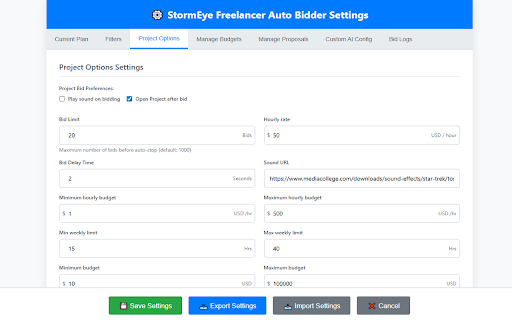


Chrome extension for managing freelancer bidding operations Streamline and optimize your bidding workflow on Freelancer.com with intelligent project filtering, AI-powered proposals, advanced bid management tools, and precision sniper bidding for individual projects. 🎯 Sniper Bid Mode - One-click bidding directly from any project page - Floating "Bid on This Project" button when sniper bid is enabled - Instant bid submission using your configured proposal templates - Automatic project ID extraction and validation - Smart proposal matching based on your keywords and conditions - Real-time success/failure notifications - Works independently from bulk bidding automation 🔍 Intelligent Project Filtering - Filter projects by country, budget range, and delivery timeline - Client verification filters (payment verified, email verified, deposit made) - Exclude already-bid projects automatically - Support for both fixed-price and hourly projects - NDA and IP Agreement support with contract signing assistance 📝 Smart Proposal Generation - Multiple proposal modes: Custom templates, Freelancer's AI, or your own AI integration - Template system with dynamic variables (ProjectTitle, ProjectSkills, etc.) - Support for random variations and conditional content - Integration with popular AI providers (requires your own API keys for Anthropic Claude, OpenAI, Google Gemini, ZhipuAI) - Automatic keyword matching for proposal selection - Country-specific proposal filters 💰 Advanced Budget Management - Customizable bid amounts per currency and budget range - Separate configurations for fixed-price and hourly projects - Milestone percentage settings - Smart bid amount calculation based on project type 🔔 Real-time Monitoring - Visual and audio notifications for successful bids - Optional automatic project tab opening - Comprehensive bid logs (success and failure tracking) - Real-time status updates - Duplicate bid prevention system 🔐 Secure & Private - Login status detection and validation - Cookie-based authentication with your existing Freelancer.com session - No data collection or external data transmission - All processing happens locally in your browser ⚙️ Customization Options - Dual-mode operation: Bulk bidding automation + precision sniper mode - Configure delivery periods (min/max days) - Set custom hourly rates - Country-specific filtering - Profile selection for different bid types - Toggle sniper mode on/off from extension popup Bulk Bidding Mode: 1. Log in to Freelancer.com in your browser 2. Configure your bidding preferences in the extension Settings 3. Set up your proposal templates or AI integration (optional) 4. Click "Start Bidding" to enable assisted bidding 5. Review and monitor bid statistics and logs in real-time Sniper Bid Mode: 1. Enable "Sniper Mode" in the extension popup 2. Browse to any project page on Freelancer.com 3. Click the floating "Bid on This Project" button 4. Extension automatically matches the project with your configured proposals 5. Bid submitted instantly with appropriate template and bid amount 6. Get real-time success/failure notification Perfect For: - Freelancers who want to save time on repetitive bidding tasks - Professionals managing multiple project opportunities - Users who need consistent bidding presence - Anyone looking to optimize their Freelancer.com workflow - Quick-response freelancers wanting to snipe competitive projects Permissions Explained: - Storage: Save your settings and bidding history locally - Cookies & Tabs: Authenticate with Freelancer.com and manage project tabs - Notifications: Alert you when bids are successfully placed - Host Permissions: Communicate with Freelancer.com and selected AI providers (only when configured) ⚠️ IMPORTANT: This extension requires an active Freelancer.com account and operates within Freelancer.com's terms of service. Users maintain full control over bidding operations and settings. The extension assists with bid submission but does not operate without user configuration and activation. Key Updates in This Version: - 🔗 One-click access to client profile from project page - ✨ Sniper Bid mode for one-click bidding on individual projects - 🎯 Floating bid button appears on project pages when sniper bid is enabled - 🚀 Instant bid submission with automatic proposal matching - 📊 Enhanced notification system with success/error feedback - 🎨 Beautiful gradient UI for sniper bid button - ⚡ Smart project ID extraction from project url by using API

Money Maker
Chrome Game Extension Introducing Money Maker, a fun clicker game extension for your Chrome browser! Start with just a click and watch your earnings grow as you unlock powerful upgrades and exciting casino games. Simple clicker gameplay: Just click the "Earn Money!" button to start earning money right away. Upgrades: Purchase upgrades to increase your earnings per click and multiply your wealth. Casino games: Take a break from clicking and test your luck at casino games for a chance to win big. Save progress: Your game progress is saved automatically in local storage, so you can pick up right where you left off. Help and Credits: Learn how to play and get support when you need it.

Easy Extension Manager
Effortlessly Manage Your Chrome Extensions Easy Extension Manager is your all-in-one tool for optimizing and organizing Chrome extensions. Easily search, sort, snapshot, export, and import your extension setups in JSON format—all with a user-friendly interface. ☆ Complete List: View all your installed extensions from a single popup. ☆ Snapshot: Save and load your extension setups with a single click. ☆ Export & Import: Backup or restore your extension configurations in JSON format ☆ Toggle Extensions: Easily enable or disable extensions to improve performance. ☆ Sort Options: Sort extensions alphabetically or by enabled/disabled status for quick access. ☆ Quick Search: Find specific extensions quickly and easily. ☆ Dark Mode: Switch between dark and light themes for better viewing. ☆ Context Menu: Right-click for powerful options ☆ Disable All Extensions to temporarily boost performance. ☆ Enable All Extensions with one click. Effortlessly back up and restore your extension snapshots in JSON format. Export & Import Highlights: ☆ Backup Snapshots: Export your extension setups as JSON files for safekeeping. ☆ Restore Setups: Import your saved configurations and apply them instantly. ☆ Auto Save Snapshots: Automatically back up your latest extension setup, ensuring it's always up to date. ============================== Why Choose Easy Extension Manager? Easy Extension Manager simplifies managing Chrome extensions. Stay organized, perform backups and restores easily, and streamline your workflow. With powerful search and sorting with features like Snapshots, Export & Import, and Auto Save, managing extensions has never been simpler. Take control of your extensions today with Easy Extension Manager—the smarter way to manage Chrome.

Exploratory Testing Extension
Chrome extension for exploratory testing A Chrome extension designed for making web exploratory testing easier Features: - 🐛 Quickly create and track bugs, notes, ideas and questions - 📸 Capture full page or custom cropped screenshots - 🔗 Automatically track URLs for each annotation created - 🔍 Advanced filtering of annotations by type in reports - 📊 Visualize testing data through interactive charts - 👁️ View screenshot previews instantly on hover - 💾 Export testing sessions to JSON, CSV or HTML formats - 🤝 Share and collaborate by importing/exporting sessions

Visualping: Website change detection, monitoring and alerts
Visualping Chrome Extension Website change detection and monitoring that does the watching for you. Right now you're checking that page by hand. Refreshing to see if the price dropped, the job posted, or the policy changed. Visualping does the checking instead. It watches any web page and emails you the moment something changes, with a plain language summary of exactly what's different. Visualping reads the change and tells you what happened in one sentence. ➤ How it works: • Click Visualping on any page you want to watch. • Pick how often to check: every few minutes, hours, days, or weeks. • Tell Visualping what you're monitoring for on the page • Get an alert the moment something important changes. ➤ Visualping AI reads the change for you: • Every change comes with a plain-English summary, so you read one short description of what happened • Visualping AI flags the changes that actually matter, so a small footer update doesn't ping you at 2am. ➤ What people watch with Visualping: • Price drops and back-in-stock alerts on shopping sites • Concert, event, and travel-deal availability • New job postings at the companies you want to work for • New property and rental listings that match your criteria • Grades, course registration dates, and scholarship deadlines • Competitor pricing pages, product launches, and policy updates ➤ Get notified your way: • Email, WebHooks, Zapier, and the API on every plan. Paid plans add SMS, Slack, Microsoft Teams, and Google Sheets. • Run as many local monitors as you want, free. They check pages right in your browser. • For pages you want checked even when your browser is closed, a free account includes 5 cloud monitors, and paid plans add more. Never check that page by hand again. Stay in the know with Visualping.
