
aolbomhlimkdakklifkocohcgpmojdia

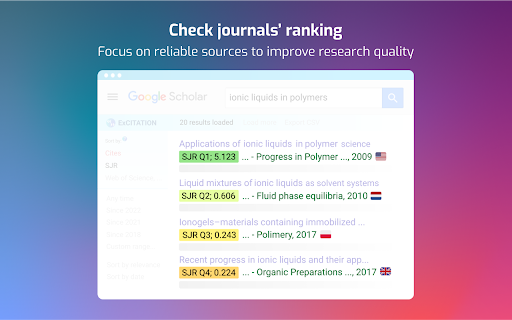
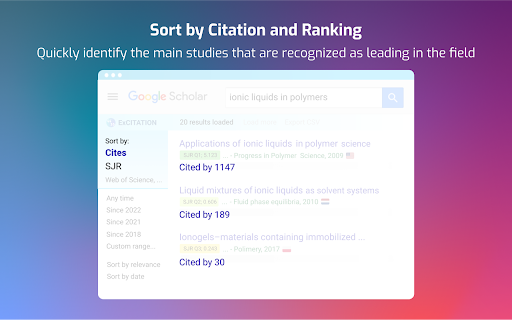

Trusted by 100,000+ researchers, PhD students, and academics worldwide. ExCITATION adds journal quality rankings directly to your Google Scholar search results so you can identify high-quality sources in seconds, not hours. Updated for 2025 with the latest SJR, ABS, and ABDC data. 👉 Journal Quality Rankings ✔️ Auto-display SJR quartile (Q1-Q4), impact score, and country of origin for every result ✔️ ABS Academic Journal Guide (AJG 2024) ratings, the standard for business & management research ✔️ ABDC Journal Quality List (2025) ratings: A*, A, B, C classifications ✔️ Color-coded badges for instant visual assessment of source quality ✔️ 32,000+ journals covered across all disciplines 👉 Sort by What Matters ✔️ Sort search results by SJR journal impact factor ✔️ Sort by citation count to surface the most influential studies ✔️ Works within your current Google Scholar page, no extra tabs or tools 👉 Predatory Journal Detection ✔️ Flags 1,400+ known predatory and low-quality journals ✔️ Visual warnings so you never accidentally cite a dubious source ✔️ Protects the integrity of your literature review 👉 Abstract Preview ✔️ One-click abstract preview without leaving the search results page ✔️ Pulls metadata directly from publisher pages ✔️ Saves time deciding which papers to read in full 👉 Author Page Insights ✔️ See journal quality distribution across any author's publications ✔️ Quickly assess a researcher's publication profile • SCImago Journal & Country Rank (SJR): 32,000+ journals from the Scopus® database (Elsevier B.V.), updated 2025 • ABS Academic Journal Guide (AJG 2024): Chartered Association of Business Schools • ABDC Journal Quality List (JQL 2025): Australian Business Deans Council ExCITATION is an independent tool and is not affiliated with or endorsed by these organizations. 1️⃣ Install the extension. It's free, no account required. 2️⃣ Go to Google Scholar and search as you normally would. 3️⃣ Journal rankings, citation sorting, and predatory warnings appear automatically. 4️⃣ Click any abstract icon to preview a paper without leaving the page. 👤 Who Is It For? • PhD & doctoral students building literature reviews • Postdocs and faculty selecting journals for submission • Research supervisors evaluating source quality • Systematic review teams screening large result sets • Anyone who uses Google Scholar and cares about journal quality All journal ranking data is bundled within the extension itself. The extension requests host permissions to support abstract previews (fetching article metadata from publisher sites) and CrossRef lookups. 📌 Which ranking systems are included? SJR (all disciplines), ABS/AJG 2024 (business & management), and ABDC 2025 (business & management). Color-coded Q1-Q4 quartiles, impact scores, and country flags are displayed for each result. 📌 Is it free? Yes, completely free. No registration, no account, no premium tier required for any feature. 📌 How current is the data? SJR: 2025 release. ABS: AJG 2024. ABDC: 2025 release. We update with each new official release.

Perplexiti AI Goocle Scholar Search
Searches Google Scholar automatically with Perplexiti AI queries Unlock the full potential of academic research with our Chrome extension, which seamlessly integrates Perplexity AI with Google Scholar. This tool automates and enhances your search experience by generating precise AI-driven queries on Google Scholar, saving you time and improving the relevance of your results. Automated AI Searches: Leverage Perplexity AI to generate and refine Google Scholar queries automatically. Enhanced Precision: Get more accurate and tailored search results, quickly identifying the most relevant papers and research. Effortless Workflow: Streamline your academic research process with a single click. Whether you're a researcher, student, or academic enthusiast, this extension provides an efficient, AI-powered approach to scholarly discovery. Install today and revolutionize your research workflow!

Self-Citations Checker
Calculates author self-citation rates on Google Scholar using DBLP, OpenCitation, and OpenAlex data. Enhance your academic research with the Self-Citation Checker. This powerful extension seamlessly integrates into Google Scholar, allowing you to instantly analyze and assess author self-citation rates directly on their profile pages. Whether you are a researcher, student, or academic professional, this tool provides a new layer of insight into citation patterns, promoting transparency and helping you evaluate an author's influence more effectively. 📊 Seamless Integration: Automatically adds a "Self-Citation Rate" column to the main statistics table on any Google Scholar author page. 🔍 Instant Analysis: Upon visiting a profile, the extension immediately calculates the self-citation percentage. The result is displayed clearly, with a loading icon to show it's working. ℹ️ Transparent & Reliable Data: The analysis is powered by trusted academic sources, using author data from DBLP and citation data from the DBLP-OpenCitations integration. For non CS/EE, it uses OpenAlex. 🔄 One-Click Refresh: A simple "Refresh" button allows you to clear cached data and re-run the analysis at any time for the most up-to-date calculation. For this tool, a 'self-citation' is defined as any instance where the citing paper and the cited paper share at least one author. Please note that the citation coverage from DBLP, OpenCitations, and OpenAlex is extensive but may not be 100% complete. The calculated rate should be considered a valuable estimate to aid in your research, not as an absolute, definitive figure. Install the Self-Citation Checker today to bring deeper analytical power to your work on Google Scholar

SciSpace: Do hours of research in minutes
Your AI research assistant for understanding scientific literature. Your AI research assistant for discovering and analyzing scientific literature. With SciSpace, you no longer have to open new tabs and Google unfamiliar concepts every time you come across one. Just ask SciSpace for research-backed explanations or summaries for any text, maths, and tables in any research paper, technical blog post, or report you’re reading. You can also ask follow-up questions, and it will give you answers with citations. With SciSpace for Chrome, you can: 👌 Simplify technical language — SciSpace gives you simple explanations for jargon, acronyms, and complex paragraphs. All you need to do is highlight them. 🤿 Delve deeper while learning — Choose from SciSpace’s preset questions or ask your own if you have doubts while reading an article. 🔢 Understand math and tables in PDFs — Clip unfamiliar math equations or tables using SciSpace to find out what exactly they mean. 🌐 Toggle between multiple languages — Interact with SciSpace in 13 languages and get explanations in your native language. 🔖 Bookmark the URL — Save any article or PDF to your collection in SciSpace. Come back to it any time and pick up right where you left. 📡 Find related papers – Discover research papers related to any passage you highlight. Literature Review – Want to inquire about a research question or topic you have in mind? Ask the Lit. Review tool and find insights from 270 million+ papers in the SciSpace repository. Citations in answers – No more fake references or misinformation. Copilot now gives a citation with every answer along with the location of the source.

Google Scholar Button
Lookup scholarly articles as you browse the web. This extension adds a browser button for easy access to Google Scholar from any web page. Click the Scholar button to: - Find full text on the web or in your university library. Select the title of the paper on the page you're reading, and click the Scholar button to find it. - Transfer your query from web search to Scholar. Press the Scholar button to see top three results; click "full screen" at the bottom of the popup to see them all. - Format references in widely used citation styles. Press the quote button below the result to see a formatted reference and copy it into the paper you're writing. - Save the article to your Scholar library, so you can read it or cite it later. Press the blue star below the result to save it, or the gray star at the bottom to see all saved articles. Library links work best when you're on campus. To configure them for off-campus use, visit Google Scholar Settings at https://scholar.google.com/scholar_settings (you may need to login with your library password or to set up your browser to use a library proxy; please visit your library's website or ask a local librarian for assistance). To search the US case law, click the gear icon at the bottom of the popup, and configure your preferred collection in Google Scholar Settings. By installing this extension, you agree to the Google Terms of Service and Privacy Policy at https://www.google.com/intl/en/policies/.
