
aofebfljannpdpbeapgnolkihjiepdeo
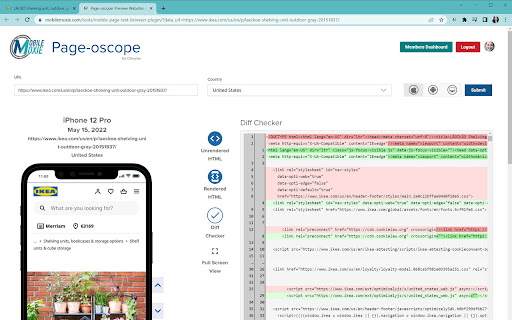


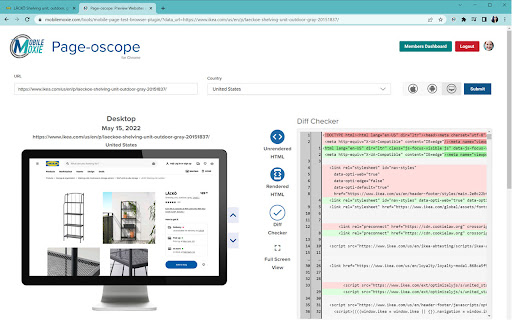
Compare rendered & un-rendered page code of mobile & desktop pages. Great for SEO's validating page code for Mobile-First Indexing. Summary: Sometimes it can be hard to know exactly what code is being sent to a mobile phone, but now, with Mobile-First Indexing, it is critical for SEO. This tool lets you see the visual page rendering right next to the code - with views for rendered HTML and JavaScript, unrendered HTML and a Diff Checker view that will let you see what is added and what is removed after JavaScript is executed. It is even geo-aware, incase you are modifying content for users in different countries! Use this free mobile emulator plugin from MobileMoxie to easily test your landing pages to understand how they are working for mobile users an mobile search engine bots! Validate Responsive Design: Mobile Responsive Design is critical for a good user experience, but it is now also critical for good SEO rankings. If you are not sure how your pages look on a mobile phone, or what is added and what is removed in the mobile rendering, then this tool is for you! Mobile SEO is now critical to over-all search rankings, and if you are not looking at your pages on a variety of different phones, you could be missing out on potential conversions that directly impact your success metrics and your companies bottom line! Validate International Landing Pages: Does your page adapt to meet the needs of users in different countries? That can be tough to test - especially for mobile, but this plugin solves the problem! Just set the country to wherever you want to test, to make sure that you know how changes to language, currency, shipping information, measurements and other localizations are impacting your users - Great for designers, developers and digital marketers of all types! Are you in a highly regulated industry that has different requirements and laws that you have to abide by in different countries - no problem! This tool can help you make sure that the website is adapting to meet the different regulations in each country you serve! How have you lived without this tool until now? Ensure that Mobile Website Visitors Are Happy: This tool is great for SEO's but also great for developers, CROs, UI/UX Experts and SEM Professionals who need to test mobile landing pages. If you are doing PPC, and spending money to send searchers to a landing page, you need to be sure that landing page works well on a mobile device! This plugin lets you see how your landing page looks on Android and iOS mobile phones, as well as on desktop. Confirm Edge SEO Modifications: If you are using an Edge server or CDN to modify what is served to mobile devices, sometimes it can be tough to know exactly what the finished code actually looks like when everything is compiled and sent. This mobile emulator extension lets you interact with the mobile page, but it also lets you see the mobile page code in the same screen - rendered, unrendered and a comparison mode that highlights how execution of JavaScript change the page. If you are troubleshooting mobile problems or SEO and indexing problems that might be caused by an errant rule on an Edeg server, then this is the tool you need to help!

Mobile View: Test responsive designs fast
Test your responsive designs on multiple devices at once. See your website on multiple devices at once with live updates, even for locally hosted sites. Hot module reloading ensures instant code changes across all devices, while synchronised scrolling and navigation lets you test seamlessly across any website. Perfect for: ----- ✅ Full-Stack & Front-End Developers ✅ UX/UI Designers ✅ Anyone using Polypane/Blisk/Responsively/Sizzy Get started in seconds: ----- ✅ Install Mobile View from the Chrome Web Store. ✅ Click the extension icon to activate it. ✅ Select devices and breakpoints for continuous testing. ✅ Start developing - changes appear instantly! Join the future of responsive design testing and quality assurance. Works with all your favourite frameworks. Try Mobile View today and revolutionise your development process!

Schema Builder for Structured Data
Easily build validated json-ld structured data markup for any webpage. Based on schema.org specification Generating structured data markup for your webpages doesn't have to be hard! No more having to learn each Schema type, which elements are required vs. recommended or worrying about errors and issues. Schema.dev's Schema Builder makes it as simple as point and click to generate the perfect JSON-LD structured data for dozens of Google supported Schema types! and all for FREE! ============================================= Be sure to view the initial training video for fastest time to value. https://videos.seoclarity.net/video/kazj73n005plxgv61 ============================================= Simply enable the plugin, choose the schema markup you'd like to add and then populate the form using the point and click capabilities or manual input. Already have schema markup on your webpages? The built-in Schema testing tool helps validate your schema markup and shows errors and warnings. Key Features - Updated March 2nd, 2025 ================================== + NEW! Support for Vehicle Listing Markup + Support for 20+ Schema types - including ALL Google supported markups + Automatic detection of existing structured data + Point-and-click ease to populate schema fields + Intuitive UI that guides you through required, recommended and optional elements for each schema + Structured Data Testing capabilities built in for any schema markup generated + Intuitive UI to guide through required, recommended and optional elements NOTE: The plugin is in actively development - Join the forums at https://support.schema.dev for feedback, bugs and tips.

SERPerator by MobileMoxie
See & parse Google mobile search results from any location in the world-Get Pixel Height, % of SERP, Traditional Rank & Actual Rank. This SERP checker tool is great for seeing what real mobile search results look like from anywhere in the world, down to a specific address - not just a city, state, or postcode! You can easily see Google search results for SEO on iOS, Android and Desktop searches. You can also use this tool to see how changes default phone languages or locations impact search results - great for local SEO! For those who don't know the term, 'SERP' is just an acronym for a 'Search Engine Results Page' - so basically, a Google result. Google often gives results that are different from one location to another, one device to another, or one language to another. They can even sometimes change results from one person to another, (though they claim that this is very uncommon). This is why it can be so important to check search results, to know what they look like and which competitors or Google elements are ranking there. To use this extension: 1) Install the extension and pin it in your browser 3) Click the extension icon. It will replicate the parameters of your search on a mobile phone, and it will parse the entire search result in a new tab 4) You can see: ----- Traditional Rank ----- Actual Rank ----- Pixels from the Top ----- Type of Ranking ----- Percent of SERP 5) The mobile phone is also interactive, so you can click on any result, use the 'back' or 'refresh' buttons, take screenshots, or switch between iOS, Android, and Desktop results. The device and SERP will update, and so will the parsing 6) From there, you can also change the query or language settings on the device, and re-run the search 7) You can also expand the 'Advanced' settings to change the address or location of the query, to see what results look like in a different country, city or neighborhood - or at a specific location, like from a store location, transportation hub, or shopping center This extension is great for digital marketers, SEO's, CMO's, Pay-per Click experts, small business owners, and anyone in marketing who wants to know what Google results look like. It can also be great for planning local events or trips from a distance, helping a friend or family member research local information or businesses, or a variety of other uses. Location-specific mobile search results can be hard to get, and this will save you from having to ask friends in different locations to do searches and send you screenshots! See what your competitors PPC ads look like from anywhere, get Incognito mobile search results without opening another browser, test the impact of location or language settings on a query, and of course, see the difference between iOS, Android and Desktop search results - If you didn't already realize it, things can change! Traditional Rank: This is how digital marketers have traditionally counted organic search rankings in SERP tracking tools - ignoring the number of paid results, and the impact of things like Knowledge Graph, Map Packs, People Also Ask, and other types of Google inclusions. Actual Rank: This is a new metric that we are introducing, because we think that the Traditional Ranking numbers are now ignoring so much of the search result that they are just not quite as useful as they used to be. So this number represents the total number of entries that are in a Google search result - including everything: PPC/Paid results, Maps, Apps, News carousels, People Also Ask (PAAs), Interesting Finds, Image Packs, and more. We think that this has become a more accurate measurement of the potential for a search result of any kind to drive rankings. Pixels from the Top: This can be an even more meaningful metric, because the size of different rankings can change dramatically, but the measurement of a pixel is always the same. This number represents the actual number of pixels from the top of the first result in the SERP - whatever it is. This way, if you are ranking #2 in Traditional or Absolute Rank, but your Clicks go down, you might also notice that your position #2 ranking has been pushed down by a larger ranking for position #1 or something else occurring higher in the SERP. Percent of SERP: Just like the size of an individual ranking can vary, the total length or size of a SERP can vary. We like to put things in perspective, to show what % of a particular search result, a particular ranking is taking. For example, a Knowledge Graph result can be very big, and sometimes, Google will decrease the number of organic rankings when a Knowledge Graph result is present. This can mean that a Knowledge Graph result, which generally happens at the very top of a mobile search result, can take up as much as 10 - 20% of the entire search results page. Moxie Score: This is a proprietary metric that we have created to describe how much of a search result your brand controls. It is only available for subscribers, but once you subscribe, and begin tracking a specific search result, we let you claim elements of the search result, if they benefit your brand. This means that they can be anything - not just pages on your site. So they can include blog posts with editorial mentions, ads, People Also Ask results, Knowledge Graph, social media, news - really, just about anything. We think it is time that digital marketers get more credit for their work - both on and off the main domains - because it is important. Searchers notice if one brand or another is deaminating a search result, so that is what we want to help you do! Start claiming and measuring your Moxie, so that you have a more meaningful metric to show your boss! Mess Score: This is another proprietary metric that we have created. It describes how easy or hard it is to get an organic ranking for a particular query. We are were just tired of seeing digital marketers break their hearts trying to rank for queries that are incredibly difficult - not just because of competition from normal competitors, but because the query is dominated by Google results like Knowledge Graph, which push organic rankings down, and are nearly impossible to displace. The more Google inclusions a search result has, the messier it is going to be to rank there and to drive traffic from the result - Google inclusions are just so interactive, colorful, and distracting! It is possible to have high Moxie on a search result with a high Mess score, but it is tough! NOTE: Remember, Mess is about the difficulty of getting clicks in the search result as a whole, whereas, Moxie is your brand's overall dominance of a particular search result, based on what you have claimed. They tend to have an inverse relationship, but not always. The Mess Score is only available for subscribers, but it helps them decide which results are worth trying for in organic search results, and which are better to pay for in PPC. PS: This extension does not just work in Chrome - It will work in Firefox and Brave too!

GSC crawl stats downloader
instead of downloading 42 separate CSV files (by response, file type, purpose, Googlebot type and summary) this allows you to download everything with one click (and you can decide wether you want to only use the extension or if you want to backup the original CSVs as well)
