
amkkoimhfpljblhfjnkdidlfehhdfnli
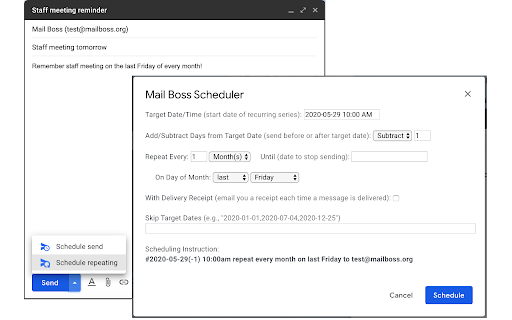
Recurring email scheduler for Gmail Mail Boss Scheduler is a Chrome extension companion to the MailBoss.org email scheduling service. It adds a "Schedule repeating" option next to the existing "Schedule send" option in Gmail's compose message window (click the down arrow on the "Send" button). The "Schedule repeating" option allows you to schedule recurring emails with just a few clicks. After installing this extension, you'll be taken to the Mail Boss web site in order to sign up for the service. It's free!

Copilot for Gmail™ by cloudHQ
Mini CRM for your Gmail Copilot for Gmail™ is a mini CRM that lets you see a snapshot view of your email contact's profile information, and any past emails conversations you've had. This is crucial to have so that you can respond intelligently, and help you dramatically cut down your search time when you're looking for a past email conversation you had with your email contact. Right within Gmail, you can: ✔️View profile information of the person you're emailing, or who emailed you ✔️Create private notes about this contact (For example: This client has needed support for over 4 hours last week) ✔️Set up a reminder alarm for this contact (For example: Follow up with client on a specific date/time) ✔️A list of all the email conversation history you have with that email contact ✔️A list of all documents and attachments related to that email contact This is great for anyone who wants to appear more professional, and have everything neatly organized in their email. Key features: ⭐️ person and company profile info ⭐️ easy access to all email messages ⭐️ easy access to all attachments ⭐️ notes (private or shared with the team) ⭐️ reminders cloudHQ. Helping your productivity, 1 click at a time. cloudHQ website: https://www.cloudhq.net/ App website: https://www.gmail-copilot.com/ Pricing: https://www.gmail-copilot.com/pricing Support page: https://support.cloudhq.net/category/browser/gmail-copilot Blog: https://blog.cloudhq.net Demo: https://www.cloudhq.net/demo Google Workspace, Google Sheets, Google Drive, Google Alerts and Gmail are trademarks of Google LLC. Use of this trademark is subject to Google Permissions.

MailKing: Email Campaigns in Gmail by cloudHQ
Looking for the best mass email and email marketing software available? MailKing sends your email campaigns from your Gmail address, so you're guaranteed higher open rates. Not only that, but it's built to work right in Gmail, so it's easy to access anytime you need to. Setting up a campaign is easy, intuitive, and extremely effective. ✅ Higher open rates ✅ Send emails from your Gmail, not "noreply@url.com" ✅ Thousands of professionally designed email templates for you to select ✅ Intuitive drag and drop email design editor if you prefer to design your emails from scratch ✅ HTML design editor available too ✅ Import Mailchimp templates, or Hubspot templates ✅ Easily upload CSV file from Mailchimp, Yesware, Salesforce, Zoho and other CRMs ✅ Mail merge available from any of your spreadsheets ✅ Email list builder ✅ Create multiple email contact lists for hyper-targeted campaigns ✅ Embed a branded signup form on your website with your logo, brand colors, and text ✅ Track opens, clicks, and replies ✅ Sequence and follow up email campaigns ✅ Full merge tag support: personalize name, email, or other data ✅ Detailed email campaign analytics ✅ Send up to 2000 emails/day based on Gmail send limits, upgrade to Premium Plan to remove logo on the bottom Bottom line: This is a solid mass email and email marketing software designed to help small to medium-sized businesses cut through the noise and get noticed. Enjoy this feature-rich app, a best-in-class mass email and email marketing software. Who uses MailKing? - Small Business Owners: For reliable and efficient email marketing campaigns. - Sales Professionals: To close deals faster and improve outreach efforts. - Marketers: Whether part of a small business or working as contractors, for creating impactful email campaigns. - Managers: To send internal newsletters and keep teams informed. - Organizations: For distributing internal newsletters, announcements, or notifications to employees. - Anyone: Who needs to send emails to large groups quickly and effectively. NOTE: For easy access to your settings and other cloudHQ apps, look for the cloudHQ icon in the top right corner of your Gmail inbox. Click on it to get started! NOTE: To access Hubspot and Mailchimp templates, simply click on the Hubspot or Mailchimp tab in the template browser to install the necessary extensions. cloudHQ. Helping your productivity, 1 click at a time. Website: https://www.mailking.io Pricing: https://www.mailking.io/pricing Support page: https://support.cloudhq.net/category/browser-extensions/gmail_campaigns/ Blog: https://blog.cloudhq.net Gmail, Google Shared Drive, Google Drive, and Google Workspace are trademarks of Google LLC. Use of these trademarks is subject to Google Permissions.

Schedule Email by cloudHQ
Schedule your email to send at a later date and time Need to send an email to your client or boss, but it's 1am? No worries. Just schedule it to send first thing in the morning while you catch up on your beauty sleep. cloudHQ. Helping your productivity, 1 click at a time. App website: https://www.schedule-email.com/ cloudHQ website: https://www.cloudhq.net Pricing: https://www.schedule-email.com/pricing Support page: https://support.cloudhq.net/category/browser-extensions/schedule-email/ Blog: https://blog.cloudhq.net Gmail, Google Calendar, and Google Workspace are trademarks of Google LLC. Use of these trademarks is subject to Google Permissions.

Boomerang for Gmail
Meeting scheduling and email management tool trusted by millions. Schedule meetings, track responses, send later, and more. One-click calendar scheduling and email management for Gmail™. Boomerang saves you time so you can focus on what matters to you. Why should you use Boomerang? - Meeting scheduling and email management tool for Gmail™ - Trusted by millions of users all over the world - Security audit by Google - Google Premier Partner - SOC 2 Type 2 certified - Featured in The New York Times, Lifehacker, The Next Web, and more - Used by organizations like Epic Games, Clark Construction, The University of Texas at Austin, and more A calendar scheduling app and email productivity tool for Gmail™. You can schedule meetings right from your inbox, track responses, set up recurring emails, and use AI to write better emails. ▣ What is Boomerang? ▣ Millions of Gmail™ and Google Workspace™ users count on Boomerang for easy, integrated calendar scheduling and email tools. One-click meeting scheduling that’s easier for everyone than a scheduling link and email tools help you keep your Inbox clean, without losing track of important messages. Plus, Boomerang is GDPR ready. Benefits of Boomerang’s meeting scheduling features: ✓ Spend less time scheduling meetings ✓ Close more deals ✓ Get more clients ✓ Impress your guests by making it easy for them ✓ Set up schedule of availability just once ✓ Faster scheduling Benefits of Boomerang’s email tools: ✓ Focus on important projects without constant distractions ✓ Easier project management ✓ Automatic follow ups ✓ Know if your emails are being read with cross-platform read receipts ✓ See email engagement with open tracking and click tracking ✓ Write effective emails that get a response ✓ Achieve Inbox Zero! ▣ The best way to schedule meetings ▣ Schedule meetings via a clickable, always up to date, patented Magic Live Calendar sent in your email invite. Supports multiple-calendars, Zoom and Google Meet integration, dual time zone views, and more. 🗓 Bookable Schedule: Set up a schedule of available times, use it again and again. 🗓 Suggest Times: Schedule one-off meetings in a single email - no more back and forth. 🗓 Share Free/Busy: A lightweight way to share your availability without giving up your privacy, even across domains! 🗓 Meeting Poll: Schedule a group meeting — easy for everyone involved! Invite participants to vote on times, then book and add to calendar in one click. The person you’re meeting with simply clicks on a time slot and confirms. Events are automatically placed on everyone’s calendar complete with details like phone number, Google Meet, or Zoom meeting link. ▣ Tame your inbox ▣ ✓ Track responses ✓ Track emails with read receipts ✓ Schedule emails to automatically send when you want ✓ Set up recurring emails ✓ Pause your inbox ✓ “Snooze” incoming emails. Boomerang helps keep your Inbox clean, without losing track of important messages. And it can alert you if you do not get a reply to a message. Boomerang also includes Respondable, an AI-powered assistant that predicts the likelihood that the message will receive a response, right in your compose window. ▣ Need Help? ▣ Email us - support@baydin.com FAQ - https://help.boomeranggmail.com/ ▣ Why do you need the Management Permission? ▣ We need Management Permission so you can run a troubleshooting feature which identifies a list of installed extensions that are known to conflict with Boomerang’s functionality. ▣ Connect with Us ▣ LinkedIn: https://www.linkedin.com/company/baydin Twitter: https://twitter.com/boomerang Facebook: https://www.facebook.com/boomeranggmail ▣ Plans and Pricing ▣ There is no charge for Boomerang up to a limited number of messages per month. To learn more about our unlimited use plans, visit https://www.boomeranggmail.com/subscriptions.html
