
amjnhlafemdodfphfcohacnbkifndeka


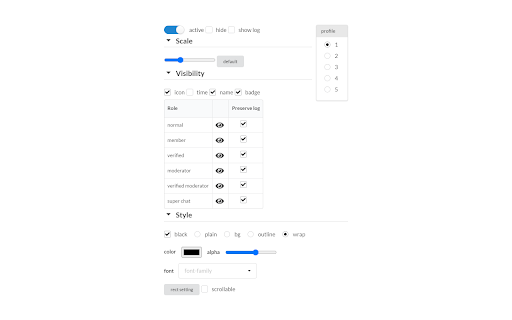
YouTubeのチャットメッセージを映像の上にも被せて表示します 2025/11/15 新しい仕様に対応しました。チャット欄を閉じても機能するようにしましたが、ライブではなくアーカイブの場合はチャットリプレイを一度開く必要があります🙇♂️ YouTubeのチャットメッセージを映像の上にも被せて表示します 2025/11/15 新しい仕様に対応しました。チャット欄を閉じても機能するようにしましたが、ライブではなくアーカイブの場合はチャットリプレイを一度開く必要があります🙇♂️

Youtube Chat Ex
Provides additional features to Youtube. It can be used by checking the item you want to add. Main features Bottom pinning of specific comments like streamer and verified user. Show the Youtube chat in full screen viewing. Mouse scrolling in Super Chat list. How to open the settings screen Click on the button in the upper right corner of the chat field to access the settings. Update history 2.0.13 (2024-12-01) fix Corrupted layout 2.0.12 (2024-11-30) fix Corrupted layout 2.0.11 (2025-11-30) fix Chat view does not work properly 2.0.10 (2025-09-28) fix Chat view does not work properly 2.0.9 (2025-08-06) fix Chat movement does not work properly 2.0.8 (2025-06-29) fix Minor style corrections 2.0.7 (2024-12-16) fix Minor style corrections 2.0.6 (2024-12-14) fix Minor style corrections 2.0.5 (2024-11-23) fix Minor style corrections 2.0.4 (2024-10-26) fix Comments were not pinned on Bottom pinning of comments 2.0.3 (2024-10-22) fix Minor style corrections 2.0.2 (2024-08-25) fix Corrupted layout 2.0.1 (2024-08-23) fix Corrupted layout 2.0.0 (2024-07-27) fix Core system improvements Corrupted layout 1.3.12 (2024-05-31) fix Corrupted layout 1.3.11 (2024-02-11) fix Compatible with tablet devices Chat movement does not work properly when changing page magnification Minor style corrections Other minor things 1.3.10 (2024-01-14) fix Minor style corrections 1.3.9 (2024-01-14) fix Minor style corrections 1.3.8 (2024-01-13) fix Adjust design on View chat list in full screen Corrupted layout 1.3.7 (2023-08-23) fix Corrupted layout 1.3.6 (2023-07-08) fix Corrupted layout 1.3.5 (2023-04-01) fix Corrupted layout 1.3.4 (2023-01-01) implementation Pin the chat list to the right side on View chat list in full screen fix Some fixed comments were not displayed on Bottom pinning of comments Adjust text outline on View chat list in full screen 1.3.3 (2022-12-28) implementation Text outline on View chat list in full screen Notify with badge on update fix Corrupted layout on Bottom pinning of comments when the number of pinned comments increases 1.3.2 (2022-12-11) fix Corrupted layout Support Super Chat for Bottom pinning of comments Other minor things 1.3.1 (2022-11-09) fix Addition of some parts that were not translated to English 1.3.0 (2022-11-07) implementation Bottom pinning of specific comments View chat list in full screen Mouse scrolling in Super Chat list

HyperChat [Improved YouTube Chat]
Improved YouTube chat with CPU/RAM optimizations, customization options, and cutting-edge features! HyperChat improves the YouTube livestream chat experience with a suite of CPU/RAM optimizations, customization options, and cutting-edge features! FEATURES ▶ CPU/RAM Optimizations ➣ Memory leak patches ➣ Custom-built message renderer ➣ Cross-extension message parser ▶ Customizable appearance ➣ Light/dark theme ➣ Show/hide: • Profile icons • Timestamps • Usernames • User badges • Mentions • Emojis ➣ Toggle sticky superchats ➣ Render system-native emojis ▶ Quality-of-life features ➣ Translate messages with Google Translate ➣ Member-only message filter ➣ Skip emoji-only messages ➣ Auto-switch to "Live Chat" HyperChat is compatible with other chat extensions such as LiveTL and YtcFilter. HyperChat is maintained by the same developers behind LiveTL. HyperChat is, and always will be, fully free and open source.

YouTube Live Chat Fullscreen
Watch YouTube Live in fullscreen without losing chat. Post comments, send Super Chats, and style the overlay your way. YouTube's fullscreen mode hides the chat. This extension brings it back — as a transparent, draggable overlay right on your video. Features: 💬 Chat in fullscreen — Post comments and Super Chats directly from the overlay. 🖱️ Drag, resize, reposition — Put the chat window exactly where you want it. 🎨 Style it your way — Background, text color, font size, blur, spacing. 📋 Save presets — One-click switch between styles for different streams. 🌗 Light and dark themes — Follows your system, or set it manually. 📼 Archive support — Works with chat replay on archived streams too. 🌐 50+ languages supported. How to use: 1. Install the extension. 2. Open a YouTube live stream or archive with chat replay. 3. Go fullscreen — flip the switch at the bottom-right. 4. Drag, resize, and make it yours. Questions, ideas, or bug reports? We'd love to hear from you on GitHub. Source code: https://github.com/daichan132/Youtube-Live-Chat-Fullscreen Support the developer: https://ko-fi.com/daichan132

Chat Overlay for Youtube, Twitch & more
Add live chat from Youtube, Twitch, Restream and more to your OBS as a browser overlay. Feature requests accepted! Select live chat messages within YouTube and Twitch to have them appear as featured message overlays within your broadcasting studio software, such as OBS Studio.
