
amjceiojhojdcnenchkplanlghfbpnmc
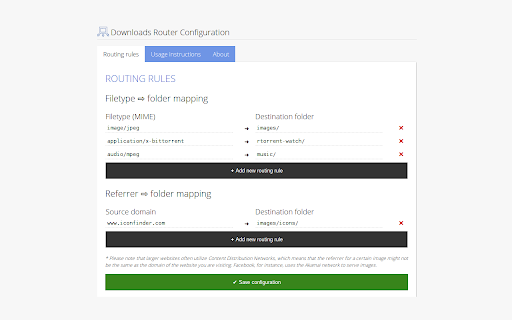

Organize your downloads automatically! Set custom download locations based on filetype, filename, or source domain. Organize your downloads automatically! Set custom download locations based on filetype, filename, or source domain.

3Dir (Dynamic Download Directories)
This is 3Dir: an extension that dynamically moves/renames your downloads to directories according to your specified criteria. This is a pre-alpha release. It does only 1 thing: - always moves your download to a folder named the same as the domain name of the download's URL, i.e., essentially a downloads router within your local downloads directory. This has been tested for normal binary downloads and for webpages downloaded using the "Save Page WE" Chrome extension. CTRL+S behavior is not overridden. Feedback is welcome: do it at the project's GitHub page (click Website ->).

Download Organizer
Automatically organizes downloaded files into folders based on domain and file type. Download Auto Organizer – Smart File Management for Your Downloads Tired of a cluttered download folder? Download Auto Organizer automatically sorts your downloaded files into structured folders based on their source domain and file type. This smart extension helps you keep your downloads neat and organized without any manual effort. Key Features: ✅ Automated Folder Organization – Files are automatically saved into categorized folders based on website domain and file format. ✅ Customizable Rules – Set up your own folder structure and define specific rules for different file types (e.g., PDFs in “Reports,” images in “Designs”). ✅ Seamless Background Operation – Works silently in the background without altering Chrome’s default download settings. ✅ Quick Access & Easy Management – Find your files faster with a structured storage system. Why Install This Extension? Boost Productivity: No more wasting time searching for lost downloads. Stay Organized: Keep your work, personal, and media files neatly arranged. Hassle-Free Setup: Simply install and let the extension handle everything automatically. Stay in control of your downloads with Download Auto Organizer – the ultimate tool for a clutter-free digital workspace! 🚀

Image Helper - Rename & Download
Compress and rename images in WebP, JPG, or PNG format under 100KB, or copy/download them easily. Image Helper makes saving images smarter, cleaner, and faster. Instead of downloading files with random names and messy formats, this extension allows you to rename, compress, and save images directly from your right-click menu. It’s designed to make your image workflow effortless — whether you’re a designer, researcher, or just saving reference pictures. 🔄 Smart renaming based on search keywords, page titles, or auto-generated names 🎯 Who is it for? Anyone who wants organized and properly named image files instead of random strings

Download Router Pro
DOWNLOAD ROUTER PRO - Free Download Router Pro automatically organizes your downloads based on source domain rules. Instead of dumping everything into a single default Downloads folder, this extension routes files into specific subfolders depending on the website they came from. No manual sorting. No drag-and-drop cleanup. ✔ Domain-based routing ✔ Custom subfolder structure ✔ Windows junction command generator ✔ Safe fallback to normal Downloads ✔ Lightweight and fast ┌───────────────────────────────┐ │ WHO IT'S FOR │ └───────────────────────────────┘ 1. What is a junction? A Windows junction is a link that redirects one folder location to another. It allows your Downloads folder to point to another drive without copying files. 2. How do I connect Google Drive or another cloud drive? 1. Install the official desktop sync app (Google Drive, OneDrive, etc.). 2. Ensure the cloud storage appears as a local drive on your system. 3. Create a junction from your Downloads subfolder to the mounted drive location. ** IMPORTANT NOTES 1. Junction setup is required for external or cloud routing. 2. Deleting the junction does NOT delete files stored on the target drive. 3. The extension does not upload, copy, or access file contents. It only redirects download paths using Chrome’s downloads API. 3. How it help-full for Job Seekers If you download resumes from Overleaf or similar platforms, this extension automatically separates each version into a specific folder — either in a local subfolder or another drive (including cloud drives if mounted).
