
amicmnmoekicldlhhkglfkahfgedobmb

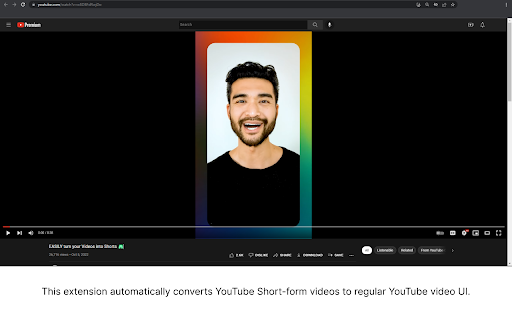
This extension automatically converts YouTube Shorts interface to regular YouTube video UI. Update: version 1.3 - The previous extension of the same name has been taken down by the Chrome Web Store. Please install this version for updates and more info. - Changed logo - Minor code clean-up Update: version 1.2 - Fixed double-click issue when navigating back from Shorts page. - Seamless navigation to previous page without unnecessary redirection. - Minor code clean-up

YouTube Longener
YouTube shorts have no controls (to rewind, fast-forward, or change the volume). On a PC, there's no reason for us not to have these basic functions. Youtube Longener takes a short and redirects you automatically to the regular video version.

Shorts to Normal player
When you access to the short video, Change the URL like this. ~.com/shorts/●● ↓ ~.com/watch?v=●●

Better YouTube Shorts
Take back the controls on YouTube Shorts with playback, volume, progress bar and more! Notice: This extension is currently unmaintained, expect bugs and issues. If you are interested in maintaining this repository, please create an issue or submit changes via PR in GitHub or contact me@ynshung.com. ⏭️ Control your YouTube Shorts just like a normal YouTube video! Features include progress bar, seeking, playback speed, auto skip and more. You can also customize the keybinds to your liking! List of features: - Progress bar at the bottom with time and duration - Seeking 5 seconds backward and forward with arrow keys (adjustable time) - Mini timestamp and speed above the like button (can be scrolled on!) - Fullscreen support with F key and double click - Decrease and increase playback speed with keys U and O - Click the speed button to revert to normal speed or toggle between different speeds - Toggle to auto skip short when current one ends - Control volume with the volume slider or with - and =, mute audio with M - Customizable keybinds - 🌐 Supports more than 10 languages! Extra features: - Start short from beginning with J - Go to the next or previous frame of the video - Set default playback rate when first opening shorts - Auto skip short with likes below custom threshold (e.g. 500 likes) - Auto open comment section on each short - Hide overlay on shorts (title, channel, etc.) - Go to the next frame or previous frame with . and , while paused - View counter and upload date above video title Fully open-source with MIT License: https://github.com/ynshung/better-yt-shorts If you have any suggestions or feedback, please let us know here: https://github.com/ynshung/better-yt-shorts#issues--suggestion

Classic View for YouTube Shorts
Watch YouTube Shorts in full screen view. Pin it to your tool bar for easy access. Watch YouTube Shorts in the normal, full-screen player automatically. Tired of the TikTok-style Shorts player? Classic View restores the traditional YouTube viewing experience you love. With a brand new, modern design and powerful new features, taking control of your playback has never been easier. Auto-Forward: Automatically redirect every Short to the classic video player. No clicks needed. Modern UI: A sleek, dark-mode interface to manage your settings. Native Experience: Enjoy full player controls (scrubbing, volume, speed) that the Shorts player hides. 💎 PRO FEATURES (New!): Smart Whitelist: Want to keep Shorts for specific creators? Add Channel Names or Video IDs to your whitelist, and Classic View will let them play as Shorts while converting everything else. HOW TO USE: Install the extension. Pin it to your toolbar. Open the menu to toggle "Auto-Forward" on/off. (Optional) Upgrade to Pro to unlock the Smart Whitelist!
