
cmhmepchidgajcngdkpdchbdboheihgi
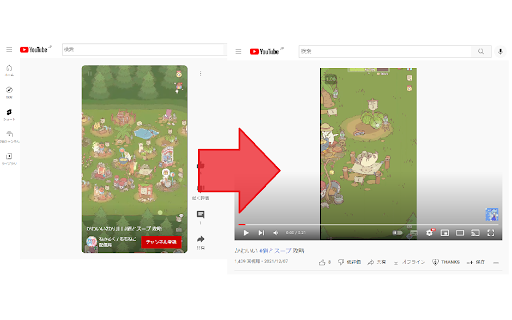
When you access to the short video, Change the URL like this. ~.com/shorts/●● ↓ ~.com/watch?v=●●

YouTube Shorts Converter
Unlock the full potential of YouTube Shorts with our YouTube Shorts Converter Chrome extension. Seamlessly transition from short videos to full-length experiences with a single click. Convert YouTube Shorts URLs to standard video URLs effortlessly, enhancing your viewing experience. • Effortless Conversion: Convert YouTube Shorts URLs to regular video URLs effortlessly, providing a seamless transition from shorts to full-length content. • Intuitive Interface: Our user-friendly interface ensures a smooth experience. Click the button, and let the magic happen. • Customization: Tailor your YouTube experience to your preferences. Enjoy the convenience of converting shorts URLs on-demand. • Sleek Design: A stylish and minimalistic design complements your browsing experience. The extension integrates seamlessly with your browser, enhancing both form and function. Install the YouTube Shorts Converter Chrome extension. Navigate to any YouTube Shorts video. Click the "Convert to Video Player" button in the extension popup. Experience the video in its full-length glory. Unlock the full spectrum of YouTube content effortlessly with the YouTube Shorts Converter Chrome extension. Elevate your viewing experience today! Note: This is a third-party extension and is not affiliated with or endorsed by YouTube.

YouTube Shorts Normal Player
Plays YouTube Shorts in the normal YouTube player so you can rewind the videos. This free add-on for Google Chrome loads all videos from YouTube Shorts in the normal YouTube player for a better user experience. The simple browser extension allows you to rewind videos and view the YouTube Shorts like they were normal YouTube videos. This Chrome extension also lets you block the AI dubbing on YouTube Shorts. It's very simple and there aren't any distracting features -- it just does one thing: lets you watch YouTube Shorts in the normal video player. To manually view a YouTube Short in the regular YouTube player, take the video ID and change the URL from a path like `/shorts/1234` to a path like `/watch?v=1234`. This extension does the URL redirect for you automatically so you don't have to think about it.

Youtube Shorts to normal Youtube Video
With just a click on the icon, this extension will automatically convert any YouTube Shorts link to a regular YouTube video link. This means that you'll have access to all the same features and functionalities that you would normally have with a YouTube video (like adding the video to a playlist).

Classic View for YouTube Shorts
Watch YouTube Shorts in full screen view. Pin it to your tool bar for easy access. Watch YouTube Shorts in the normal, full-screen player automatically. Tired of the TikTok-style Shorts player? Classic View restores the traditional YouTube viewing experience you love. With a brand new, modern design and powerful new features, taking control of your playback has never been easier. Auto-Forward: Automatically redirect every Short to the classic video player. No clicks needed. Modern UI: A sleek, dark-mode interface to manage your settings. Native Experience: Enjoy full player controls (scrubbing, volume, speed) that the Shorts player hides. 💎 PRO FEATURES (New!): Smart Whitelist: Want to keep Shorts for specific creators? Add Channel Names or Video IDs to your whitelist, and Classic View will let them play as Shorts while converting everything else. HOW TO USE: Install the extension. Pin it to your toolbar. Open the menu to toggle "Auto-Forward" on/off. (Optional) Upgrade to Pro to unlock the Smart Whitelist!
