
amdfgahmhhlfnpfdfjfcjlgbkaloehdh
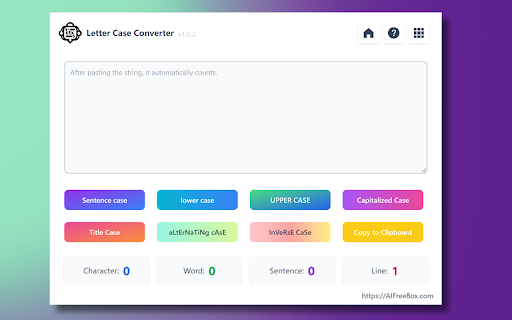

Transform text case, count characters with social media limits, analyze keyword frequency - all in one powerful text tool.AIFreeBox Discover the Case Text Letter Converter Online, a powerful and accessible web-based tool designed for instant, hassle-free text transformation. Perfect for anyone needing quick case conversions, this tool is a go-to resource for students, writers, professionals, and anyone in between. Effortless Features for Every Need: 1.Lower Case Conversion: Easily transform any text to lower case, ideal for achieving uniformity and consistency in documents and online content. 2.Upper Case Transformation: Make your text stand out by converting it to UPPER CASE, perfect for headlines, titles, or emphasizing key points. 3.Sentence Case Adjustment: Automatically capitalize the first letter of each sentence while converting the rest to lower case, ensuring your prose is neat and professionally formatted. 4.Capitalized Case Tool: Instantly capitalize the first letter of every word, ideal for headings, titles, and formal documents. 5.Alternating Case Feature: Get creative by alternating between lower and upper case letters within words, adding a fun and unique twist to your messages or social media posts. 6.Title Case Converter: Perfect for academic and professional writing, this feature capitalizes key words in titles, adhering to formal writing standards. 7.Inverse Case Option: Experiment with text by flipping the case of each letter, creating an eye-catching and distinctive style. Convenience at Your Fingertips: ●No Download, No Sign-Up: Access our tool directly online without any downloads or registration. It's ready to use whenever you are. ●Instant Results: Just paste your text and select your desired case style. The conversion happens in real time, providing immediate results. ●SEO Boost: Enhance your content for SEO with varied text cases, ensuring your writing is more likely to catch attention in search engine results. ●Free and Accessible: This tool is completely free and available for use anytime, making it perfect for quick edits or last-minute adjustments. The Case Text Letter Converter Online is more than just a text transformation tool. It's a user-friendly, efficient way to refine the presentation of your writing, ensuring your text is always perfectly formatted for any context. Whether you're polishing an essay, preparing a report, or crafting engaging online content, our tool makes it easy to switch between case styles effortlessly. Try it now and elevate the readability and style of your text! FAQs for Case Text Letter Converter Online: Q1: What is the Case Text Letter Converter Online? A1: The Case Text Letter Converter Online is a versatile web-based tool designed for easy text case conversion. It offers multiple styles including lower case, UPPER CASE, Sentence Case, Capitalized Case, Alternating Case, Title Case, and Inverse Case, making it ideal for various text formatting needs, from academic writing to social media posts. Q2: How do I use this online case converter tool? A2: Using the tool is simple and user-friendly. Just open the website, paste your text into the input box, and select the desired case style. The tool instantly converts the text, which you can then copy and use as needed. Q3: Is there any cost associated with using the Case Text Letter Converter? A3: No, our online text case converter is completely free to use. There are no hidden charges or subscription fees, making it an accessible tool for everyone. Q4: Do I need to download or install any software to use this tool? A4: No, there's no need to download or install anything. The Case Text Letter Converter is a web-based tool, accessible directly through your browser, ensuring convenience and ease of use. Q5: Can this tool help in SEO optimization of my content? A5: Absolutely! The Case Text Letter Converter can be a valuable asset for SEO content creation. By altering the case of your text, you can enhance the visual appeal and readability of your content, which are important factors in SEO optimization. Q6: Is the text case converter secure to use for confidential documents? A6: Yes, our tool is designed with user privacy in mind. No text entered into the converter is stored or monitored, ensuring your information remains confidential and secure. Q7: Are there any limitations on the amount of text I can convert? A7: The Case Text Letter Converter does not have a strict limit on text length, but it's optimized for best performance with reasonably sized documents, making it perfect for day-to-day text formatting tasks. Q8: Can I access this tool from any device? A8: Yes, our online case converter is accessible from any device with internet access and a web browser, including smartphones, tablets, and laptops, providing flexibility and convenience. Q9: Does the tool support languages other than English? A9: Currently, the tool is optimized for English text conversion. However, basic case conversion should work with any Latin-script based language. Q10: Who can benefit from using the Case Text Letter Converter? A10: This tool is ideal for students, writers, content creators, marketers, and professionals who are looking for quick and efficient text case conversions for various types of writing projects and online content creation.

Convert 2 Case
Just input your text and pick the case you wish to change it to. Transform text effortlessly with 'convert2 case,' the must-have Chrome extension for text manipulation. Whether you need to make your text UPPERCASE, lowercase, Sentence case, or even CapITaliZed, this versatile tool has you covered. Say goodbye to extra spaces cluttering your content – 'convert2 case' also tidies it up for you. Experience a smoother text editing experience with this essential extension, designed to save you time and effort. UPPERCASE Conversion: Convert text to all capital letters. lowercase Conversion: Transform text into all lowercase characters. Sentence Conversion: Capitalize the first letter of each sentence. Capitilize Conversion: Make the first letter of each word capitalized. Remove Extra Spaces: Effortlessly clean up extra spaces and formatting in your text.

Case Converter
Meet Case Converter: convert text case in any input using right-click menu; uppercase to lowercase converter and more. Need to fix text that was typed in the wrong case? A case converter extension puts formatting control right where you work. Change any selection to lower case, UPPER CASE, Title Case, Sentence case, or other styles from the right-click menu or in the side panel. All changes happen on your device—nothing is sent to a server. 🛠 What you can do The extension works as an uppercase to lowercase converter and more. Use it to turn ALL CAPS into normal text, apply Title Case to headings, fix pasted text that came in the wrong case, and switch between lower and upper case quickly. You can also use formats like camelCase or snake_case when you need them. No copy-paste into external sites; the case converter runs in your browser. 1. Select text on any webpage or in any input field 2. Open the context menu or the side panel 3. Pick the format you want (lower case, UPPER CASE, Title Case, and others) 4. The text updates in place—no extra steps Formats include Sentence case, aLtErNaTiNg CaSe, kebab-case, camelCase, PascalCase, snake_case, and CONSTANT_CASE. Toggle case is available to flip the current capitalization. A title case converter is built in, so headings and titles are one click away. The extension runs entirely in your browser tab; no data is sent to external servers. You can convert from upper case to lower case in one click, or go the other way. This lower case converter is useful for forms, emails, and documents. Convert caps to lowercase when you receive text in all caps, or change lower case to upper case for titles and labels. The tool fits into your existing workflow. The case converter appears in the context menu and in the side panel. • No account or sign-up—install and use right away • Works offline after installation • No data sent to servers—everything stays on your machine • Supports many formats so you can convert case and convert uppercase to lower case without leaving the page • Fast: change text in place without opening new tabs The case converter is designed for daily use on any website. Students, writers, and developers can all benefit. It works in input fields, text areas, and editable content on any page. An uppercase converter in one tool helps with essays, code, and everyday typing. Use the capitalization converter for headings, or the case changer when you need to fix pasted content. The case converter supports all caps converter and capital letter converter needs. Converter uppercase and cap converter options are there when you need them. 1️⃣ Fix capital letters to lowercase when you have text in ALL CAPS 2️⃣ Use a capital letters converter style for consistent formatting 3️⃣ Apply title capitalizer logic to headings and titles 4️⃣ Rely on a title capitalization tool for blog posts and articles 5️⃣ Use the letter case converter for one place for all case formats 6️⃣ Whether you prefer caseconverter or case convertor spelling, the extension covers it All processing is done on the client side for privacy and speed. A case converter that works in the browser saves time and keeps your data local. No account or login is required; the extension is ready as soon as you install it. You can use it in the side panel for longer texts or from the context menu for quick changes. Try it from the context menu or side panel on any site. The case converter is free to use with no limits. The case converter gives you an uppercase to lowercase converter and title case converter in one extension. Use it to convert from upper case to lower case or as a lower case converter when you need readable text from caps. Convert caps to lowercase in one click, or change lower case to upper case for titles and labels. You can convert case and convert uppercase to lower case without leaving the page. An uppercase converter and all caps converter are built in. The capital letter converter and capital letters to lowercase options help with ALL CAPS text. Use the title capitalizer and title capitalization tool for headings and articles. The capitalization converter and case changer work in the context menu. Converter uppercase and cap converter choices are available. The capital letters converter and letter case converter give you one place for all formats. Whether you search for caseconverter or case convertor, the case converter runs entirely in your browser—no data is sent to any server.

Text Case Converter
Converts text to letter cases including Uppercase, Lowercase, Title Case, Capitalized Case, Sentence Case, and Alternating Case. Text Case Converter is a feature-rich Chrome extension that allows you to effortlessly change the case of any text with just one click. Whether you're formatting headlines, writing code, crafting social media posts, or editing documents, this tool makes text transformation quick and simple. Key Features Live Text Statistics Get real-time insights into your text as you type or paste. The statistics bar displays character count (with and without spaces), total word count, and whitespace count, helping you stay within character limits for social media, SEO meta descriptions, or any other requirements. Lower Case Converter Converts all letters to lowercase. Ideal for casual writing, coding variable names, or when you accidentally typed with CAPS LOCK on. Example: "HELLO WORLD" → "hello world" Upper Case Converter Transforms all letters to uppercase. Perfect for headlines, acronyms, emphasizing important text, or creating attention-grabbing titles. Example: "hello world" → "HELLO WORLD" Capitalized Case Converter Capitalizes the first letter of every word. Useful for names, titles, and headings where you want consistent capitalization throughout. Example: "hello world" → "Hello World" Title Case Converter Intelligently capitalizes text following standard title capitalization rules. The first letter of major words is capitalized, while minor words like articles, prepositions, and conjunctions remain lowercase (except when they appear at the beginning). You can customize the list of exception words to match your preferred style guide, whether it's AP, Chicago, MLA, or your own custom rules. Example: "the house on the haunted hill" → "The House on the Haunted Hill" Sentence Case Converter Capitalizes the first letter of each sentence while keeping the rest in lowercase. This is the standard format for most written English, making it perfect for cleaning up poorly formatted text or converting uppercase text to readable paragraphs. Example: "HELLO WORLD. HOW ARE YOU?" → "Hello world. How are you?" Alternating Case Converter Alternates between lowercase and uppercase letters, creating the popular "spongebob case" or "mocking text" style. Great for memes, social media, or adding a playful tone to your text. Example: "hello world" → "hElLo WoRlD" Customizable Title Case Exceptions Take full control of your Title Case conversions with the built-in exceptions editor. Add or remove words that should remain lowercase, such as articles (a, an, the), conjunctions (and, but, or), and prepositions (in, on, at, by, for). Your custom exception list is automatically saved and persists across browser sessions. Default exceptions include: a, an, and, as, at, but, by, for, in, nor, of, on, or, so, the, to, up, yet, is, are, was, were, and more. Modern, User-Friendly Interface Enjoy a clean, modern design with intuitive controls, smooth animations, and visual feedback. The streamlined layout puts all conversion options at your fingertips while displaying helpful text statistics at a glance. Additional Features One-Click Copy: Instantly copy your converted text to the clipboard with visual confirmation Clear Button: Quickly clear the text area to start fresh Keyboard Shortcuts: Power users can use Ctrl+L (lowercase), Ctrl+U (uppercase), and Ctrl+T (title case) for faster workflow Persistent Settings: Your Title Case exception preferences are saved automatically No Permissions Required: Text Case Converter works entirely within the extension popup and does not require access to your browsing data or web pages Perfect For Writers and editors formatting articles, blog posts, and manuscripts Marketers creating headlines, ad copy, and social media content Developers formatting code comments, documentation, and variable names Students and researchers formatting citations and paper titles SEO professionals optimizing meta titles and descriptions Anyone who needs to quickly reformat text How to Use Click the Text Case Converter icon in your browser toolbar Type or paste your text into the input area View live statistics (characters, words, whitespace) in the stats bar Click any case conversion button to instantly transform your text Click "Copy" to copy the converted text to your clipboard Optionally, expand "Title Case Exceptions" to customize which words stay lowercase Text Case Converter is lightweight, fast, and designed to save you time. No more manually retyping text or searching for online converters. Transform your text instantly, right from your browser. What's New in Version 2.0 -Brand new modern interface with improved usability -Live text statistics (characters, words, whitespace counts) -Customizable Title Case exceptions with persistent storage -Clear button for quick text reset -Keyboard shortcuts for faster workflow -Improved Alternating Case (now alternates only letters, ignoring spaces) -Enhanced copy functionality with visual feedback -Smoother animations and hover effects

Uppercase & Lowercase Converter
This extension perform 3 task: 1) Uppercase Converter: The Uppercase Converter is a handy option that allows users to easily convert text to uppercase within their Chrome browser. With just a few clicks, this extension can transform all text on a web page, input field, or text editor into uppercase letters. It saves users the time and effort of manually retyping or copy-pasting text into a separate tool for conversion. Whether you're working on a document, composing an email, or simply browsing the web, the Uppercase Converter extension provides a convenient solution for quickly changing text to uppercase. 2) Lowercase Converter: The Lowercase Converter option is a useful utility that enables users to convert text to lowercase directly within their Chrome browser. This extension eliminates the need for manual rewriting or copying and pasting text into an external application for lowercase conversion. By clicking on Lowercase Converter Button it will instantly transform uppercase or mixed-case text to lowercase, saving time and effort. Whether you're editing a document, composing a message, or engaging with online content, this extension simplifies the process of converting text to lowercase. 3) Capitalize Sentences: The Capitalize Sentences option is a practical tool designed to automatically capitalize sentences within the Chrome browser. This extension helps users ensure proper capitalization of sentences in their writing without the need for manual corrections. By installing the extension, users can seamlessly capitalize the first letter of each sentence, whether it's an article, blog post, email, or any other web content. This eliminates the hassle of going through each sentence individually and manually adjusting the capitalization. The Capitalize Sentences option enhances writing efficiency and accuracy, making it a valuable tool for content creators, students, professionals, and anyone who frequently works with text online.
