
jkehbmbghegdemomfhkcbdddpibnjppe
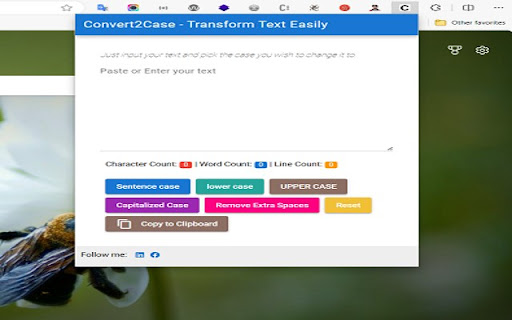

Just input your text and pick the case you wish to change it to. Transform text effortlessly with 'convert2 case,' the must-have Chrome extension for text manipulation. Whether you need to make your text UPPERCASE, lowercase, Sentence case, or even CapITaliZed, this versatile tool has you covered. Say goodbye to extra spaces cluttering your content – 'convert2 case' also tidies it up for you. Experience a smoother text editing experience with this essential extension, designed to save you time and effort. UPPERCASE Conversion: Convert text to all capital letters. lowercase Conversion: Transform text into all lowercase characters. Sentence Conversion: Capitalize the first letter of each sentence. Capitilize Conversion: Make the first letter of each word capitalized. Remove Extra Spaces: Effortlessly clean up extra spaces and formatting in your text.

Text Convert Case
Convert case, slugify data of the selected text Convert case of the selected text to uppercase, lowercase, sentence case, title case and slugify data of the selected text. Select text on any web page, right click and select the Text Convert Case menu choose UPPERCASE, lowercase, Sentence case, Title Case, Slugify and get the result on the clipboard.

Upper Lower - Text Case Converter
Change a text to uppercase and lowercase quickly and easily **Includes a converter in the right-click menu** The extension is very easy to use: - Copy a text and paste it into the extension box. - Press the button according to how you want it (Uppercase, Lowercase, Capitalize, Capitalize All, Add hyphen, No spaces and No line break). - The extension will automatically select the result for you to copy. - Done, paste it wherever you want.

Convert Case
Convert text in your browser between UPPER CASE, lower case and more Tired of retyping text just to change the case? Select text anywhere in your browser, right-click, and convert it instantly - no copy-pasting to external tools. Convert Case is a fast, lightweight text case changer with 16 conversions, keyboard shortcuts, automatic clipboard copy, and full UI translations in 15 languages. Change case directly in your browser - select, right-click, done. Works on regular web pages, Google Docs, Reddit, and more. Features: - Change case in place via right-click context menu - Keyboard shortcuts for quick access (Alt+U, Alt+L, Alt+C, Alt+A) - or set your own - Copy After Conversion - automatically copies converted text to the clipboard - Automatic proper noun casing in Title Case, Sentence case, and Capitalized Case - thousands of names, places, brands, and acronyms are recognised and cased correctly (Paris, IBM, Abu Dhabi, iOS) - toggle off or add your own custom terms in Settings - Counts submenu with live character, word, sentence, and line counts for the current selection - Configurable Title Case options (ignore words like "the", "and", "of") Works with: Google Docs (Shift+right-click or keyboard shortcut), Reddit, Disqus, WYSIWYG editors, TinyMCE, and iframe-based content. Privacy: All conversions are performed locally on your device. Convert Case does not collect, transmit, or store any user data. Languages: English, British English, Deutsch, Ελληνικά, Español, Filipino, Français, हिन्दी, Magyar, Italiano, Polski, Português, Slovenščina, Türkçe, Українська. Automatically follows your browser's language; can be overridden in Settings. Changelog: - 2.4.2 - Title Case and Capitalized Case now capitalise the letter after a forward slash — `loving each other/hurting each other` becomes `Loving Each Other/Hurting Each Other`; accented letters after quotes, brackets, and slashes are also handled correctly - 2.4.1 - Refined the built-in proper noun list to reduce false positives, including removals like WHO and JAR so common words are less likely to be forced into acronym casing - 2.4.0 - Conversions in input and textarea fields now dispatch input/change events so host pages register the update — fixes silent reverts in tools like Yoast meta titles and React-controlled inputs - 2.3.1 - Refined the built-in proper noun list to avoid false positives for common words (e.g. "us", "one", "man", "ice", "raw", "arm", "pet") that were being incorrectly capitalised - 2.3.0 - New "Proper Nouns" setting replaces Ignored Words and Correct Words; toggle auto-correction of built-in proper nouns and abbreviations on or off, and add your own custom terms whose casing overrides the built-in list. Existing Correct Words are migrated automatically; Ignored Words are retired (add the word in your preferred casing to the new list instead) - 2.2.0 - Translated into 15 languages (English, British English, German, Greek, Spanish, Filipino, French, Hindi, Hungarian, Italian, Polish, Portuguese, Slovenian, Turkish, Ukrainian); follows your browser's language automatically, with an override in Settings - 2.1.0 - Automatic proper noun casing in Title Case, Sentence case, and Capitalized Case (names, places, brands, acronyms); accented characters now transliterate properly when slugifying (café → cafe, straße → strasse); new Counts submenu showing live character, word, sentence, and line counts for the current selection - 2.0.0 - New developer conversions (camelCase, PascalCase, CONSTANT_CASE, param-case, snake_case, dot.case, path/case), new utility conversions (Capitalized Case, Alternating Case, Inverse Case, No Accents, No Case), ignored words and correct words settings, autosave - 1.6.0 - Support for Google Docs - 1.5.2 - Fixed conversions not working on existing tabs after first install - 1.5.1 - Added keyboard shortcuts link to context menu - 1.5.0 - Additional keyboard shortcuts and refreshed info/settings UI - 1.4.1 - Reliability updates - 1.4.0 - Bug fixes and optimisation - 1.3.0 - New icon - 1.2.1 - Disqus and Slate Editor fixes - 1.2.0 - Support for Disqus and more iframe-based content - 1.1.0 - Support for Reddit and WYSIWYG editors - 1.0.10 - Fixed automatic copy after conversion not working - 1.0.9 - Settings page for title case options and keyboard shortcuts - 1.0.8 - Reliability updates - 1.0.7 - Title Case conversion and Slugify option - 1.0.0 - Initial release

Case Converter
Easily switch your text between formats like UPPERCASE, lowercase, Capitalized Case, camelCase, and more — all in one click. Easily convert text between different letter cases with just a click! Case Converter is a simple, fast, and privacy-friendly Chrome Extension designed to help you instantly reformat text and boost productivity. 🚀 Sentence case – Capitalizes only the first word of the sentence. UPPER CASE – Converts all letters to uppercase. lower case – Converts all letters to lowercase. Capitalized Case – Capitalizes the first letter of every word. aLtErNaTiNg cAsE – Alternates between uppercase and lowercase letters. tOGGLE cASE – Reverses the case of each letter. camelCase – Joins words with a lowercase first word and capitalized inner words. PascalCase – Like camelCase, but the first word is also capitalized. snake_case – Joins words with underscores and uses all lowercase. kebab-case – Joins words with hyphens and uses all lowercase. dot.case – Joins words with dots and uses all lowercase. COBOL-CASE – Joins words with hyphens and uses all uppercase. CONSTANT_CASE – Uses underscores and uppercase letters throughout. #hashtag #case – Turns words into lowercase hashtags. 📋 Copy to clipboard – One-click copying for instant use 📂 Upload files – Open and convert text from .txt files 💾 Download as .txt – Save your converted text instantly 🧹 Clear input – Reset with a single click 🔒 100% private – No data sent to servers, works entirely offline 🎯 Perfect For: 👨💻 Developers – Format variable names and code snippets ✍️ Writers – Fix capitalization in drafts and documents 📱 Social media – Create consistent hashtags and captions 📊 Data entry – Standardize text formats quickly Whether you're writing code, posting online, or organizing notes, Case Converter makes formatting quick, easy, and consistent. 🚀 Install now and never worry about text formatting again!
