
baoecndgoggbleknpnfhhjoghmgadkec
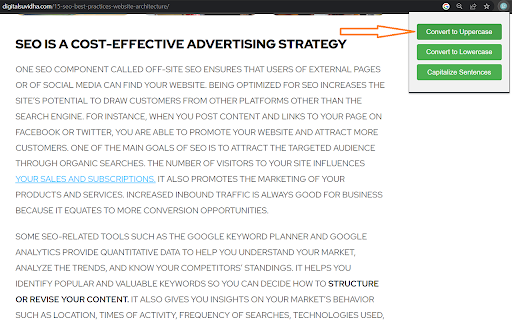


This extension perform 3 task: 1) Uppercase Converter: The Uppercase Converter is a handy option that allows users to easily convert text to uppercase within their Chrome browser. With just a few clicks, this extension can transform all text on a web page, input field, or text editor into uppercase letters. It saves users the time and effort of manually retyping or copy-pasting text into a separate tool for conversion. Whether you're working on a document, composing an email, or simply browsing the web, the Uppercase Converter extension provides a convenient solution for quickly changing text to uppercase. 2) Lowercase Converter: The Lowercase Converter option is a useful utility that enables users to convert text to lowercase directly within their Chrome browser. This extension eliminates the need for manual rewriting or copying and pasting text into an external application for lowercase conversion. By clicking on Lowercase Converter Button it will instantly transform uppercase or mixed-case text to lowercase, saving time and effort. Whether you're editing a document, composing a message, or engaging with online content, this extension simplifies the process of converting text to lowercase. 3) Capitalize Sentences: The Capitalize Sentences option is a practical tool designed to automatically capitalize sentences within the Chrome browser. This extension helps users ensure proper capitalization of sentences in their writing without the need for manual corrections. By installing the extension, users can seamlessly capitalize the first letter of each sentence, whether it's an article, blog post, email, or any other web content. This eliminates the hassle of going through each sentence individually and manually adjusting the capitalization. The Capitalize Sentences option enhances writing efficiency and accuracy, making it a valuable tool for content creators, students, professionals, and anyone who frequently works with text online.

Clipboard Uppercase Converter
Converts clipboard text into uppercase with one click. This simple extension allow you to convert text into uppercase in one click.

Upper Lower - Text Case Converter
Change a text to uppercase and lowercase quickly and easily **Includes a converter in the right-click menu** The extension is very easy to use: - Copy a text and paste it into the extension box. - Press the button according to how you want it (Uppercase, Lowercase, Capitalize, Capitalize All, Add hyphen, No spaces and No line break). - The extension will automatically select the result for you to copy. - Done, paste it wherever you want.

Caseify
Caseify is a chrome extension that allows you to convert selected text in an input to uppercase, lowercase, or capitalize it using context menus. HOW IT WORKS - Select the text you want to modify - Right-click, and choose the desired option from the context menu

Convert Case
Convert text in your browser between UPPER CASE, lower case and more Tired of retyping text just to change the case? Select text anywhere in your browser, right-click, and convert it instantly - no copy-pasting to external tools. Convert Case is a fast, lightweight text case changer with 16 conversions, keyboard shortcuts, automatic clipboard copy, and full UI translations in 15 languages. Change case directly in your browser - select, right-click, done. Works on regular web pages, Google Docs, Reddit, and more. Features: - Change case in place via right-click context menu - Keyboard shortcuts for quick access (Alt+U, Alt+L, Alt+C, Alt+A) - or set your own - Copy After Conversion - automatically copies converted text to the clipboard - Automatic proper noun casing in Title Case, Sentence case, and Capitalized Case - thousands of names, places, brands, and acronyms are recognised and cased correctly (Paris, IBM, Abu Dhabi, iOS) - toggle off or add your own custom terms in Settings - Counts submenu with live character, word, sentence, and line counts for the current selection - Configurable Title Case options (ignore words like "the", "and", "of") Works with: Google Docs (Shift+right-click or keyboard shortcut), Reddit, Disqus, WYSIWYG editors, TinyMCE, and iframe-based content. Privacy: All conversions are performed locally on your device. Convert Case does not collect, transmit, or store any user data. Languages: English, British English, Deutsch, Ελληνικά, Español, Filipino, Français, हिन्दी, Magyar, Italiano, Polski, Português, Slovenščina, Türkçe, Українська. Automatically follows your browser's language; can be overridden in Settings. Changelog: - 2.4.2 - Title Case and Capitalized Case now capitalise the letter after a forward slash — `loving each other/hurting each other` becomes `Loving Each Other/Hurting Each Other`; accented letters after quotes, brackets, and slashes are also handled correctly - 2.4.1 - Refined the built-in proper noun list to reduce false positives, including removals like WHO and JAR so common words are less likely to be forced into acronym casing - 2.4.0 - Conversions in input and textarea fields now dispatch input/change events so host pages register the update — fixes silent reverts in tools like Yoast meta titles and React-controlled inputs - 2.3.1 - Refined the built-in proper noun list to avoid false positives for common words (e.g. "us", "one", "man", "ice", "raw", "arm", "pet") that were being incorrectly capitalised - 2.3.0 - New "Proper Nouns" setting replaces Ignored Words and Correct Words; toggle auto-correction of built-in proper nouns and abbreviations on or off, and add your own custom terms whose casing overrides the built-in list. Existing Correct Words are migrated automatically; Ignored Words are retired (add the word in your preferred casing to the new list instead) - 2.2.0 - Translated into 15 languages (English, British English, German, Greek, Spanish, Filipino, French, Hindi, Hungarian, Italian, Polish, Portuguese, Slovenian, Turkish, Ukrainian); follows your browser's language automatically, with an override in Settings - 2.1.0 - Automatic proper noun casing in Title Case, Sentence case, and Capitalized Case (names, places, brands, acronyms); accented characters now transliterate properly when slugifying (café → cafe, straße → strasse); new Counts submenu showing live character, word, sentence, and line counts for the current selection - 2.0.0 - New developer conversions (camelCase, PascalCase, CONSTANT_CASE, param-case, snake_case, dot.case, path/case), new utility conversions (Capitalized Case, Alternating Case, Inverse Case, No Accents, No Case), ignored words and correct words settings, autosave - 1.6.0 - Support for Google Docs - 1.5.2 - Fixed conversions not working on existing tabs after first install - 1.5.1 - Added keyboard shortcuts link to context menu - 1.5.0 - Additional keyboard shortcuts and refreshed info/settings UI - 1.4.1 - Reliability updates - 1.4.0 - Bug fixes and optimisation - 1.3.0 - New icon - 1.2.1 - Disqus and Slate Editor fixes - 1.2.0 - Support for Disqus and more iframe-based content - 1.1.0 - Support for Reddit and WYSIWYG editors - 1.0.10 - Fixed automatic copy after conversion not working - 1.0.9 - Settings page for title case options and keyboard shortcuts - 1.0.8 - Reliability updates - 1.0.7 - Title Case conversion and Slugify option - 1.0.0 - Initial release
